

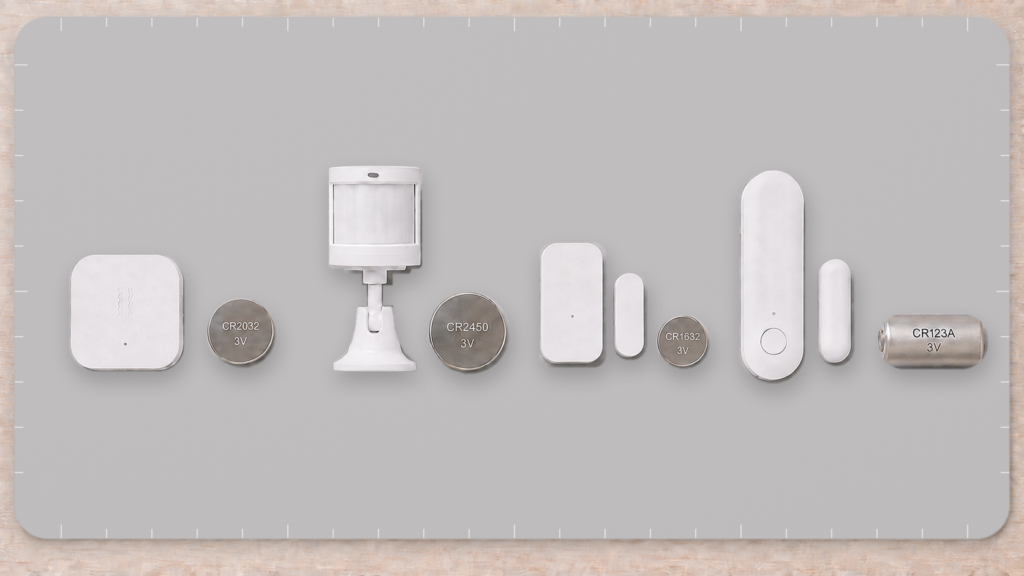
Aqara and Xiaomi don’t put the same battery in every Zigbee sensor they make, and they don’t even use one battery across every generation of the same sensor. The vibration sensor takes one coin cell, the first-generation motion sensor takes a physically bigger one, and the door and window sensor has changed cell type nearly every generation — including one generation that went back to a cell an earlier one had already dropped. Own more than two or three of these devices and eventually you’re guessing at a hardware-store shelf or ordering the wrong size online.
This piece pulls together what’s actually confirmed for each device family, cross-referenced against Zigbee2MQTT’s own device pages and Aqara’s published specs, rather than assuming one pattern holds across the whole product line. It doesn’t. It also covers a separate but related complaint: why the battery percentage in Zigbee2MQTT or Home Assistant often sits at 100% for months, then the device drops off the network with no gradual warning. Everything discussed here is local. Battery state is read straight off the Zigbee radio by your coordinator, with no cloud round-trip involved.
Why there isn’t one answer
Some of Aqara’s classic Zigbee sensors run on a CR2032, the common 20mm lithium coin cell used in a lot of consumer electronics. The vibration sensor (DJT11LM) is one, and several of the wireless mini switches are others. But that cell is not the default across the lineup, and assuming it is will send you home with the wrong battery.
The clearest illustration is Aqara’s own door and window sensor. It looks like one product with a few generational updates, but the battery changes almost every generation:
- the original (MCCGQ11LM) uses a CR1632, a thinner 16mm coin cell;
- the T1 (MCCGQ12LM) moved to a CR2450, a wider 24.5mm coin cell;
- the E1 (MCCGQ14LM) went back to a CR1632, the same 16mm coin cell as the original;
- the Matter/Thread P2 uses a CR123A, larger again.
Four generations of the same nominal product, three different cells, and not in any progression you could predict — the T1 moved up to a bigger coin cell, then the E1 dropped back to the original’s CR1632, then the P2 jumped to something else again. Aqara hasn’t published a rationale for where those lines fall, and it doesn’t cleanly track sensor type or apparent complexity. It reads more like a per-generation component-sourcing decision than a documented design rule. It’s one more entry in the same naming and specification inconsistency covered in our guide to Aqara’s model codes.
The P2’s jump to CR123A is the one Aqara’s engineering explains most plausibly. Thread’s mesh-radio duty cycle draws meaningfully more power than plain Zigbee, so the larger cell buys back comparable battery life. It’s a reasonable trade, and also a real trap if you own a mix of P2 and older door sensors. The replacement isn’t the same part just because the devices look alike on the shelf.
Motion sensors show the same drift. The first-generation motion sensor (RTCGQ11LM) uses a CR2450, not the CR2032 you might expect from a small sensor, and a later generation isn’t guaranteed to match it.
These cells look similar in a drawer but are not interchangeable. CR1632, CR2032, and CR2450 are all 3V lithium coin cells, but they differ in both diameter and thickness (16mm, 20mm, and 24.5mm respectively) and won’t fit each other’s holders. The P2’s CR123A isn’t a coin cell at all. Read the marking on the old cell before you buy a replacement rather than guessing from the device family — two generations of the same sensor can take the same cell while the generation between them takes a different one.
Battery type by device family
| Device | Model | Battery | Source |
|---|---|---|---|
| Vibration sensor | DJT11LM | CR2032 | Zigbee2MQTT device page + this site’s DJT11LM guide |
| Motion sensor (1st generation) | RTCGQ11LM | CR2450 | Zigbee2MQTT device page + Aqara specs |
| Door & window sensor, original | MCCGQ11LM | CR1632 | Aqara product spec + this site’s MCCGQ11LM guide |
| Door & window sensor T1 | MCCGQ12LM | CR2450 | Aqara T1 spec page |
| Door & window sensor E1 | MCCGQ14LM | CR1632 | Confirmed by Private Home Lab — Aqara publishes no spec page for this model |
| Door & window sensor P2 (Matter/Thread) | DW-S02D | CR123A | Aqara product spec + this site’s P2 guide |
| Everything else (water leak sensors, wireless mini switches, later motion-sensor generations, etc.) | — | Varies by model | Check that device’s own listing first |
That last row matters more than it looks. Aqara doesn’t share one battery spec across a product family the way some vendors do, and as the door and window generations show, it doesn’t even hold one spec across a single family over time. A second-generation motion sensor isn’t guaranteed to take the same cell as the first, and a wireless mini switch isn’t guaranteed to match a vibration sensor just because they’re both small buttons on the shelf. For water leak sensors specifically (a family where the “stuck at 100%” complaint is especially well documented), our Aqara water leak sensor guide has the model-specific detail we could actually confirm, rather than us extending the table above with a guess. If your device isn’t listed here, the reliable way to confirm the battery type is that model’s own page on Zigbee2MQTT.io, or the label on the cell itself, not a resemblance to a device you already own.
The “stuck at 100%” problem, explained
If you’ve watched a battery percentage sit at 100% for the better part of a year and then had the device drop off the network with no warning, that’s not a bug specific to your setup. It’s a long-running, widely reported pattern across Aqara and Xiaomi Zigbee devices in Zigbee2MQTT, documented across multiple GitHub issues going back years (issue #248 and issue #8499 among them) and echoed independently in a Home Assistant Community thread about battery status not updating.
The root cause isn’t a failing sensor. These devices report a raw voltage reading, and Zigbee2MQTT converts that voltage into the percentage shown in your dashboard. As of the time of writing, that conversion for a lot of Aqara/Xiaomi models is a coarse mapping rather than a proper fuel-gauge curve, so the reported percentage stays pinned near 100% for most of the discharge curve and only moves once voltage has dropped close to the cell’s cutoff. A full CR2032 delivers roughly 3.1–3.2V. A commonly cited community reference point treats around 3.0V as the point the cell is no longer meaningfully full, which is a narrow window for a percentage figure to represent as a straight line from 100 down to 0.
Don’t treat a 100% battery reading on these devices as a reliable early-warning signal on its own. By the time the percentage actually starts dropping, you may have very little runway left before the device stops reporting entirely. Track device availability or last_seen alongside battery%, and for anything you’d actually notice failing (a leak sensor, a door sensor on an entry you arm), replace on a fixed schedule instead of waiting for the number to move.
When to actually replace the battery
For most Aqara/Xiaomi Zigbee sensors, that means treating battery percentage as a secondary signal rather than the trigger. A low-effort approach is scheduled replacement. Replace batteries in security-relevant sensors (door/window, water leak) on a fixed annual schedule regardless of what the percentage shows, and use battery% plus last_seen mainly to catch sensors that are draining unusually fast, which can point to a weak mesh link forcing extra retransmissions rather than normal wear.
Worth knowing: reporting frequency changes real-world battery life more than most people expect. A motion sensor set to report on every trigger in a high-traffic hallway will drain faster than the identical model mounted on a rarely used spare-room door, even with the same hardware and the same battery. Aqara’s own community thread on extending battery life won’t commit to a number, but its directional guidance (fewer triggers, avoid temperature extremes) is more useful in practice than a spec-sheet battery-life estimate would be.
Replacing the battery: what’s the same, what isn’t
The physical process of swapping a cell is broadly similar across Aqara’s classic coin-cell sensors. There’s usually a twist-off back cover you turn with a coin or a fingernail, the coin cell sits in a spring-loaded holder, and reseating the correct polarity (typically + facing out) is the whole job. But “broadly similar” isn’t “identical.” The exact latch mechanism, cover orientation, and pairing behavior after a swap vary by device, and forcing a cover the wrong way is how battery contacts get bent.
The P2’s CR123A is the one that breaks the coin-cell pattern entirely. It’s a cylindrical cell, with a housing built around that shape rather than a coin-cell slot, so nothing about the swap transfers from the older sensors. Every other generation of the door and window sensor, the E1 included, is still a coin-cell swap — just not the same coin cell. One thing worth flagging directly about the CR123A: it’s sold in two chemistries that aren’t interchangeable. There’s the standard 3V lithium primary cell the P2 expects, and a 3.7V rechargeable lithium-ion variant (often labeled RCR123 or 16340) sold in the same battery aisle. The higher voltage of the rechargeable version isn’t what the device is designed for. If you’re buying a CR123A for a P2, confirm it’s the 3V primary type, not the rechargeable one.
Quick reference: what to buy
| You own | Buy | Availability |
|---|---|---|
| Vibration sensor (DJT11LM) | CR2032, 3V lithium coin cell | Common (most supermarkets and hardware stores stock it) |
| 1st-gen motion sensor (RTCGQ11LM) | CR2450, 3V lithium coin cell | Less common than CR2032 (check electronics or battery specialty stores, or order online) |
| Door/window sensor, original (MCCGQ11LM) | CR1632, 3V lithium coin cell | Less common than CR2032 (battery specialty or electronics stores) |
| Door/window sensor T1 (MCCGQ12LM) | CR2450, 3V lithium coin cell | Less common than CR2032 |
| Door/window sensor E1 (MCCGQ14LM) | CR1632, 3V lithium coin cell (same as the original, not the T1’s CR2450) | Less common than CR2032 (battery specialty or electronics stores) |
| Door/window sensor P2 (Matter/Thread) | CR123A, 3V lithium primary (not rechargeable/RCR123) | Common in camera and flashlight battery sections |
| Anything not listed above | Confirm on that device’s own guide or Zigbee2MQTT.io page first | — |
FAQ
Why does my Aqara sensor’s battery say 100% and then die with no warning?
Because Zigbee2MQTT’s percentage for these devices is a coarse mapping from raw voltage, not a real fuel gauge. The number stays near 100% for most of the discharge curve, so it isn’t a reliable early warning. See the “stuck at 100%” section above.
What battery does an Aqara door and window sensor use?
Depends which generation. The original (MCCGQ11LM) uses a CR1632; the T1 (MCCGQ12LM) uses a CR2450; the E1 (MCCGQ14LM) is back on CR1632, the same cell as the original; and the Matter/Thread P2 uses a CR123A. Four generations, three different cells, and the order isn’t something you can guess from the model name, so check your specific model rather than assuming.
Is CR2032 the same as CR2450?
No. Both are 3V lithium coin cells, but CR2450 is physically larger (24.5mm vs 20mm diameter) with roughly double the capacity, and the two aren’t interchangeable.
How long do Aqara Zigbee sensor batteries actually last?
Vendor spec pages cite figures like “up to 2 years,” but actual life depends heavily on reporting frequency and mesh signal strength, so a single “X months” number is closer to marketing than measurement. Tracking last_seen for your specific devices tells you more than any spec-sheet estimate would.
Does the Aqara P2 really need a different battery than other Aqara sensors?
Yes, confirmed on Aqara’s own product spec page. The P2’s Matter/Thread radio has a higher duty cycle than plain Zigbee, and CR123A gives it the extra capacity to match.
What this covers, and where to check for yourself
This piece is research-synthesis, not a bench test. Nobody at Private Home Lab took a caliper to a stack of coin cells for it. What’s confirmed above traces to Zigbee2MQTT’s own device pages for DJT11LM and RTCGQ11LM, Aqara’s published spec pages for the door and window generations (the original’s CR1632, the T1’s CR2450, the P2’s CR123A), and this site’s own MCCGQ11LM setup guide for the original’s CR1632. The E1 is the exception worth naming: Aqara publishes no spec page for the MCCGQ14LM, its Zigbee2MQTT device page lists no battery type, and third-party listings disagree with each other — some still circulate a CR2 figure, which is wrong. The CR1632 in the tables above is confirmed by Private Home Lab and supersedes it. If you own an E1, the marking on the cell you pull out is the last word. The “stuck at 100%” mechanism is cross-referenced against two long-running Zigbee2MQTT GitHub issues (#248, #8499) and a Home Assistant Community thread describing the same symptom independently.
Everything here happens locally. Battery voltage and percentage are read off the Zigbee radio by your coordinator and reported through Zigbee2MQTT or ZHA, with no cloud service involved in that particular exchange. What still depends on the vendor is the battery chemistry and capacity spec itself, and Aqara doesn’t publish a consistent rationale for why one device family gets one cell type and a neighboring one gets another, or why a single family changes cells generation to generation.
If your device isn’t in the table above, don’t extrapolate from a similar-looking sensor. Check that model’s own listing on Zigbee2MQTT.io, or the label on the old cell, before you order a replacement. And if Aqara ever standardizes battery types across a refreshed product line, the device-family table above is the first thing that’ll go stale — worth a glance at your specific model’s Zigbee2MQTT device page if you’re reading this more than a year after publication.