

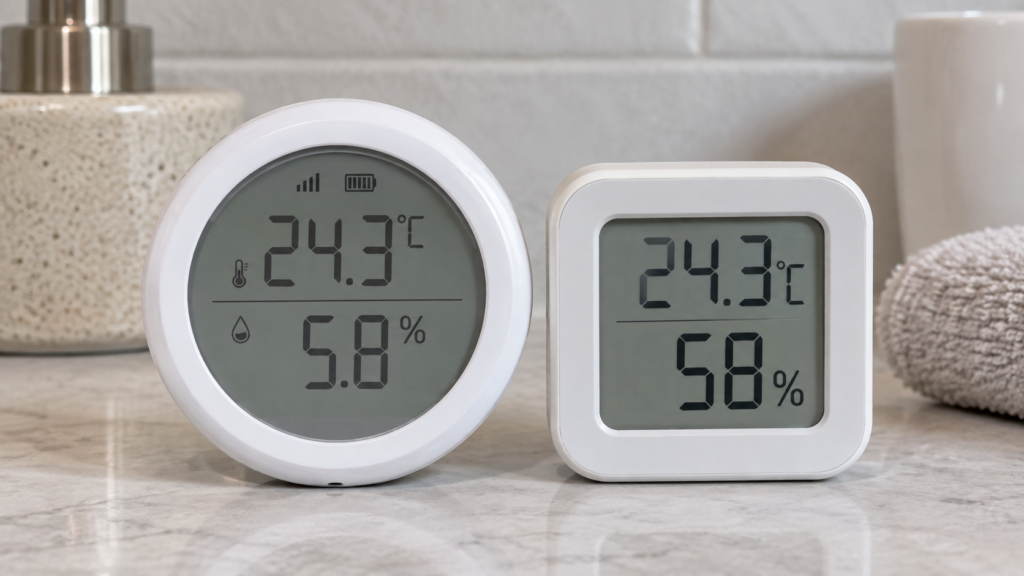
If you just paired a Tuya TS0201 in Zigbee2MQTT and the humidity value looks wrong, you’re probably not imagining it. A common version of this bug shows something like 5.8% when the room is actually sitting around 58%. Not a little off. Off by almost exactly a factor of 10.
The TS0201 is a cheap Zigbee temperature and humidity sensor with a small LCD, a coin cell, and dozens of white-label names on top of the same hardware. It’s a good fit for a fully local Zigbee2MQTT setup, with no Tuya account or cloud dependency involved. The humidity error is a separate, well-documented problem that has nothing to do with whether you’re running local.
In forums and comment threads, the advice almost always comes down to trying humidity_calibration. It’s a real option on this device, and it’s the wrong tool for this particular bug.
This isn’t your unit. It’s a recurring bug class
GitHub issues describing the same symptom go back years. #13973 reported humidity off by a factor of 10, #18513 picked up the same pattern in 2023, and in early 2026 two more variants surfaced. A third 2026 report, #29174, frames it from the other end: the sensor is being falsely recognised as a TS0201 in the first place, and the wrong humidity scale follows from that misidentification.
The batch-to-batch framing here (new production batch, new manufacturer code, wrong scale until a matching converter exists) is this site’s reading of the pattern across these reports. No Zigbee2MQTT maintainer has stated it in those terms in the issues cited below.
| Manufacturer code | Reported symptom | Issue | State |
|---|---|---|---|
| Not specified in the report | Humidity reads a factor of 10 smaller | #18513 | Opened Aug 2023, closed |
| _TZ3000_wol32olt, sold as “T040” | Humidity roughly 10x too small | #30861 | Opened Jan 2026, closed |
| _TZ3000_yupc0pb7, an “outdoor” variant | Humidity reports 0.0 to 10.00 instead of 0 to 100% | #30801 | Opened Jan 2026, closed |
Zigbee2MQTT publishes more than one page under this model string: TS0201 alongside TS0201_1, TS0201_2 and TS0201-z. That’s the normal convention when different manufacturer codes need different converters. A sensor labelled TS0201 can’t tell you which page applies to it, but the frontend’s device view can, and that’s the first thing to check.
Why humidity_calibration can’t fix this
Zigbee2MQTT answers this one in its own documentation, and the wording is the whole answer. Its device pages describe humidity_calibration as calibrating the humidity value with an absolute offset. On this device it ranges from -50 to +50. You give it a number, and that number is added to whatever the sensor reports.
The contrast is the interesting part. The same documentation describes illuminance_calibration as a percentual offset. Zigbee2MQTT does implement proportional calibration where the error class calls for it, and it didn’t give humidity one. An absolute offset is the right tool for a sensor that reads a few points high or low across its whole range, the kind of drift you’d correct against a reference hygrometer. It’s the wrong tool for an error where the true value is roughly 10 times the reported value everywhere.
Take the 5.8%-instead-of-58% case. To make that one reading correct you’d need to add 52.2, which is already outside the range the option allows. But say you could. Apply +52.2, then check the sensor at a true 20% humidity, where the raw reading would be about 2.0%. The same offset now displays 54.2% for a room sitting at 20%. A flat offset can only ever be tuned correct at one point on the curve.
Underneath, this is a scale mismatch rather than a sensor reading badly. Zigbee devices don’t send humidity as a percentage. They send an integer on a fixed scale, in hundredths of a percent, and the converter divides by that fixed factor to produce the value you see. A batch that encodes on a different scale is wrong by the same constant multiple at every reading, which is exactly the shape people report. Correcting it means changing the divisor, and humidity_calibration doesn’t touch the divisor.
What actually helps
Roughly in order of likely payoff:
- Find your exact manufacturer code in the Zigbee2MQTT frontend and compare it against the codes above and against whichever device page Zigbee2MQTT matched your sensor to. Everything else depends on knowing this, and it’s the one identifier that actually distinguishes these units from each other.
- Update Zigbee2MQTT and recheck before assuming you’re stuck. New fingerprints get added to the built-in converters as they’re reported, and every issue in the table above is closed. A version bump has a real chance of quietly resolving it.
- Load an external converter. Zigbee2MQTT’s external converter system lets you override how a raw value is processed before it’s exposed, which is the layer where a scale correction belongs. This isn’t hypothetical for this device: the tracker carries a run of issues titled “[External Converter]: TS0201 from …” filed per manufacturer code, including #29972 for
_TZ3000_yupc0pb7, the same fingerprint as the wrong-multiplier report in the table. If your code matches one of those, an override for your exact variant has already been worked through in public. Our walkthrough on loading external converters covers the procedure.
Here’s what the raw state looks like on an affected unit.
{
  "humidity": 5.8,
  "temperature": 24.3,
  "battery": 82,
  "voltage": 3005,
  "linkquality": 60
}
Because the error is a consistent multiplier rather than random noise, the raw value still tracks the real one proportionally. An automation that only needs humidity to cross a threshold will behave correctly if you scale the threshold by the same factor, triggering at 8 instead of 80. It won’t give you an accurate percentage on a dashboard, but it keeps threshold automations working while you sort out the converter.
The other TS0201 gotcha: don’t apply the firmware update
The official Zigbee2MQTT device page carries an explicit warning that the latest available firmware for this device bricks it and leaves it totally unusable. Zigbee2MQTT’s OTA check can surface that update automatically, so confirm the current guidance on the device page before accepting any firmware prompt for this sensor.
That’s easy to trigger by accident while you’re already clicking through prompts on a device that isn’t behaving.
Setup notes: exposes, battery, pairing
The TS0201 exposes battery, temperature, humidity and voltage, all read-only, plus the linkquality value Zigbee2MQTT reports for every device. Nothing on it is settable and there are no actions, since this is a sensor with no buttons or scenes attached.
Battery percentage can take up to 24 hours to appear after pairing. If there’s no battery reading on the first day, that’s expected, not a dead cell or a failed pairing.
Zigbee2MQTT’s device page doesn’t state a cell type for this model. Third-party listings for these units commonly describe a single CR2032, so treat that as the common case rather than a spec: the same model string covers several white-label shells, including BlitzWolf’s BW-IS4. Check the compartment before ordering spares.
If you’re new to running Tuya-origin Zigbee devices without a Tuya account, that groundwork is covered separately. And if the temperature and voltage names look confusing next to what other sensors expose, our note on device_temperature versus temperature sorts out that distinction.
Is this just a TS0201 problem?
No. The same shape turns up across cheap Tuya sensors: one model string covering hardware from different production batches with different firmware behaviour. The TS0203 door and window sensor has a false-closed contact bug that only affects specific manufacturer codes, and the TS0202 PIR sensor exposes different settings depending on which code it reports. Different bugs, same underlying situation, and in all three cases the manufacturer code rather than the model number is what identifies your device.
Verification notes
Device data here (the exposes, the calibration option and its range, the OTA warning, the BlitzWolf BW-IS4 rebrand) comes from the official Zigbee2MQTT device page as of 2026-09-15. No TS0201 is in this site’s test bench inventory, and no pairing, calibration or bug reproduction was performed for this article. The reason an absolute offset can’t correct a proportional error follows from Zigbee2MQTT’s own documented behaviour for the option, not from bench testing it.
The three issues in the table were verified for title, opening date and closed state. Their close dates and last-comment activity weren’t, so nothing here characterises how any of them was resolved. Still open: which manufacturer codes map to which of the suffixed device pages, and whether any of the per-fingerprint external converters has been folded into Zigbee2MQTT’s built-in support.