

Disclosure: This post contains affiliate links. If you buy through them, we earn a small commission at no extra cost to you.
The safest way to buy a replacement battery for an Aqara or Xiaomi sensor is to match the exact model number. Similar-looking sensors can use different cells, and a familiar product name is not enough to identify the battery.
This guide covers the original Aqara vibration and motion sensors, three Zigbee door/window models and the Matter-over-Thread P2 as a clearly marked exception. It also explains why a battery percentage can remain at 100%, how to decide when to replace a cell, and which replacement steps are model-specific. The specifications come from manufacturer documents; no battery-life or physical-device test was performed for this article.
Why there isn’t one answer
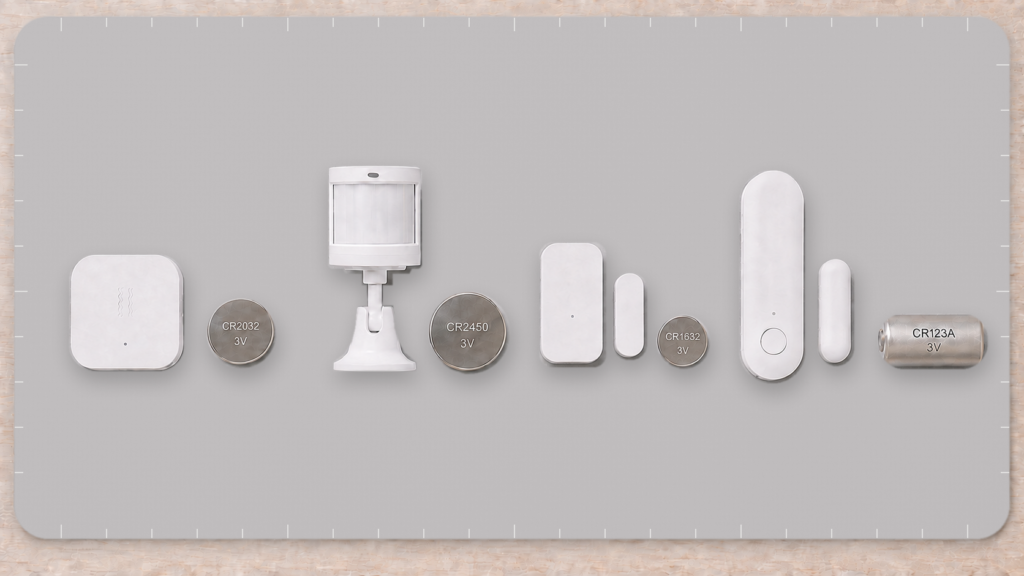
The DJT11LM vibration sensor uses a CR2032. The older RTCGQ11LM motion sensor uses a CR2450. The original MCCGQ11LM door/window sensor, T1 MCCGQ12LM and E1 MCCGQ14LM all use CR1632. The Door and Window Sensor P2 uses a cylindrical CR123A.
Aqara’s T1 specification list and MCCGQ12LM manual specify CR1632. The official E1 bilingual manual also specifies CR1632 for MCCGQ14LM. Both use the same cell as the original MCCGQ11LM.
These door sensors therefore illustrate two battery types, rather than a cell change at every generation. Aqara’s naming still needs care: a motion sensor called P1 is a different family from a door sensor called P2. Use the printed model and the model-code guide when checking regional listings.
The P2 is Matter over Thread, not Zigbee, and cannot supply its battery reports through Zigbee2MQTT. Its battery choice is documented; a claim that Thread inherently needs more power than Zigbee is not established by that specification. Radio settings, traffic, firmware and hardware design matter, so the larger cell does not by itself explain the engineering decision.
CR1632, CR2032 and CR2450 are nominal 3V lithium coin cells, but their nominal diameter × thickness is respectively 16 × 3.2 mm, 20 × 3.2 mm and 24.5 × 5.0 mm. They are not interchangeable. CR123A is cylindrical, approximately 17 × 34.5 mm. A 3V marking alone does not make a cell fit or make it an approved substitute.
Battery type by device family
| Device | Exact model | Replacement quantity and type | Primary reference |
|---|---|---|---|
| Aqara Vibration Sensor | DJT11LM | One CR2032, 3V primary lithium coin cell | Aqara specifications |
| Aqara Motion Sensor, original | RTCGQ11LM | One CR2450, 3V primary lithium coin cell | Aqara specifications |
| Aqara Door and Window Sensor, original | MCCGQ11LM | One CR1632, 3V primary lithium coin cell | Aqara specifications |
| Aqara Door and Window Sensor T1 | MCCGQ12LM | One CR1632, 3V primary lithium coin cell | Aqara T1 specification and model-specific manual linked above |
| Aqara Door and Window Sensor E1 | MCCGQ14LM | One CR1632, 3V primary lithium coin cell | Aqara E1 bilingual manual linked above |
| Aqara Door and Window Sensor P2, Matter/Thread | DW-S02D / DW-S02E | One CR123A, 3V primary lithium cylindrical cell | Aqara P2 user guide |
| Xiaomi-branded sensors, water-leak sensors, wireless mini switches and later motion models | Not covered by the six rows above | Check the exact model; do not infer from a neighboring sensor | That model’s manufacturer manual/specification |
The table is deliberately tied to six exact models. For example, the Aqara P1 motion sensor uses two CR2450 cells rather than the single cell in RTCGQ11LM, as shown in Aqara’s P1 specification. A name such as “Aqara motion sensor battery” can therefore produce the wrong shopping list. For water-leak sensors, use the model-specific setup guide and its manufacturer reference.
The “stuck at 100%” problem, explained
Aqara/Xiaomi users have reported battery readings that remain full until a device stops reporting. Issue #248 includes a 2018 report of 100% at 3025 mV; #8499 describes a Xiaomi door sensor on Zigbee2MQTT 1.21.0-4 that died while showing 100% and unchanged 3035 mV. These are observations from those installations, not evidence that every current battery sensor has the same fault.
The current conversion is model-dependent. In Zigbee2MQTT 2.14.2’s zigbee-herdsman-converters 26.115.1, the definitions for DJT11LM, RTCGQ11LM, MCCGQ11LM, MCCGQ12LM and E1 MCCGQ14LM use a linear voltage-to-percentage mapping from 2850 to 3000 mV, clamped to 0–100%. A reported 3025 mV therefore maps to 100%; 2925 mV maps to 50%. That is an estimate from voltage, not a measurement of remaining capacity or operating time.
Even within Z2M, other models can use a different voltage curve or a percentage supplied by the device. The standard battery converter deliberately uses the configured voltage mapping rather than trusting a device percentage when that mapping is present. ZHA has its own clusters and device quirks, and Matter P2 reporting follows another integration. Do not apply this Z2M curve to all of them.
A percentage may also be old. A cached dashboard value does not prove a recent battery measurement, and a new contact/motion report does not necessarily contain new battery information. Watch the actual report content and timestamp. A coin cell’s voltage also depends on its load, temperature and discharge history; a single universal “3.0V means empty” rule is unsuitable.
Check battery percentage, reported voltage where available, low-battery warnings where supported, and the date of the last battery report. Availability and last_seen can show missing communication; they cannot measure battery health or distinguish a depleted cell from interference, a failed router or a stopped bridge.
When to actually replace the battery
Replace a cell when the exact device reports low battery, normal operation becomes unreliable and battery/contact checks point to the cell, or a maintenance plan based on your own recorded service life calls for it. Record the installation date, cell brand/type and replacement date. If a leak or door notification matters, periodically trigger the sensor and verify the entire automation and notification path.
There is no manufacturer-backed annual replacement interval covering this mixed set of models. A planned interval can be useful, but choose it from that sensor’s observed life and the consequences of a missed report; do not treat twelve months as a universal requirement. Nor does a working radio test prove remaining capacity.
Reporting frequency and operating conditions affect battery life. Aqara’s advertised P1 five-year estimate, for example, assumes a detection timeout of at least 30 seconds and the motion indicator disabled. A busy hallway with frequent reports is a different workload from a quiet room. Temperature and a poor radio path can also affect service life, but a low percentage alone cannot identify the cause. Check the mesh and contact condition before attributing every early replacement to retransmissions.
Replacing the battery: what’s the same, what isn’t
Read the exact model’s battery instructions before opening its case. Photograph the cell orientation, use the indicated cover slot or latch, and match the compartment’s positive/negative markings. Do not generalize “twist the back” or “positive side out” across the lineup.
- DJT11LM vibration sensor: Aqara’s replacement FAQ says to rotate its battery cover counterclockwise with a coin, replace the CR2032 with its positive side upward, then refit and rotate the cover clockwise. That instruction belongs to this model.
- RTCGQ11LM and the three CR1632 door sensors: follow their own cover/latch instructions and the polarity marked inside. The linked T1/E1 specification sheets establish the cell type but do not provide a detailed replacement sequence. Do not force a coin-cell holder or copy the vibration sensor’s cover direction onto these cases.
- Door and Window Sensor P2: the official user guide shows a slotted screwdriver used to pry the battery cover, one CR123A removed and replaced following the polarity markings, and the cover refitted. Keep this procedure separate from the smaller Zigbee door sensors.
Use a fresh cell of the specified chemistry and voltage. The CR types listed here are primary lithium cells, commonly lithium/manganese dioxide. A similarly shaped rechargeable cell is not an approved replacement: for example, Nitecore’s NL166 lithium-ion rechargeable cell is rated 3.7V, whereas the P2 specifies a 3V CR123A. Check the battery’s datasheet and the device specification rather than treating an RCR123/16340 label as equivalent.
After replacement, refit the cover, make a normal short test/identify press if the model supports it, and trigger a real contact, motion or vibration event. Confirm a fresh report and any important automation. Battery telemetry may arrive later. If it does not work, check orientation, contact and the correct cell first; a long reset press or deletion/re-pair should not be the automatic response to an old percentage.
Quick reference: what to buy
| You own | Buy | Check before ordering |
|---|---|---|
| DJT11LM | 1 × CR2032, 3V primary lithium | 20 × 3.2 mm; exact cell marking |
| RTCGQ11LM | 1 × CR2450, 3V primary lithium | 24.5 × 5.0 mm; distinguish from P1’s two cells |
| MCCGQ11LM, MCCGQ12LM or MCCGQ14LM | 1 × CR1632 per sensor, 3V primary lithium | 16 × 3.2 mm; all three specified models share this size |
| Door and Window Sensor P2, DW-S02D / DW-S02E | 1 × CR123A, 3V primary lithium | Cylindrical; do not substitute a rechargeable 16340/RCR123 |
| Another model | Its own specified quantity/type | Manufacturer manual and compartment label |
Local stock and prices change. Search by the full cell code, quantity and chemistry rather than relying on a claim that a supermarket or camera shop always carries it. Energizer’s CR1632, CR2032, CR2450 and 123 datasheets show the dimensions, chemistry and manufacturer-specific test conditions. Capacity is not a universal “double the runtime” comparison.
FAQ
Why can a sensor show 100% and then stop reporting?
The percentage may be a clamped voltage estimate, a device-supplied estimate or a stale reading. Check the exact model/converter and reporting age. The symptom alone does not prove which mechanism caused the outage.
What battery do Aqara door/window sensors use?
MCCGQ11LM, T1 MCCGQ12LM and E1 MCCGQ14LM each specify one CR1632. Door and Window Sensor P2 DW-S02D/DW-S02E specifies one CR123A. Check the complete code for other variants.
Is CR2032 the same as CR2450?
No. Both are nominal 3V primary lithium coin cells, but diameter and thickness differ. A CR2450 has a different capacity under its datasheet’s test conditions; it does not fit a CR2032 holder.
How long will my battery last?
Use the exact model’s stated conditions as a reference and record your own service life. Reports, temperature, installation and cell condition affect the result. last_seen is useful for communication monitoring, not a battery-life forecast.
Does the P2 need a different battery?
Yes. Its official guide specifies CR123A. That is a model specification, not proof that Thread inherently draws more power than Zigbee.
What this covers, and where to check for yourself
The battery table was checked against Aqara’s exact-model specifications and manuals, including the Chinese T1 document and bilingual E1 document. Battery dimensions and chemistry were checked against cell-manufacturer datasheets. The voltage examples were checked in the released Lumi device definitions, Lumi report handling and standard battery converter. The DJT11LM device page remains useful for current integration features. Historical reports remain scoped to their stated installations.
With directly paired Zigbee sensors, radio reports travel to your local coordinator and Zigbee2MQTT or ZHA; no Aqara account is needed for that exchange. P2 reports instead travel through its Thread/Matter arrangement. Online updates, remote access and phone notifications have separate dependencies. Nothing here claims a measured battery lifetime, a universal ZHA conversion curve or a verified zero-traffic result for an entire home.
Hardware referenced:
CR2032 batteries on Amazon
CR2450 batteries on Amazon
CR1632 batteries on Amazon