

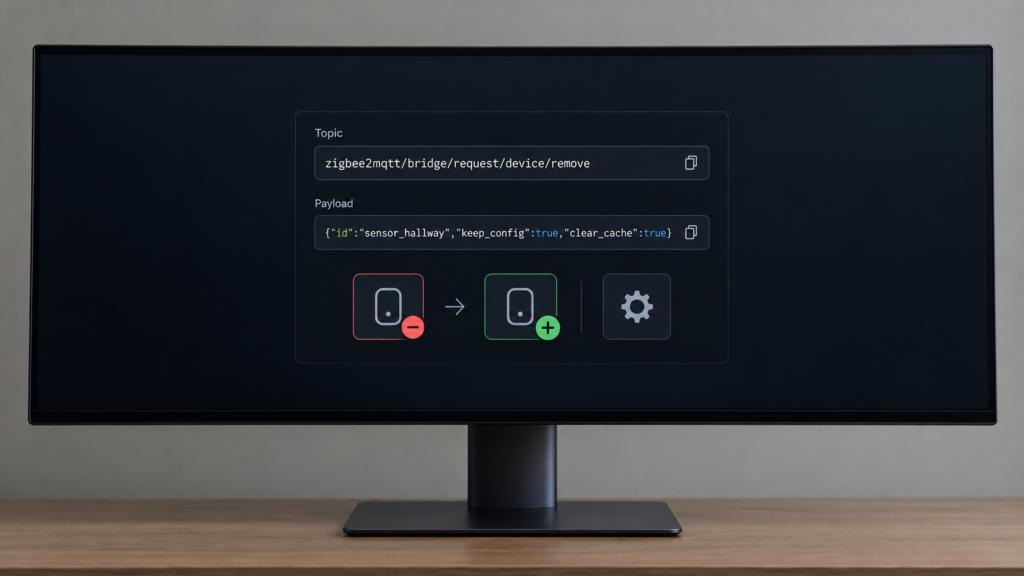
Zigbee2MQTT’s keep_config option fixes a small, long-standing annoyance: until September 2026, removing a device meant losing everything you had configured on it. Reporting intervals, calibration offsets, decoupled-mode toggles, whatever you’d set through the device’s exposed options — all of it lived on the device record Z2M deleted the moment you hit remove. Re-pair the same device after moving it to a new spot, swapping mesh routers, or forcing a clean re-interview, and you were reconfiguring from scratch.
That changed across two recent releases. Zigbee2MQTT 2.13.0 (released August 1, 2026) added a clear_cache option to the device remove request, and 2.14.0 (released September 1, 2026) followed with keep_config. Both are documented, but tersely: one line each on the official MQTT topics reference, plus a changelog credit in each release. Here’s what each one actually does, and when you’d reach for them.
Quick refresher: what remove already meant
Zigbee2MQTT’s device removal happens through the zigbee2mqtt/bridge/request/device/remove MQTT request, whether you trigger it from the frontend or publish to that topic directly. The request/response pattern the bridge topics follow is covered separately in our guide to Zigbee2MQTT’s MQTT topics.
Before these two additions, the option that mattered on that request was force. A plain remove asks the device to leave gracefully and clears its own stored network key. Force skips that handshake and only deletes Z2M’s database entry, leaving the key on the device’s radio. Our guide to Remove vs Force Remove vs Factory Reset covers that distinction and the security gap force leaves behind in more depth. It’s the mechanism the two new options sit on top of, not something either one changes.
keep_config and clear_cache operate on a different axis entirely. They’re about what happens to Zigbee2MQTT’s own saved settings and cached interview data for that device record, not about the network key.
This is about re-pairing the same physical device you’re removing. If you’re swapping in new hardware to replace something dead and want to keep its Home Assistant entity history, that’s a different problem: see replacing a dead device without losing history.
keep_config: what it actually preserves
Set keep_config: true on the remove request and the device is still taken off the network exactly like a normal remove, but its saved configuration isn’t deleted along with it. The official reference frames this as a deliberate feature for the case where you already know you’re bringing the device back: you’re moving it to another room, changing mesh routers and expect it to need a fresh join, or forcing a clean re-interview to troubleshoot something acting up.
Practically, that means the exposed options you’d otherwise have to redo by hand are still sitting in Z2M’s device record when the device rejoins. You get a device that comes back already configured instead of one you have to walk through setup again.
clear_cache: forcing a clean re-interview
clear_cache does something closer to the opposite. Set it to true and the next time that device joins, Zigbee2MQTT performs a full interview from scratch instead of reusing the cached interview and cluster data it saved from the previous pairing.
That’s useful when a device is acting up after a firmware update, or when you suspect Z2M’s cached picture of the device’s clusters and endpoints has gone stale relative to what the hardware actually reports now. A normal remove and rejoin doesn’t force that refresh on its own. clear_cache does.
| Option | Default | What it changes |
|---|---|---|
| force | false | Skips the graceful leave handshake. Only deletes Z2M’s database entry. Network key stays on the device until a physical factory reset. |
| keep_config | false | Preserves the device’s saved Z2M settings instead of deleting them on remove. |
| clear_cache | false | Forces a full re-interview on the next join instead of reusing cached interview/cluster data. |
| block | false | If the device tries to rejoin, Z2M immediately asks it to leave again. |
block is in the table only to rule it out: it prevents rejoin outright, a separate axis from what either option does with the device’s saved data.
Combining keep_config and clear_cache
These two aren’t mutually exclusive, and combining them covers a specific real scenario: you want the device’s settings intact when it comes back, but you also want Z2M to re-interview it fresh rather than trust stale cached data. That’s a coherent ask — keep the configuration, distrust the cache — and the request supports it as a single payload:
# Remove, but preserve saved config and force a fresh interview on rejoin
mosquitto_pub -h 192.168.10.20 -t zigbee2mqtt/bridge/request/device/remove -m '{"id": "sensor_hallway", "keep_config": true, "clear_cache": true}'
Point -h at your own broker, swap the id for the device’s friendly name or IEEE address, and drop either boolean if you only need one of the two behaviours.
force is the one combination to be careful with. The reference lists all four fields as independent properties of the same request, so nothing stops you setting force and keep_config together on a sleepy device that won’t leave gracefully, but it doesn’t spell out how the two interact. If you need both, confirm the settings actually survived on your own install before you rely on it.
What neither flag touches: the network key
Neither keep_config nor clear_cache change how the device’s network key is handled. That’s still governed by whether you used a plain remove or a force remove underneath. If the device is asleep and you have to fall back to force to get it out of the device list, it still keeps the network key on its radio until you physically factory-reset it, regardless of what you set for these two options.
This matters most if the device is leaving your possession rather than just moving rooms. keep_config and clear_cache are about your Z2M install’s own bookkeeping; the network-key decision still belongs to the force-remove article.
Version requirement: check before you rely on this
clear_cache requires Zigbee2MQTT 2.13.0 or later (released August 1, 2026). keep_config requires 2.14.0 or later (released September 1, 2026). Check what you’re running before you depend on either: the version is on the frontend’s About screen, and Zigbee2MQTT also publishes it on the zigbee2mqtt/bridge/info topic.
Both options are properties of the remove request payload, not frontend features, so publishing to the topic works on any install at the required version. If your build’s remove dialog doesn’t offer a checkbox for the one you want, the MQTT request is the route that always works.
FAQ
What does keep_config do in Zigbee2MQTT? It preserves a device’s saved Zigbee2MQTT configuration — reporting settings, calibration offsets, mode toggles — when you remove it, instead of deleting that record along with the device. Available from Zigbee2MQTT 2.14.0.
What’s the difference between keep_config and force in Zigbee2MQTT’s remove request? They operate on different axes. force controls whether the device gets a graceful leave handshake or a database-only removal, which determines whether the network key stays on the device. keep_config controls whether Z2M keeps or deletes the device’s saved settings. They aren’t the same decision.
Does clear_cache delete my device settings? No. clear_cache clears Z2M’s cached interview and cluster data so the device gets a full re-interview on its next join. It doesn’t touch the saved configuration that keep_config preserves; the two can be set independently or together.
Can I use keep_config and clear_cache together? Yes. That combination keeps your saved settings while still forcing a clean re-interview on rejoin, which is a reasonable combination if you want configuration continuity but don’t trust the previously cached interview data.
Do I need Zigbee2MQTT 2.14 or later to use keep_config? Yes. keep_config shipped in 2.14.0 (September 1, 2026). clear_cache shipped one release earlier, in 2.13.0 (August 1, 2026), and works on its own on a 2.13.x install.
What this covers, and what to check yourself
This article is built from Zigbee2MQTT’s official MQTT topics reference, which documents all four remove-request fields, and the GitHub release notes for 2.13.0 and 2.14.0, which confirm when each option shipped — 2.14.0’s notes credit the keep_config work to #32765. No behaviour described here goes beyond what those sources state, and none of it was bench-tested here.
What stays local. Everything covered here happens entirely on your own coordinator and MQTT broker. None of it depends on a vendor cloud service.
What to check yourself. Confirm your installed Zigbee2MQTT version before relying on either flag, and don’t treat either one as a substitute for the network-key handling in the force-remove article — they answer a different question.
These options are about a remove that loses too much. If your problem is the opposite — a remove that left something behind — that’s a different failure family: an orphaned entry on the Z2M side is covered in our ghost device guide, and a device that’s gone from Z2M but still listed in Home Assistant in device removed, still shows in Home Assistant.
Because keep_config and clear_cache are ordinary properties on a standard MQTT request rather than UI-only toggles, anything that can publish to your broker can set them — which is the practical answer for anyone re-pairing more than a handful of devices at a time.