

Disclosure: This post contains affiliate links. If you buy through them, we earn a small commission at no extra cost to you.
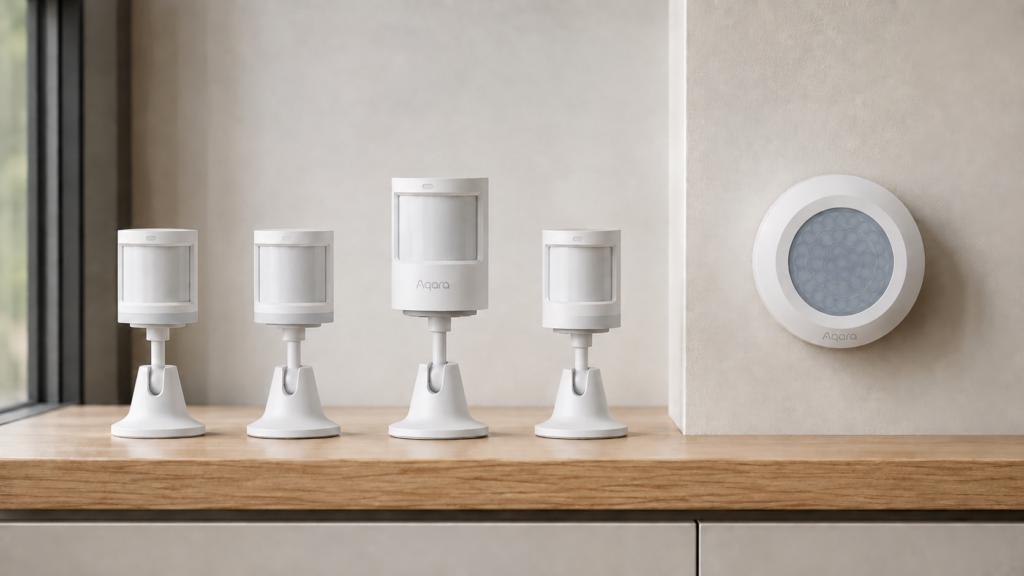
The original RTCGQ11LM, T1 (RTCGQ12LM), High Precision model (RTCGQ13LM), P1 (RTCGQ14LM) and E1 (RTCGQ15LM) cover different needs. For Zigbee2MQTT, the useful differences are adjustable re-trigger timing, sensitivity, light sensing and update support. The model code is a better starting point than a listing that simply says “Aqara motion sensor.” Our Aqara model-naming guide explains the wider naming pattern, but a tier name alone does not tell you the features.
This comparison covers those five Zigbee models, using manufacturer specifications, the current Zigbee2MQTT definitions and released ZHA handlers. It does not establish which models are in stock in your region or cover every newer Aqara motion or presence sensor. No sensor was bought or paired for this comparison.
Among these five, only the P1 combines sensitivity adjustment and illuminance. The High Precision model has sensitivity adjustment but no illuminance expose. The original has a fixed normal re-trigger interval and no enabled Zigbee2MQTT OTA path; the other four have adjustable intervals and an OTA implementation. All five have integration support for local Zigbee use, although ZHA does not necessarily present the same settings as Zigbee2MQTT.
The five generations at a glance
| Model | Marketing name | Illuminance | Motion sensitivity | Device-side detection_interval |
OTA via Z2M |
|---|---|---|---|---|---|
| RTCGQ11LM | Original | Yes; calibration option | No | No exposed setting; normal 60-second re-trigger interval | No enabled implementation |
| RTCGQ12LM | T1 | Yes; calibration option | No | Read/write; API range 2–65535 seconds | Implemented |
| RTCGQ13LM | High Precision | No | Low / medium / high | Read/write; API range 2–65535 seconds | Implemented |
| RTCGQ14LM | P1 | Yes; calibration option | Low / medium / high | Read/write; API range 2–65535 seconds | Implemented |
| RTCGQ15LM | E1 | Yes; calibration option | No | Read/write; API range 2–65535 seconds | Implemented |
The interval range in the table is what the Zigbee2MQTT interface accepts. It is not a measurement proving that every firmware accepts or behaves correctly at every value. Aqara documents the P1’s app setting as 1–200 seconds; that and the converter’s wider range describe different interfaces. Choose a supported practical value, wake the sensor if needed, and confirm the report and behavior after changing it.
OTA implementation also does not guarantee a newer image exists for your unit. It provides the update route; the image still has to match the device and be available. T1 and High Precision support appears in the Zigbee2MQTT 1.23.0 release history. The current released definitions retain it for those models and add it for P1 and E1.
detection_interval is a device setting for how soon it can report another detection. occupancy_timeout is an integration timer that clears occupancy after reports stop. For the four adjustable models, Zigbee2MQTT documents a default of the detection interval plus two seconds and requires an explicit timeout at least as long as that interval. A shorter attempted timeout does not make the sensor detect faster. In the released converter, a value below the known interval falls back to interval plus two seconds.
occupancy means motion was detected within that reporting and timeout window. These are PIR sensors, so an occupied room with someone sitting still can eventually clear. no_occupancy_since is an optional integration message after the last detection, available on the original as well as the four later models; it is not an extra hardware sensor introduced by the T1.
RTCGQ11LM: the original’s fixed motion timing
The RTCGQ11LM definition exposes occupancy, illuminance, device_temperature, battery, voltage and power_outage_count. It uses one CR2450. Illuminance calibration is a percentage offset applied to future reports; device-temperature calibration is an absolute offset. The device-temperature reading describes the sensor itself and should not be treated as a calibrated room thermometer.
In normal operation, the device waits about 60 seconds between motion reports. Zigbee2MQTT documents a 90-second default occupancy_timeout and advises against setting it below 60 seconds. The documentation links a hardware modification as a workaround, but there is no normal device-side interval setting in this integration. Our RTCGQ11LM setup guide covers its reporting and older Home Assistant naming examples.
The released converter has no OTA extension for this model. That is stronger evidence than just the absence of an OTA heading on a web page. If yours is reliable and its timing suits the room, it can remain useful; lack of that update route does not by itself establish that replacement is necessary.
T1 (RTCGQ12LM): the re-trigger interval arrives
The T1 adds a readable and writable detection_interval while retaining occupancy, lux, device temperature, battery, voltage and outage count. Its definition does not expose motion sensitivity. The lux and temperature calibration options are integration adjustments, and the original already has them.
If you need a light to respond to another movement sooner than the original’s normal cooldown allows, adjustable timing is a useful difference. If you need to reduce nuisance detections through sensitivity control, choose one of the models that exposes that setting instead. Our T1 setup guide explains the interval and timeout interaction.
Released ZHA handlers recognize these five model families, but support for basic motion does not promise a Zigbee2MQTT-style settings panel. Check the entities and device-management controls on your actual installation. The T1, High Precision and P1 device notes also list minimum firmware for older coordinators. Use those model notes when diagnosing a join problem; do not assume a firmware requirement for one radio applies to every adapter.
High Precision (RTCGQ13LM): a ceiling sensor with no light expose
This model is physically different from the small freestanding sensors. Aqara’s mainland specifications describe a roughly 60-degree cone, a five-metre detection distance and a circular area about six metres across at that distance. Its manual supports surface or recessed ceiling installation, requires indoor use at a height of at least two metres, and rules out adhesive-only fixing.
Aqara also describes detecting small human movements; the product name is not merely a ranking above P1. The 60-degree cone is not directly comparable to P1’s horizontal field-of-view figures. Mounting position and the shape of the area you need to cover matter more than comparing those two numbers alone. Follow the manual’s indoor ceiling-installation requirement; it does not establish suitability for a damp outdoor porch.
The RTCGQ13LM integration provides occupancy, low/medium/high sensitivity, interval, device temperature, battery, voltage and outage count. It has no illuminance expose. A motion-and-darkness automation therefore needs another lux source. Sensitivity can help manage nuisance detections, but it does not create a measured distance boundary or guarantee that a seated person will always remain detected.
Our High Precision setup guide covers the model and historical naming changes, including the Z2M 1.24.0 rename. Check actual entity IDs when adapting an older automation rather than treating that old change as a current pairing fault.
P1 (RTCGQ14LM): sensitivity and illuminance together
The P1, also listed as MS-S02 in the integration, combines motion sensitivity, illuminance and adjustable interval. Its trigger_indicator setting controls the blue LED on detection. It also exposes device temperature, battery and voltage, but the current released definition does not expose battery_low or power_outage_count. The absence of the outage counter matters only if you used it as a diagnostic.
Aqara specifies two CR2450 cells for P1. The other four models here use one each. The manufacturer overview describes 170-degree viewing to two metres and 150-degree viewing to seven metres, with an adjustable stand. These are published coverage figures, not a promise of the same result at every mounting angle or in every room.
Zigbee2MQTT explicitly asks you to press the pairing button just before changing the P1’s sensitivity, interval or indicator. Apply a setting while it is awake, then check the returned value and subsequent motion reports. The P1 guide has the model-specific setup details. Aqara’s five-year battery claim has conditions: the indicator is off and detection timeout is at least 30 seconds. It is not a measured comparison of these five models on a third-party network.
E1 (RTCGQ15LM): a similar feature set to T1
The E1 exposes occupancy, illuminance, detection interval, device temperature, battery, voltage and outage count. Its model identifier is lumi.motion.acn001. It has the same broad Zigbee2MQTT capability set as T1, including lux and device-temperature calibration, timeout and no-occupancy messages, without a motion-sensitivity setting.
That makes T1 and E1 similar choices for basic motion and lux with adjustable timing. Their model names do not establish that E1 replaced T1 in every market or is still in production everywhere. Check availability, price and support where you live. Our E1 setup guide covers pairing and timer alignment.
Battery sensors can be asleep when a write is attempted. P1’s wake-before-write requirement is explicitly documented; use the same practical check when another model fails to respond. Inspect the log and returned setting, wake the unit with the documented button gesture, and try again. This is troubleshooting advice, not proof that every model silently drops writes or that E1 accepts them only in one exact window. A value shown immediately after a write can also be optimistic, so confirm a subsequent read or report and actual behavior.
Which one for which use case
| What you need | Consider | Why |
|---|---|---|
| A basic motion trigger with no need for faster repeats | Original RTCGQ11LM, especially if already owned | Motion and lux; accept normal 60-second timing and no Z2M OTA route |
| Adjustable re-trigger timing and lux | T1 or E1 | Similar feature sets; compare local price and availability |
| Light level in automation conditions | Any of these except RTCGQ13LM | Only High Precision lacks an illuminance expose |
| Sensitivity adjustment | High Precision or P1 | Both expose low, medium and high; test placement as well |
| Sensitivity and lux in one device | P1 | The only combination of both among these five |
| A defined indoor area viewed from the ceiling | High Precision RTCGQ13LM | Ceiling mounting and a cone-shaped detection area; follow the manual |
For a light that should turn on only in darkness, the missing lux reading is an easy buying mistake to avoid. For a corridor that needs quick repeat detections, interval control matters more. For nuisance movement, try placement and sensitivity together; “low” is not a reliable promise to ignore all small or distant motion.
The original may be enough if you already own it. No price survey supports calling it the cheapest today, or assuming that T1 and E1 always cost less than P1. Check the printed model, battery quantity and current listing before buying. Our Aqara and Xiaomi battery guide covers replacements, and the door and window sensor comparison covers the corresponding contact-sensor choices.
FAQ
What does T1 add over the original? A device-side interval setting and an enabled Zigbee2MQTT OTA route. Both have lux and calibration options, and neither exposes motion sensitivity. Optional no_occupancy_since messages are available for both.
Does High Precision have a light reading? Its current Zigbee2MQTT definition does not expose one. Choose another model or a separate lux source for a darkness condition.
Which have Zigbee2MQTT OTA support? T1, High Precision, P1 and E1 have an enabled implementation in the checked release. The original does not. Available images and successful updates remain model- and firmware-specific.
Is P1 worth choosing over the original? It offers sensitivity plus lux, adjustable timing and an OTA route, and uses two CR2450 cells. Choose it when those features help your automation; compare actual prices rather than assuming a fixed price ranking.
Which should I buy for Home Assistant? Match the features above to your installation and check whether you will use Zigbee2MQTT or ZHA. Both support these model families, but their controls and reporting behavior are not identical. High Precision is an indoor ceiling model, not a weatherproof outdoor choice.
What this comparison verified
The comparison was checked against the five linked device references and the released converter definitions bundled with Zigbee2MQTT 2.14.2. The later converter release 26.118.0 was also checked for these model definitions. ZHA’s released model handlers establish support, without making the Zigbee2MQTT feature table a ZHA guarantee. Manufacturer documents establish the cell types, P1 quantity and different mounting and coverage figures.
These are documentation and source checks, not detection-range, battery-runtime or pairing tests. The API’s wide interval range, manufacturer coverage figures and vendor runtime estimates should be read with their limits. Historical integration changes are useful context for old automations, not proof that a new fault has the same cause.
Reports and local automations through Zigbee2MQTT or ZHA can run without an Aqara hub, account or cloud. A remote notification target, firmware download or other service can have its own internet requirement. Confirm the exact model, adapter firmware, entities and reported setting before applying advice from another generation.
Hardware referenced:
Aqara Motion Sensor on Amazon
Aqara Motion Sensor P1 on Amazon