

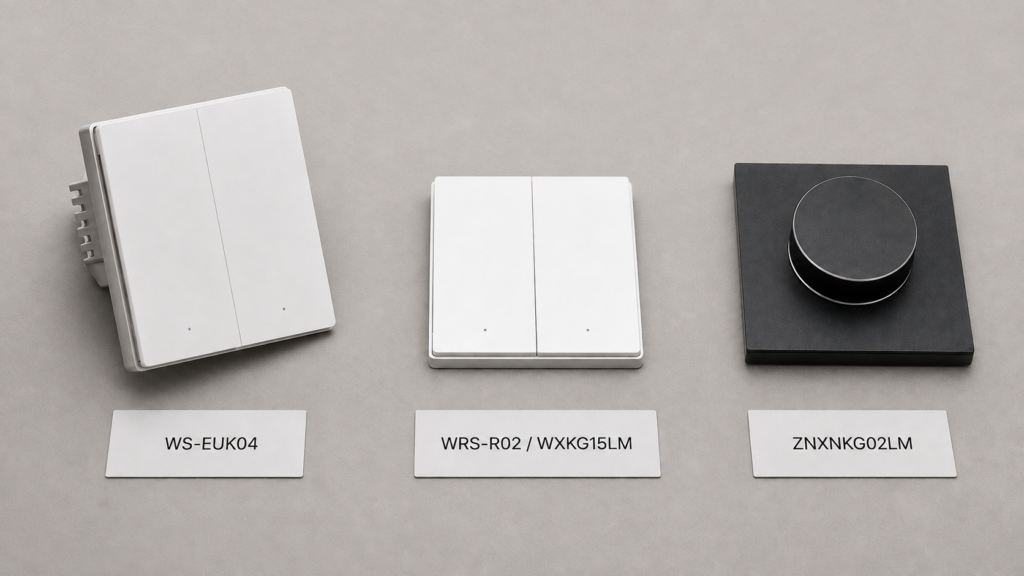
Aqara reuses “H1” across four unrelated device families: mains-wired wall switches, a battery-powered wireless mini switch, a wall-mount wireless remote, and a pair of rotary knobs. If you searched “aqara h1 home assistant” because you’re holding a box, staring at a switch already in the wall, or trying to match a Zigbee2MQTT/ZHA entry to the right setup guide, the generation name alone won’t get you there. The model number will.
This page doesn’t repeat pairing steps or wiring instructions. Every model below already has its own setup guide on this site, sourced and Editor-reviewed. What this page does is help you work out which of those guides is actually yours, and flag the one place this site’s own documentation of the lineup is genuinely inconsistent so you don’t infer a rule that isn’t there.
Why “H1” alone doesn’t tell you what you have
Four device categories currently carry the H1 name on this site:
- Wired wall switches — seven SKUs, splitting further by neutral/no-neutral wiring, rocker count, and market documentation
- The Wireless Mini Switch H1 — WXKG15LM and WXKG16LM, battery-powered buttons
- The Wireless Remote Switch H1 — WRS-R02, a different wall-mount form factor from the mini switch
- The Smart Rotary Knob H1 — ZNXNKG01LM and ZNXNKG02LM
Beyond sharing a generation name, the wireless devices have nothing to do with the mains-wired switches. They’re separate Zigbee end devices with separate pairing flows and separate guides.
Check the exact model code printed on the device, or the model ID Zigbee2MQTT/ZHA reports after pairing (for example lumi.switch.l1aeu1 or lumi.switch.b1lc04). That code, not the “H1” name, is what determines which guide below applies to you. You can also cross-check any model code against Zigbee2MQTT’s own supported-devices list.
Wall switches: neutral, rocker count, and a documentation caveat
Seven H1 wall-switch SKUs are documented on this site so far. They split along two independent axes — whether the switch needs a neutral wire, and how many rockers it has — plus whether that model’s own guide states an EU market designation.
| Model | Wiring | Rockers | EU market stated in its own guide |
|---|---|---|---|
| WS-EUK01 | No neutral | Single | Yes (in title) |
| WS-EUK02 | No neutral | Double | Yes (in title) |
| WS-EUK03 | With neutral | Single | Yes (in title) |
| WS-EUK04 | With neutral | Double | Yes (in title) |
| QBKG38LM | No neutral | Single | Not stated |
| QBKG29LM | No neutral | Triple | Yes (in body text only) |
| QBKG34LM | With neutral | Triple | Not stated |
Don’t read a clean “WS-EUK equals EU, QBKG equals China-market” rule into that table. The four WS-EUK-prefixed guides say “EU” directly in their titles. Of the two triple-rocker QBKG models, only the QBKG29LM guide describes the device as being for the EU market — and it does so in body text, not the title. The QBKG34LM guide, despite sharing the same QBKG prefix, makes no market claim at all. That’s not a clean pattern; it’s inconsistent documentation across two switches with the same prefix. Go by what each model’s specific guide actually states, not the model-code prefix, and don’t assume a market when a guide doesn’t name one.
The no-neutral variants (WS-EUK01, WS-EUK02, QBKG38LM, QBKG29LM) don’t need an Aqara hub and speak Zigbee 3.0 directly to Zigbee2MQTT or ZHA. They also carry known Zigbee2MQTT quirks — decoupled-mode behavior, an anti_flicker_mode setting related to LED flicker, and minimum-load/bypass-capacitor considerations. Those are covered in depth on the WS-EUK01 and QBKG38LM guides linked below, not repeated here.
Each model’s full setup guide:
- WS-EUK01 — EU, no neutral, single rocker
- WS-EUK02 — EU, no neutral, double rocker
- WS-EUK03 — EU, with neutral, single rocker
- WS-EUK04 — EU, with neutral, double rocker
- QBKG38LM — no neutral, single rocker, no market stated
- QBKG29LM — no neutral, triple rocker, EU market per its own guide text
- QBKG34LM — with neutral, triple rocker, no market stated
Wireless Mini Switch H1 vs. Wireless Remote Switch H1
Two more H1 devices are wireless buttons, not switches you wire into a wall box, and they’re easy to conflate with each other.
The Wireless Mini Switch H1 is two separate models: WXKG15LM, a two-rocker button reporting up to 12 action values, and WXKG16LM, a single-rocker button reporting 3 action values. Both run on a CR2032 coin cell and pair directly over Zigbee. Setup and the full action list are in the Wireless Mini Switch H1 guide.
The Wireless Remote Switch H1 (WRS-R02) is a different device: a rocker-style, wall-mount remote in a distinct form factor from the mini switch, not just a renamed version of it. If your device looks like a small wall plate rather than a compact button, this is likely the one. Full details are in the WRS-R02 guide.
Rotary Knob H1: wired vs. ZNXNKG02LM
Aqara also sells two Smart Rotary Knob H1 models: ZNXNKG01LM, which is wired, and ZNXNKG02LM. Both are documented separately with their own pairing and setup steps: the wired ZNXNKG01LM guide and the ZNXNKG02LM guide. Check the model code on your unit against those two pages before assuming which power arrangement applies.
Quick reference: every Aqara H1 device on this site
| Model | Device type | Guide |
|---|---|---|
| WS-EUK01 | Wall switch, no neutral, single rocker | Setup guide |
| WS-EUK02 | Wall switch, no neutral, double rocker | Setup guide |
| WS-EUK03 | Wall switch, with neutral, single rocker | Setup guide |
| WS-EUK04 | Wall switch, with neutral, double rocker | Setup guide |
| QBKG38LM | Wall switch, no neutral, single rocker | Setup guide |
| QBKG29LM | Wall switch, no neutral, triple rocker | Setup guide |
| QBKG34LM | Wall switch, with neutral, triple rocker | Setup guide |
| WXKG15LM | Wireless mini switch, double rocker | Setup guide |
| WXKG16LM | Wireless mini switch, single rocker | Setup guide |
| WRS-R02 | Wireless remote switch, wall-mount | Setup guide |
| ZNXNKG01LM | Smart rotary knob, wired | Setup guide |
| ZNXNKG02LM | Smart rotary knob | Setup guide |
Stamping “H1” across four unrelated product categories, then further splitting the largest of those categories by wiring, rocker count, and inconsistent market documentation, makes this generation harder to navigate than most vendors’ model-naming choices in this space. It’s not malicious — just inconsistent — and it pushes the identification work onto the buyer.
If you’re trying to understand Aqara’s letter-and-number naming pattern more broadly, rather than just the H1 generation, the model naming convention breakdown covers T1/T2/E1/H1/P1 across the whole catalog. As this page shows, the letter alone still won’t tell you the wiring or market details, only which generation you’re looking at.
FAQ
What does “H1” mean on an Aqara switch?
It’s a generation label Aqara applies to four separate device families released around the same period: mains-wired wall switches, a wireless mini switch, a wireless wall-mount remote, and rotary knobs. It doesn’t indicate a single product, wiring requirement, or region.
Do I need a neutral wire for the Aqara H1 switch?
It depends on the specific model. WS-EUK01, WS-EUK02, QBKG38LM, and QBKG29LM don’t require a neutral wire. WS-EUK03, WS-EUK04, and QBKG34LM do. Check your model code against the table above, then confirm wiring details on that model’s own setup guide.
What’s the difference between the Aqara H1 wall switch and the H1 wireless mini switch?
The wall switches are mains-wired, permanently installed devices that replace a physical wall switch. The Wireless Mini Switch H1 (WXKG15LM/WXKG16LM) is a small battery-powered button you can mount anywhere or leave loose. They don’t share wiring, pairing flow, or entities beyond the “H1” generation name.
How do I tell my Aqara H1 switch’s exact model number?
Check the code printed on the device itself, or the model ID Zigbee2MQTT or ZHA reports after pairing (for example lumi.switch.l1aeu1 for WS-EUK01 or lumi.switch.b1lc04 for QBKG38LM). Match that against the quick-reference table above rather than assuming from packaging alone.
Is the Aqara H1 wireless mini switch the same as the H1 wireless remote switch?
No. The Wireless Mini Switch H1 (WXKG15LM/WXKG16LM) and the Wireless Remote Switch H1 (WRS-R02) are different devices in different form factors, each with its own setup guide. Don’t assume one guide’s pairing steps apply to the other.
What this page verified
This page is a navigational synthesis, not a new device investigation. Every fact above — model codes, wiring requirements, rocker counts, market documentation, action counts, and battery type — comes directly from this site’s own already-published, Editor-reviewed setup guide for that specific model, cross-checked against those guides during this run rather than pulled from memory.
The one thing worth restating plainly: there is no clean, reliable rule for inferring market from the WS-EUK vs. QBKG prefix across this lineup. QBKG29LM’s own guide describes it as an EU-market device — in body text, not the title — while QBKG34LM’s guide makes no market claim at all, despite sharing the same QBKG prefix. Separately, QBKG29LM’s Zigbee model ID (lumi.switch.l3acn1) uses the same “acn” pattern this site’s WS-EUK01 guide associates with non-EU SKUs, which is worth an editorial follow-up on that older post rather than something this page can resolve. If your model isn’t listed in the quick-reference table above, it may be a variant this site hasn’t covered yet — check the code on your device against Aqara’s own documentation rather than assuming it matches the closest entry here.