

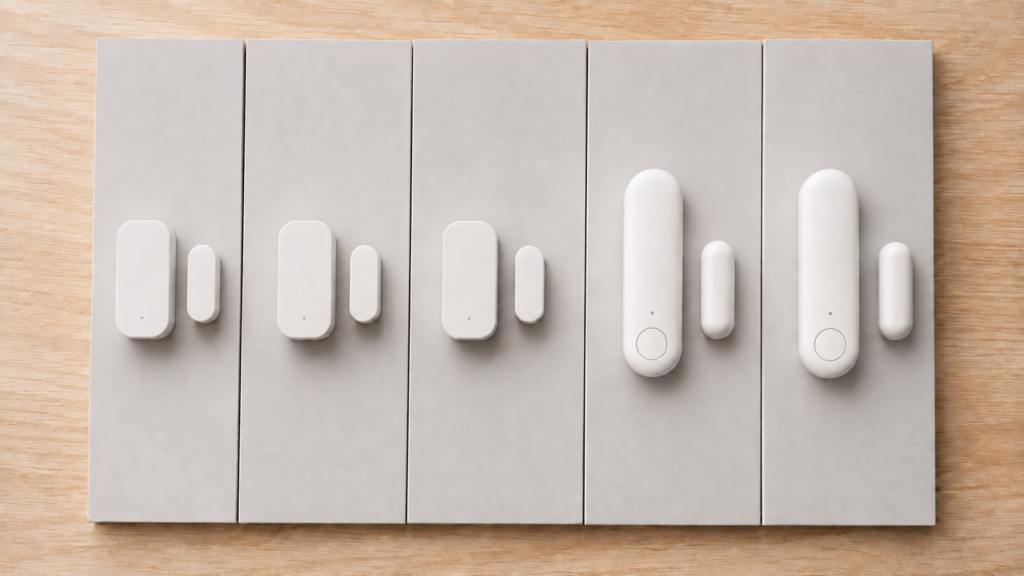
Aqara has shipped five distinct generations of its basic door and window sensor: the original MCCGQ11LM, the T1 (MCCGQ12LM), the P1 (MCCGQ13LM), the E1 (MCCGQ14LM), and the Matter-based P2. They look close to identical in most product photos, and searching “aqara door sensor home assistant” surfaces guides for all five without ever explaining what’s actually different between them.
This comparison puts the five side by side using what each model actually exposes to Zigbee2MQTT, and for the P2, to Home Assistant’s Matter integration, sourced from the official Z2M device reference pages, Aqara’s published specifications, and this site’s five existing device guides. No new hardware was bought for this piece, and nothing here implies bench testing beyond what those individual guides already cover.
Three things separate them in practice: the original runs Zigbee 1.2 rather than Zigbee 3.0, the P1 is the only one with tamper detection and an adjustable detection distance, and the P2 isn’t a Zigbee device at all. Everything else is close to identical. All four Zigbee generations stay fully local through Zigbee2MQTT or ZHA once paired, and none of them accept over-the-air firmware updates from Z2M.
The five generations at a glance
This is a research-synthesis comparison built from official Zigbee2MQTT device pages, Aqara’s published spec pages, and this site’s own device guides for each generation, not new hands-on testing. Links to the full setup guide for each model are below.
| Model | Generation | Protocol | Local path | Standout feature |
|---|---|---|---|---|
| MCCGQ11LM | Original | Zigbee 1.2 | Zigbee2MQTT / ZHA, no OTA | Only generation exposing device_temperature, power_outage_count, trigger_count |
| MCCGQ12LM | T1 | Zigbee 3.0 | Zigbee2MQTT / ZHA, no OTA | Contact, battery, voltage only, no additions over baseline |
| MCCGQ13LM | P1 | Zigbee 3.0 | Zigbee2MQTT / ZHA, no OTA | Adds tamper detection and configurable detection_distance |
| MCCGQ14LM | E1 | Zigbee 3.0 | Zigbee2MQTT / ZHA, no OTA | Adds a battery_low convenience flag over T1 |
| DW-S02D | P2 | Matter over Thread | HA Matter integration via a Thread Border Router, not Zigbee at all | Only generation that doesn’t run Zigbee |
The model number is the only reliable way to know which generation you actually have. It’s printed on the back of the sensor. Aqara’s product naming (the “T1,” “P1,” “E1” labels) isn’t used consistently across every marketplace listing, and some retailers list the P2 under the P1’s MCCGQ13LM code, so match on the model code printed on the unit rather than the marketing name. Our breakdown of Aqara’s model-naming convention covers this pattern across the wider product line, not just door sensors.
Full pairing steps for each generation live in their own dedicated guides on this site, covering the original MCCGQ11LM, the T1, the P1, the E1, and the P2. There’s also an older, more general walkthrough of Aqara door sensors in Home Assistant that predates this comparison.
The Zigbee 1.2 problem with the original
The original MCCGQ11LM predates Zigbee 3.0. Aqara’s own specifications list it as a Zigbee 1.2 device, and the three later Zigbee generations (T1, P1, E1) are all Zigbee 3.0 certified. Plenty of marketplace listings for the original claim “Zigbee 3.0” anyway, which is one more reason to match on the model code rather than the listing copy.
This is the difference most likely to affect you day to day, and it’s the one the spec sheets bury. Devices from this older Xiaomi/Aqara generation are widely reported in the Zigbee2MQTT community to drop off the mesh when their traffic routes through a third-party router — a mains-powered bulb or plug from another brand acting as a repeater. The devices work reliably when they talk to the coordinator directly or through Xiaomi/Aqara routers, which is why some people never see the problem and others find it maddening.
If you’re building a mixed-brand Zigbee mesh from scratch, that history is a reasonable argument for starting with a T1 or later rather than hunting down the original for its diagnostic attributes. If you already run originals happily, this isn’t a reason to replace them.
What actually changed, generation to generation
Across the four Zigbee generations, most of what’s exposed in Zigbee2MQTT stays identical. contact, battery, and voltage appear on every one of them. Two things changed on top of that baseline, and only two.
The original MCCGQ11LM is the only generation that also exposes device_temperature, power_outage_count, and trigger_count, per its Zigbee2MQTT device page. That’s diagnostic-adjacent data, not a room-temperature reading. device_temperature reflects the chip’s own temperature, not ambient conditions, so don’t wire it into a climate automation. It’s more useful for checking whether a sensor is running unusually hot, or eyeballing how often it’s triggered without pulling up the Z2M logs. None of the three later Zigbee generations kept any of it.
The P1 (MCCGQ13LM) is where the real functional addition shows up. It’s the only generation with tamper detection and a configurable detection_distance setting (10mm, 20mm, or 30mm), which adjusts how far apart the magnet and sensor body can sit before it reports open. That second one matters more than it sounds. Doors and window frames aren’t perfectly flush, and a sensor that reports false opens because the gap sits at the edge of its default sensitivity is a real annoyance. Being able to dial that in is the one generation-over-generation change that affects day-to-day reliability rather than just diagnostics. The full exposed set is on the P1’s Z2M device page.
The E1 (MCCGQ14LM) adds a battery_low boolean on top of the T1’s exposed set. That’s a convenience flag derived from the existing battery percentage reading, not a new sensing capability, so it isn’t a meaningful upgrade over the T1 on its own.
None of the four Zigbee generations support OTA firmware updates through Zigbee2MQTT, per each model’s own Z2M device reference page. That’s a real gap from what Aqara’s general marketing implies about firmware being handled through the app or hub. If you’re relying on Z2M’s OTA tab to keep any of these current, it won’t show these devices at all.
Battery type by generation
The door and window line changes battery at almost every generation, and not in a pattern you could guess from the model name.
| Generation | Model | Battery | Source |
|---|---|---|---|
| Original | MCCGQ11LM | CR1632 | Aqara product spec + this site’s MCCGQ11LM guide |
| T1 | MCCGQ12LM | CR2450 | Aqara T1 spec page |
| P1 | MCCGQ13LM | CR123A | Aqara P1 product spec |
| E1 | MCCGQ14LM | CR1632 | Confirmed by Private Home Lab — Aqara publishes no spec page for this model |
| P2 | DW-S02D | CR123A | Aqara P2 spec + this site’s P2 guide |
Three different cells across five generations, doubling back on itself: the original’s CR1632, up to the T1’s wider CR2450, back down to the E1’s CR1632, and the CR123A in both the P1 and the P2. The CR1632 and CR2450 are both 3V lithium coin cells but differ in diameter and thickness and won’t fit each other’s holders. The CR123A isn’t a coin cell at all — it’s a cylindrical lithium primary, the type sold in camera and flashlight sections, and it’s worth confirming you’re buying the 3V primary rather than the 3.7V rechargeable RCR123 sold alongside it.
The E1 is the one value here that doesn’t trace to a vendor page. Aqara publishes no MCCGQ14LM spec page, its Zigbee2MQTT device page lists no battery type, and third-party listings contradict each other. The CR1632 above is confirmed by Private Home Lab and supersedes the CR2 figure still circulating on some retail listings. If you own an E1, the marking on the cell you pull out is the last word.
Aqara markets “up to 2 years” for the T1 and “up to 5 years” for the P1, with no published test conditions. Those are vendor claims, not comparable measurements — the two models use different cells and different radios, and real-world life depends heavily on how often the door is opened. No independent comparative runtime data across these generations turned up in the sources for this piece, so treat any specific month figure, including ours, as unverified.
The Zigbee-vs-Matter split: why the P2 isn’t a drop-in upgrade
The P2 isn’t a newer Zigbee generation. It doesn’t appear in the Zigbee2MQTT device database at all, because it doesn’t run Zigbee. It’s a Matter device that communicates over Thread, and it pairs into Home Assistant through the Matter integration rather than through Zigbee2MQTT or ZHA.
If you’re running Zigbee2MQTT or ZHA for your other Aqara sensors, the P2 will not join that mesh. It needs a Thread Border Router on your network instead, such as an Aqara Hub M3, an Apple TV 4K (3rd gen), a HomePod mini, or a Home Assistant SkyConnect/Yellow running Thread firmware, plus the Matter integration in Home Assistant. Buying a P2 to add to an existing Zigbee door-sensor deployment means standing up a second piece of network infrastructure, not just pairing another device.
Once paired, the P2 exposes two entities: a contact binary sensor and a battery sensor, per this site’s own P2 setup guide. Firmware updates on the P2 also work differently. They go through the Aqara Home app rather than through Home Assistant, since older Matter firmware versions were invalidated in Matter’s Distributed Compliance Ledger and can’t be pushed from HA once the device is commissioned.
Which generation to buy for a new Zigbee2MQTT or ZHA setup
| If you | Buy | Why |
|---|---|---|
| Just need reliable open/closed reporting on Z2M or ZHA | T1 or E1 | Identical apart from the E1’s battery_low flag; both Zigbee 3.0 |
| Want tamper alerts, or fight false opens from a loose door fit | P1 | Only generation with tamper and a configurable detection_distance |
| Want chip-temperature and outage/trigger diagnostics | Original MCCGQ11LM | Only generation exposing them, but it’s Zigbee 1.2 with the mesh-routing history above |
| Have no Zigbee coordinator but do have a Thread Border Router | P2 | Matter over Thread; pairs straight into HA without a Zigbee stick |
| Already own a working sensor of any generation | Keep it | No OTA-currency argument exists, and the functional gaps are narrow |
If you’re already running Zigbee2MQTT or ZHA and just need reliable open/closed reporting, the T1 or E1 both do the job, and the battery_low flag on the E1 is a minor convenience rather than a reason to seek one out specifically.
If tamper detection matters to you, or you’ve had trouble with false triggers from a loose-fitting door or window, the P1 is the one generation where that’s actually solvable through the configurable detection distance. It’s the only functional upgrade in the lineup worth actively choosing.
If you’re not on Zigbee2MQTT or ZHA at all, and you already have, or are willing to add, a Thread Border Router, the P2 is worth considering on its own terms. But that’s a different infrastructure decision, not a “newer Aqara sensor” decision, and anyone with an existing Zigbee mesh should read the P2 section above before assuming it slots in the same way.
This comparison doesn’t cover current retail availability or pricing for any of the five, since that data wasn’t sourced for this piece and moves fast enough that anything printed here would go stale quickly. Check what’s actually listed for your region before buying.
Should existing owners of an older generation upgrade?
Usually no. None of the four Zigbee generations support Z2M OTA updates, so there’s no firmware-currency argument for swapping to a newer model, the way there might be with a device that does get remote updates. The functional differences that do exist are narrow. The original’s diagnostic attributes are a nice-to-have for troubleshooting, not an operational feature, and the P1’s tamper detection and detection distance solve a specific problem that not every reader has.
The more useful question for most existing owners isn’t which generation is newer, but whether their current sensor actually has a problem. If your MCCGQ11LM, T1, or E1 is reporting reliably, none of the newer generations give you a reason to replace it. The two cases that do justify a swap: you’re specifically fighting false-open reports from a loose door fit, which makes the P1’s detection distance worth the cost of a new sensor, or you have an original MCCGQ11LM that keeps falling off a mixed-brand mesh, which is a Zigbee 1.2 limitation no configuration change fixes.
FAQ
What’s the difference between the Aqara T1 and E1 door sensors?
Almost nothing functionally. Per their Zigbee2MQTT device pages, the T1 (MCCGQ12LM) exposes contact, battery, and voltage. The E1 (MCCGQ14LM) exposes the same three plus a battery_low convenience flag. Neither has tamper detection or the P1’s configurable detection distance. They do take different batteries: CR2450 for the T1, CR1632 for the E1.
Does the Aqara P1 door sensor have tamper detection?
Yes. The P1 (MCCGQ13LM) is the only generation in this comparison with tamper detection, along with a configurable detection_distance setting (10mm, 20mm, or 30mm) that the other generations don’t have.
Can the Aqara P2 door sensor be used with Zigbee2MQTT?
No. The P2 doesn’t run Zigbee firmware at all. It’s a Matter device over Thread, and it pairs into Home Assistant through the Matter integration, which requires a Thread Border Router on your network rather than a Zigbee coordinator.
Is the original Aqara door sensor Zigbee 3.0?
No. The MCCGQ11LM is a Zigbee 1.2 device, despite what some retail listings claim. The T1, P1, and E1 are all Zigbee 3.0. The practical consequence is that the original is the generation most often reported to drop off a mesh when routed through non-Xiaomi/Aqara repeaters.
Which Aqara door sensor generation has the best battery life?
There’s no reliable answer. Aqara advertises up to 2 years for the T1 and up to 5 years for the P1, but publishes no test conditions, and the generations use different cells and different radios, so the numbers aren’t comparable. No independent comparative data exists in the sources for this piece. Battery type is documented: CR1632 for the original and E1, CR2450 for the T1, CR123A for the P1 and P2.
Do any Aqara door/window sensors support OTA firmware updates?
Not through Zigbee2MQTT. None of the four Zigbee generations support Z2M OTA updates, per their own device reference pages. The P2 handles firmware separately, through the Aqara Home app, since it isn’t a Zigbee device.
What this comparison verified
This comparison was built from the official Zigbee2MQTT device reference pages for the MCCGQ11LM, MCCGQ12LM, MCCGQ13LM, and MCCGQ14LM, from Aqara’s published spec pages for the original, T1, P1, and P2, and cross-referenced against this site’s own setup guides for all five generations. No new hardware was purchased or paired for this piece specifically.
Two claims here rest on weaker sourcing than the rest, and both are flagged in place: the E1’s CR1632 battery is confirmed by Private Home Lab rather than a vendor page, because Aqara publishes no MCCGQ14LM specification; and the original’s tendency to drop off third-party-routed meshes is a widely reported community pattern rather than a documented vendor limitation.
Once any of the four Zigbee generations is paired to Zigbee2MQTT or ZHA, everything runs over your own Zigbee mesh with no Aqara cloud involvement. The P2 works the same way once commissioned into Home Assistant’s Matter integration through a Thread Border Router, apart from the Aqara Home app connection needed for its firmware updates. Firmware stays vendor-dependent on every generation: none of the Zigbee models can be updated from within Z2M, and the P2 needs the Aqara Home app specifically because its Matter firmware can’t be pushed from Home Assistant.
Before buying or replacing a sensor based on this piece, confirm the exact model code printed on the unit rather than trusting a marketplace listing’s generation name, and if you’re comparing on expected battery life, treat every published figure, vendor or otherwise, as an unverified estimate.