

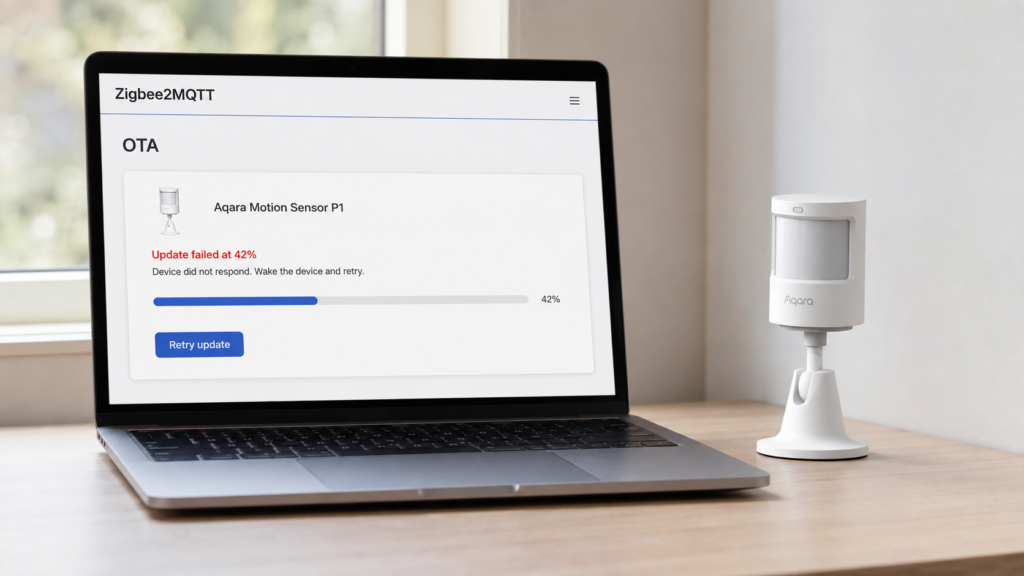
Pushing a firmware update to a Zigbee device through Zigbee2MQTT usually happens quietly in the background. When it doesn’t, either an error appears next to the device or a progress percentage stops moving and sits there. Neither means the device is bricked, and the two need different fixes.
Four distinct failure shapes are documented upstream, and the table below separates them. This is research synthesis from Zigbee2MQTT’s documentation and its issue tracker, not a bench test. No device OTA was triggered or observed for it. Every step below runs over the local Zigbee mesh, with no cloud account or vendor app anywhere in the path.
One scope note first. This is end-device OTA, not coordinator firmware. Updating the coordinator’s own radio is a separate decision with separate risks, covered in this site’s coordinator firmware update guide. And if the underlying question is whether devices still get firmware at all once they’re off the vendor app, Aqara/Xiaomi firmware updates without the app covers that path.
What “OTA update failed” actually means
Zigbee2MQTT pushes a firmware image to the device in chunks over the mesh, and the device writes each chunk to its own flash as it arrives. Treating a silent stall like an explicit error is what sends most people down the wrong path, because a stall often isn’t a device problem at all.
Version matters more than usual here. Zigbee2MQTT shipped a complete re-implementation of its OTA handling in mid-2026 (PR #30566), which changed the logging format during updates and added upload of custom firmware files from the frontend. Older forum posts quoting exact log lines may not match what your install prints.
Common failure messages and what causes each
| Symptom | What the sources show | First move |
|---|---|---|
| “Update failed (Device didn’t respond to OTA request)” | Usually the device wasn’t listening when the transfer started. Not always, though: GH #19916 is a mains-powered device where a power cycle didn’t help, closed as not planned | Power-cycle, then press a button on the device immediately before retrying (official docs) |
| “Can’t send DATA frame” mid-transfer | Transfer breaks partway through. In GH #25402 it resumed at the same percentage on restart before failing again; moving the coordinator made no difference | Treat as link stability, not a device fault. Raise image_block_response_delay |
| Stuck at a percentage, no error shown | Zigbee2MQTT crashed or restarted mid-transfer, leaving the device flagged “updating” with nothing running (GH #12794) | Restart the service — cheap to try, but not a documented cure |
| Bridge itself becomes unstable | The attempt destabilises the Zigbee2MQTT process, not just that device (GH #27419, closed as not planned) | Stop retrying that device; this is bridge-level |
Step-by-step recovery: power-cycle, re-activate, retry
For the device-side failures, the official Zigbee2MQTT OTA documentation gives one specific sequence. Power-cycle the device by disconnecting power or pulling the battery for a few seconds, then activate it — press a button on it — immediately before sending the update request again. The docs attach that sequence to two situations specifically: an update that fails with “Device didn’t respond to OTA request”, and one that fails with “aborted by device”. The activation step isn’t optional garnish. A sleeping device that isn’t listening at the moment the transfer starts is the most common reason it never answers the request at all.
The docs don’t attach that sequence to a transfer that breaks mid-flight with a DATA-frame error, which is a link-stability problem handled further down.
Zigbee2MQTT’s default log level is “warning,” which hides most of what happens during an OTA attempt. Set it to “info” before troubleshooting so the update-state messages are visible.
advanced:
  log_level: info
Stuck at a percentage after Zigbee2MQTT restarted
GH #12794, “Stuck OTA after Z2M crash,” describes the easiest case to misdiagnose. Zigbee2MQTT crashed on a timeout while updates were in flight, and the affected devices stayed flagged “updating” afterwards even though nothing was running. The device isn’t stuck. Zigbee2MQTT’s own record of the transfer is.
The fix deserves precision, because it gets repeated in a stronger form than the source supports. That report is filed because a restart didn’t resolve it: its expected-behaviour section asks that restarting Zigbee2MQTT cancel the abandoned update so the OTA can be retried, which is exactly what the reporter couldn’t do. So restart the service first. It costs nothing, it’s the behaviour the issue asks for, and OTA state handling was among the things reworked in the 2026 re-implementation. But treat it as a cheap thing to rule out, not a guaranteed fix. It’s the same category as a Zigbee2MQTT database left inconsistent by an unclean stop: internal bookkeeping that no action on the device can reach.
If the stuck flag survives a restart, a Home Assistant Community thread on this exact problem describes forcing the device to rejoin the network as the last resort. That’s much closer to re-pairing from scratch than to a routine retry, so the pairing-interview troubleshooting guide is the better reference for what to expect once a device rejoins.
The three settings that change how transfers behave
Zigbee2MQTT documents three OTA tuning options, settable globally in configuration.yaml or passed per request in the update payload. They map onto the failure shapes above more directly than repeated retrying does.
ota:
  image_block_request_timeout: 150000
  image_block_response_delay: 250
  default_maximum_data_size: 50
image_block_request_timeout (150000 ms) is how long Zigbee2MQTT waits for the device to ask for its next chunk. Raise it if a device requests blocks unusually slowly — that’s the setting for a transfer that hangs rather than errors. image_block_response_delay (250 ms) rate-limits responses to reduce congestion, and raising it is the closest documented lever for repeated DATA-frame failures on a mesh that looks unstable during updates. default_maximum_data_size (50 bytes, range 10 to 100) sets chunk size; some devices refuse anything above 50 or 64 bytes, and some manufacturers ignore the value entirely.
GH #10352 is the hang case in practice: an IKEA E1810 remote whose update stalls with 30-second timeouts, where the reporter’s battery pull and full re-pair both made no difference. Not every stall logs a timeout, but one that does is exactly what the first setting exists for.
Battery-powered devices: the power-threshold trap
Firmware transfer draws meaningfully more power than normal idle operation. The official documentation recommends keeping a battery above roughly 70% before starting an OTA. Some devices enforce their own internal threshold and will refuse to start the update below it, with no obvious error explaining why.
That last part is the trap. A device that silently refuses to start looks identical to a broken OTA process, so check the percentage before reaching for mesh theories.
When OTA destabilizes the whole bridge, not just one device
GH #27419, “OTA Updates Crashing Bridge,” documents a harsher failure shape. Attempting an update takes down the Zigbee2MQTT process itself, not just that device’s transfer. If other devices go unresponsive at the same time an OTA is running, that’s a bridge-level problem rather than a device one.
It isn’t an isolated report. The tracker carries several variants, including crashes during the OTA availability check rather than the transfer, and crashes triggered by a large number of pending updates at once. #27419 itself was closed as not planned, so there’s no upstream fix to wait for.
Restarting doesn’t resolve this the way it might a stuck flag, because it only gets you back to a bridge that will die again on the next attempt. Stop retrying that device, update the rest one at a time, and if updates are broadly unstable, raise image_block_response_delay first.
Prevention: safer update habits
Update one device at a time rather than triggering several together, so it’s obvious which update caused a problem. And read a firmware’s release notes before applying it: OTA updates can change how a device behaves, not just patch bugs quietly.
FAQ
Why does Zigbee2MQTT say “device didn’t respond to OTA request”?
Most commonly the device wasn’t listening when the transfer started, whether it was asleep, out of Zigbee range at that moment, or hadn’t been physically activated first. The documented fix is a power-cycle plus pressing a button on the device immediately before retrying. It isn’t universal: GH #19916 reports the same error on a mains-powered device where power-cycling changed nothing.
Is it safe to retry a failed Zigbee2MQTT OTA update?
For the device-didn’t-respond case, yes, retrying after a power-cycle is the documented path. It isn’t the answer for a stuck “updating” state left by a mid-transfer crash, and if the update attempt is what crashes the bridge, repeated retries are what’s making it worse.
Why is my Zigbee2MQTT OTA update stuck at a percentage with no progress?
Most often Zigbee2MQTT crashed or restarted while the transfer was in progress, leaving the device flagged “updating” with nothing running. Restart the service to rule that out, though the issue documenting this is filed because a restart didn’t clear it. If the flag survives, forcing the device to rejoin the network is the community workaround.
Does a failed OTA update brick the device?
Nothing in the sourcing here suggests that’s the typical outcome. Each of the failure modes above, from an unresponsive device to a stalled transfer to a crash-induced stuck state, has a recovery path that doesn’t involve replacing the device.
Should I update Zigbee2MQTT devices one at a time or all at once?
One at a time, per the official documentation. It isolates which update caused a problem, and at least one tracker report describes a large batch of pending updates crashing Zigbee2MQTT outright.
What this piece verified
This is research synthesis, not a bench test. No device OTA was triggered or observed for it.
From Zigbee2MQTT’s own documentation: the power-cycle-and-activate sequence and the error strings it applies to, the 70% battery guidance, the info log-level recommendation, the three ota: settings and their defaults, and the prevention advice. From the issue tracker: GH #19916 for the unresponsive-device error, #25402 for DATA-frame failures, #12794 for the stuck-after-crash state, #27419 for bridge crashes, and #10352 for the E1810 hang. The rejoin workaround comes from a Home Assistant Community thread on restarting stalled OTA updates.
Their state matters for how much weight to give them. #19916 and #27419 are both closed as not planned, which means the failure shapes are still real and the workarounds above are still the answer, not that they were fixed. #12794 (2022) and #10352 (2021) both predate the mid-2026 re-implementation, so treat their exact log output as historical even where the behaviour matches. #25402 was opened in January 2025.
Everything here happens over the local Zigbee mesh between Zigbee2MQTT and the device. No cloud account or vendor app is involved in the failure or in the fix.
After a stuck or failed OTA, check in this order: the exact error text, or absence of one; the battery percentage if the device runs on one; whether more than one device is affected at once, which points at the bridge rather than the device; and whether Zigbee2MQTT itself restarted recently. What ties the confusing cases together is that they surface as the same word. A live transfer and an update abandoned by a crashed process both read “updating,” and until those two states are named differently, telling them apart comes down to knowing whether Zigbee2MQTT restarted.