

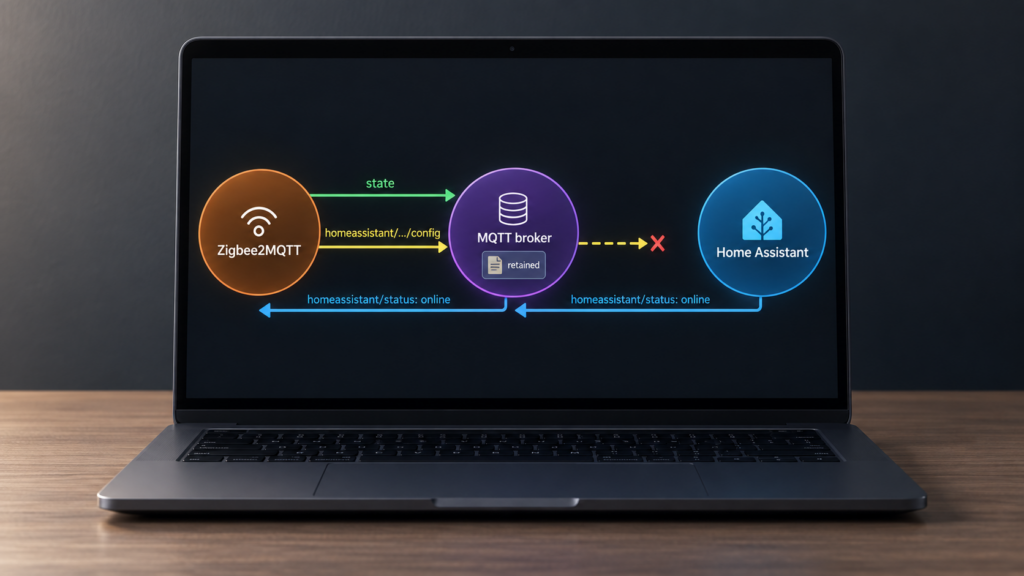
If a device updates in Zigbee2MQTT but is missing from Home Assistant, check the MQTT discovery path before re-pairing it. Device state and entity registration are separate messages. A working state topic does not show whether Home Assistant received a valid discovery configuration.
This guide follows Zigbee2MQTT 2.14.2 and its Home Assistant integration source. It covers fresh installations, entities missing after an upgrade, and discovery that fails after a broker restart. The official integration guide is the starting point; the released implementation also clarifies an easy mistake: Home Assistant’s online message prompts cached state updates, not a fresh publication of every discovery configuration.
Start by distinguishing a missing entity from an existing entity marked unavailable. These can overlap after a restart, because Home Assistant may need to receive discovery again. Availability and bridge/state are covered in the bridge/state guide; the steps here check registration first.
Devices missing from Home Assistant isn’t always a Zigbee problem
Trigger a fresh device report and watch its MQTT state topic with an MQTT client connected to the broker Home Assistant uses. A recent frontend display alone can be cached. If the new report reaches that broker, you have evidence that this device’s Zigbee-to-MQTT path works at that moment. It does not establish that every route in the mesh is healthy or that Home Assistant can read the discovery topics with its own credentials.
The MQTT topics guide explains the state payloads. Home Assistant’s automatic discovery needs an additional config message describing the entity: its identity, state topic and how to read the payload. State messages alone do not register a Zigbee2MQTT entity. Home Assistant also supports manually configured MQTT entities, but those are a separate setup method.
Before deciding registration failed, look under the MQTT integration’s device and entity lists. An entity may be disabled, hidden, renamed or already registered under a previous friendly name. Some diagnostic entities are disabled by default, and not every Zigbee2MQTT expose becomes a separate Home Assistant entity.
What MQTT discovery does
Zigbee2MQTT publishes retained discovery configs beneath homeassistant.discovery_topic, whose default is homeassistant. Home Assistant must have MQTT discovery enabled with the same prefix, on the same broker. Its credentials need permission to subscribe to those topics; Zigbee2MQTT’s credentials need permission to publish them.
Keep this prefix separate from mqtt.base_topic, which commonly defaults to zigbee2mqtt. In 2.14.2, setting them equal stops the Home Assistant extension with a configuration error. It is more than a possible topic collision.
Retained configs let a new subscriber receive the existing entity definitions without waiting for a device event. Broker retention and persistence matter: a broker that loses retained messages on restart cannot replay them. A config present in an MQTT client’s live view also does not prove the broker will replay it to a later wildcard subscription.
During startup, Zigbee2MQTT 2.14.2 waits five seconds for retained discovery messages, then publishes the eligible configurations it has not already found. Device interviews and changes to exposes, options or scenes can also cause discovery updates. The released integration source is the version reference for these details.
What the birth message does after a restart
Home Assistant’s MQTT integration normally announces online on homeassistant/status when it connects, and uses offline for its will message. Custom settings can change this. Zigbee2MQTT listens on homeassistant.status_topic.
In 2.14.2, receiving online starts a 30-second timer. Zigbee2MQTT then republishes the bridge’s online state and cached device and group states. That handler does not republish discovery configs. If the broker has lost those configs, restarting Home Assistant to send another birth message is not, by itself, a discovery-repair procedure for this release.
The status default changed from hass/status to homeassistant/status in 2.0.0. An explicit old value can still be valid if Home Assistant is configured to publish there. A mismatch prevents the birth-triggered state refresh; it does not prove why an entity’s discovery config is absent. The availability guide covers the bridge-state side of that distinction.
Issue #27458 is a useful example, not a confirmed old-topic diagnosis. Its reporter, on 2.3.0, already used homeassistant/status and saw the online message arrive. The maintainer pointed to retained discovery replay. Later participants described a RabbitMQ MQTT-plugin wildcard-retention limitation and Mosquitto persistence being disabled. Those are reports from their installations; the issue’s closure does not validate one fix for every missing entity.
Check effective discovery settings and 2.x migration
The standalone homeassistant.enabled default is false, and changing it requires a restart. However, the Home Assistant app’s startup wrapper enables it through an environment variable. A missing YAML line does not establish that discovery is off. Check the running configuration, including environment overrides and the app’s selected data directory.
The settings reference documents the schema. This is a valid 2.14.2 block for the default Home Assistant prefix and status topic:
homeassistant:
  enabled: true
  discovery_topic: homeassistant
  status_topic: homeassistant/status
Use your actual Home Assistant values if customized. Verify the effective config in the frontend’s information view or bridge/info, rather than editing a file that another instance or wrapper never reads. The app’s startup wrapper sets ZIGBEE2MQTT_CONFIG_HOMEASSISTANT_ENABLED=true. Other deployment methods may supply their own overrides.
There is no homeassistant.discovery switch in this schema. A community thread about missing discovery illustrates why copied blocks need checking against the current reference: its posted configuration includes obsolete options. Treat it as a user’s troubleshooting account, not a ready-to-paste current configuration.
The 2.0.0 migration notes describe automatic settings migration, a backup of the original configuration and migration-1-to-2.log in the data directory. Read that log when an upgrade changes behavior. The release also removed some legacy entities and disabled the legacy action sensor by default; missing action or click entities need that migration check, rather than an assumption that all discovery stopped. The event entities guide covers the action/event choices.
discovery_topic and status_topic
| Setting | Default | Role in Zigbee2MQTT 2.14.2 |
|---|---|---|
discovery_topic |
homeassistant |
Prefix for retained entity definitions. Match Home Assistant’s discovery prefix and keep it different from mqtt.base_topic. |
status_topic |
homeassistant/status; formerly hass/status |
Topic on which Zigbee2MQTT listens for Home Assistant’s online announcement, then refreshes bridge availability and cached states. |
These settings have separate jobs. A wrong discovery prefix can prevent registration. A wrong status topic can prevent the state refresh after Home Assistant reconnects. Check both, but do not treat them as interchangeable discovery triggers.
A troubleshooting order
- Confirm a fresh report. Trigger the device and watch its state topic on Home Assistant’s broker. If no fresh report arrives, diagnose the device, Zigbee2MQTT connection or MQTT publishing first.
- Check the entity registry. Search the MQTT integration’s devices and entities, including disabled entities. Confirm the device interview completed, its definition supports the expected feature, and no per-device
homeassistant: falseoverride excludes it. - Check effective settings. Confirm
homeassistant.enabled, the selected data directory and environment overrides. The integration in 2.14.2 needs JSON state output: useadvanced.output: json, orattribute_and_jsonif you also need attribute topics. Attribute-only output is rejected. Keepadvanced.cache_state: truefor its state handling. - Inspect discovery traffic. Subscribe to
homeassistant/#, substituting your prefix. Find the specific device’s/configtopic and a non-empty JSON payload. Check Home Assistant’s MQTT discovery settings, broker address, prefix, ACLs and logs for rejected payloads. Seeing the message with an administrator account does not prove Home Assistant’s account can receive it. - Check retention after a reconnect. Resubscribe with a fresh MQTT client and see whether the specific config is replayed. If a broker restart loses it, fix the broker’s retention/persistence configuration. Back up broker data before changing it.
- Restart Zigbee2MQTT after correcting its settings. With the broker available, its startup discovery pass can publish missing configs. Reconnect or reload Home Assistant’s MQTT integration once the retained configs exist. Allow for the five-second startup discovery wait and the separate 30-second birth-triggered state refresh in this release.
- Then check status and availability. Compare the actual Home Assistant online topic with
status_topic. If configs arrive but entities remain unavailable, inspect their availability payloads and bridge state.
Avoid deleting every retained discovery topic to troubleshoot one device. That can remove unrelated MQTT entities. If a stale config needs removal, identify and back up its exact topic first, then let the correct owning instance regenerate it.
FAQ
Why is a device in the frontend but missing from Home Assistant? The frontend can show cached data. Confirm a fresh report, then check the entity registry and the device’s discovery config. Discovery settings, broker permissions, retained replay, unsupported exposes and disabled entities are all worth distinguishing.
Do I need enabled: true? The effective setting must be true for Zigbee2MQTT’s Home Assistant discovery extension. Standalone installs default to false; the Home Assistant app wrapper can set it for you. Use the effective configuration to decide.
Does a birth message regenerate discovery? Not in the 2.14.2 implementation checked here. It refreshes bridge and cached states after 30 seconds. Retained configs and Zigbee2MQTT’s startup discovery pass handle registration.
Why did entities change after upgrading to 2.x? Check the migration log and release notes, especially legacy action/click entities and explicit topic settings. A status-topic mismatch is one possible state-refresh problem, not a diagnosis for every missing entity.
Which service should I restart? Restart Zigbee2MQTT after correcting its restart-required settings or after restoring broker retention. Home Assistant’s MQTT reconnect can receive retained configs and send the birth message. Restarting the broker without persistent storage can make missing-discovery problems worse.
Sources and checks on your own setup
This is a documentation and released-source review, not a hardware reproduction. Startup timing and birth-message behavior were checked in Zigbee2MQTT 2.14.2; Home Assistant’s MQTT documentation describes registration, retained discovery and entity availability. Forum and issue accounts remain reports from those installations.
A local Zigbee2MQTT, broker and Home Assistant deployment can perform this discovery exchange without a device vendor’s cloud. That does not describe every broker’s hosting arrangement or every other integration in your installation. Confirm the broker and credentials in use, then follow one affected entity’s state and discovery topics from publisher to Home Assistant.