

If you run a button, remote, or scene switch on Zigbee2MQTT, the automation that fires when someone presses it probably depends on an entity called something like sensor.living_room_switch_action. Update to Zigbee2MQTT 2.0 and that entity disappears, and the automation that used to trigger on it goes quiet with no error anywhere in the log. That isn’t a bug in your setup. It’s a deliberate change, and getting presses working again means knowing what replaced the old sensor and picking which of three mechanisms to build on.
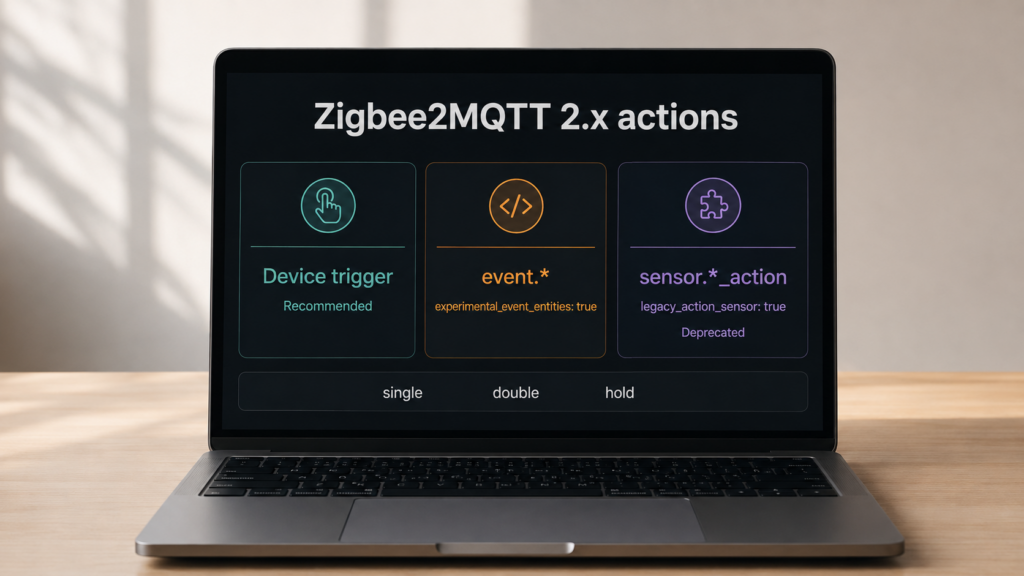
The short version: Zigbee2MQTT 2.0.0 switched off the legacy sensor.*_action entity that older guides and blueprints build their triggers on. Two configuration flags can bring back an entity, one for the old sensor and one for Home Assistant’s newer event.* type, and both are off by default. What a stock 2.0 install does publish is a Home Assistant device trigger per action, which is what Zigbee2MQTT’s own documentation currently recommends you automate against.
None of this touches the cloud in either direction. Whichever path you pick, the press travels device to coordinator to Zigbee2MQTT to MQTT broker to Home Assistant, entirely inside your own network. This is a local software-representation question, not a privacy one.
This applies to Zigbee2MQTT 2.x talking to Home Assistant. The event entity domain itself arrived in Home Assistant 2023.8; Zigbee2MQTT’s support for exposing devices that way was added afterward by a community contribution, then refined for multi-endpoint devices. On a Zigbee2MQTT 1.x install the entity names and defaults below won’t match what you see, so check your version before assuming this is your problem.
The symptom: automations that used to fire, don’t
The common way to hit this is the boring way: update Zigbee2MQTT, restart, change nothing else. A day later a button-triggered light toggle or scene recall hasn’t fired. Checking Home Assistant shows either that sensor.<device>_action no longer exists, or that it exists and never changes.
The Home Assistant Community thread on the 2.0 action change is a long, still-active pile of exactly this pattern, and the shape of the complaint is consistent: no error, just silence. The automation is still syntactically valid. It is watching an entity Zigbee2MQTT has stopped publishing.
What actually changed in Zigbee2MQTT 2.0
Before 2.0, Zigbee2MQTT exposed presses as a sensor entity whose state was the action itself: single, double, hold, release, whatever the device supports. That is easy to write automations against, but it doesn’t match how Home Assistant models momentary events elsewhere.
Home Assistant’s event domain exists for signals that happen and are then gone. A doorbell press or a button click has no persistent “on” state to represent, so an event entity’s state is a timestamp recording when it last fired, and the actual value lives in an event_type attribute.
Zigbee2MQTT 2.0.0 dropped the legacy action sensor from its defaults, per the project’s own 2.0.0 breaking-changes discussion. It did not switch everyone over to event entities in its place. That option exists, but it is opt-in and still labelled experimental.
sensor.*_action (legacy) |
event.* (opt-in, experimental) |
|
|---|---|---|
| Entity domain | sensor |
event |
| State value | The action itself (single, double, hold) |
Timestamp of the last firing |
| Where the action value lives | Entity state | event_type attribute |
| Repeated identical presses | State doesn’t change, so a state trigger can miss the repeat | Timestamp changes every press, but only if your trigger watches the entity rather than the attribute |
| Enable with | legacy_action_sensor: true |
experimental_event_entities: true |
| Default in 2.x | Off, documented as deprecated | Off, documented as experimental |
Three paths, not two
Because both flags default to off, a freshly updated 2.0 install publishes neither entity. Presses still reach Home Assistant: Zigbee2MQTT publishes an MQTT device trigger for each action, which shows up in the automation editor as a device-based trigger and in YAML like this.
triggers:
  - trigger: device
    domain: mqtt
    device_id: 8f2c1b09e4a7d35f6c0b2a1e7d4c9b3a
    type: action
    subtype: single
This is the path Zigbee2MQTT’s Home Assistant documentation recommends for now, and it is the one that survives the argument below, because it is published independently of whichever entity flag you set. One catch: a device trigger is only discovered after that exact action has fired at least once (issue #29667), so a freshly paired remote looks like it supports nothing. Press it single, double, and hold once each before going looking in the automation editor.
The two settings, and what each one does
Both flags live under the homeassistant block in Zigbee2MQTT’s configuration.yaml, and both have frontend equivalents in the Home Assistant integration settings page.
homeassistant:
  enabled: true
  experimental_event_entities: false
  legacy_action_sensor: false
Those are the defaults. They are independent booleans, not an either/or: set one, the other, both, or neither. With experimental_event_entities: true, event.<friendly_name>_action entities appear. With legacy_action_sensor: true, the old sensor.<friendly_name>_action comes back, deprecated and slated for eventual removal. Neither takes effect until Zigbee2MQTT restarts and Home Assistant’s MQTT discovery picks up the new definitions, which trips people up more than it should.
Rebuilding an automation for event entities
If you do opt into event entities, the trigger needs rethinking rather than repointing. The entity’s state is a timestamp, so to: "single" against the state matches nothing. The obvious fix, watching the event_type attribute instead, has a trap of its own: Home Assistant’s state trigger only fires when the watched attribute changes, so pressing single twice in a row fires once. That is the exact repeat problem event entities are supposed to solve.
The trigger built for this is event.received, which matches on event type directly:
triggers:
  - trigger: event.received
    target:
      entity_id: event.living_room_switch_action
    options:
      event_type:
        - single
If your Home Assistant is older than that trigger, the portable version is to trigger on the entity itself, with no to: clause, and filter on the attribute in a condition. The state changes on every press because the timestamp does, so repeats survive, and the condition sorts out which press type it was.
triggers:
  - trigger: state
    entity_id: event.living_room_switch_action
conditions:
  - condition: state
    entity_id: event.living_room_switch_action
    attribute: event_type
    state: single
The single/double/hold values don’t change, only where the automation looks for them. That’s a small edit per automation, but a dozen buttons wired into a dozen scenes is a dozen careful edits rather than a find-and-replace, since the entity ID moves from sensor. to event. too.
The rough edges
Neither entity is enabled by default after a Zigbee2MQTT 2.x update. If you upgrade without deliberately setting experimental_event_entities or legacy_action_sensor, any automation built on the old action sensor goes silent with no error anywhere in the log, because the entity it watches stops existing. Check your button and remote entities in Home Assistant’s entity list right after any Zigbee2MQTT 2.x update.
Node-RED users report a specific version of this: flows that used to let you pick a button action from a dropdown no longer have that entity to pick from, and rebuilding the flow isn’t optional. The community thread also carries at least one report of unwanted or “ghost” trigger firings after the switch, traced back by the reporter to a trigger built against the new timestamp-based state rather than the press type.
Zigbee2MQTT’s maintainers haven’t settled where this goes next either. An open architecture discussion proposes moving action-pattern matching into a structured, regex-capable expose definition per device instead of the current hardcoded approach, with pushback from a contributor arguing it adds Home-Assistant-specific coupling to a project whose value proposition has always been staying agnostic about what sits on top of it. That thread was still open with no resolution at its last recorded activity, 2025-05-26. The current split is unlikely to be the final shape.
Which path to pick
For a fresh install with no automation library to preserve, build on device triggers. They work with no flags set, they’re what Zigbee2MQTT currently recommends, and they don’t care which entity model is active underneath, which is worth something while the maintainers are still arguing about it. Our TS0042 two-button switch guide and TS0043 scene switch guide both use this pattern, and the same shape applies to the TS0041, the Sonoff SNZB-01, the Aqara Mini Switch E1, and the Magic Cube.
Turn on experimental_event_entities if you want the entity visible in the UI, in the logbook, and available to blueprints written against the event model. Just be aware that a blueprint written for event entities won’t fire on an instance still using the classic action sensor, and vice versa, so check which mechanism a blueprint assumes before importing it.
Turn on legacy_action_sensor if you have a working library of sensor.*_action automations and want them back today. It’s deprecated, not broken, so there’s no need to rewrite everything in one sitting. My own read is that it buys migration time rather than a destination, and the migration worth making isn’t sensor-to-event, it’s whatever-you-have-to-device-triggers. That’s the one mechanism in this article that isn’t waiting on an unresolved design discussion.
If you’re weighing the two platforms partly on this basis, ZHA vs Zigbee2MQTT for Aqara devices covers how ZHA models the same presses through its own device triggers. And if your automations lean on grouping devices rather than triggering individually, Zigbee2MQTT groups vs scenes covers a related area where the entity model diverges from what Home Assistant conventions would suggest.
What this article verified
This is a research-synthesis piece, not a hands-on test. No device was paired or bench-tested for it, and no first-person claim of running a specific configuration should be read into anything above.
Verified against primary sources: the key names, their nesting under the homeassistant block, and their defaults, both false, checked against Zigbee2MQTT’s Home Assistant integration documentation; the removal of the legacy action sensor from 2.0.0’s defaults, from the project’s own breaking-changes discussion; the event entity’s timestamp state and event_type attribute, and the event.received trigger’s shape, from Home Assistant’s own documentation; and the attribute-trigger repeat limitation, which is documented behaviour of Home Assistant’s state trigger rather than a Zigbee2MQTT quirk.
Reported rather than verified: the Node-RED and ghost-trigger friction comes from named community reports in the thread linked above, attributed as such, not from testing here. The maintainer discussion’s state is as of its last recorded activity in May 2025 and has not been re-checked since.
What depends on Zigbee2MQTT’s maintainers rather than anything you can fix locally: experimental_event_entities is still flagged experimental, and the open architecture discussion means the shape of event-entity support can still change in a future 2.x release. If you’re setting up today, check the Zigbee2MQTT changelog at your next update rather than assuming today’s split is permanent.