

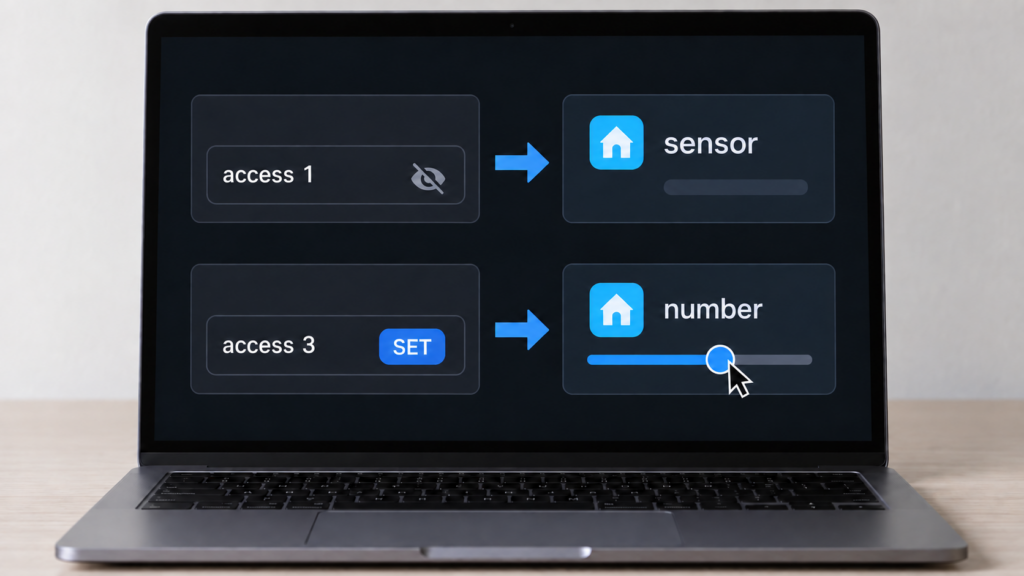
You open a device’s exposes list in the Zigbee2MQTT frontend, or pull it out of the bridge/devices MQTT topic, and the entity types don’t line up. One numeric value arrives in Home Assistant as a slider you can drag. Another, on the same device, is a flat read-only sensor. A setting you expected on the main device card is filed under Configuration instead. And if you upgraded to Zigbee2MQTT 2.x recently, entities you remember from before have gone missing.
None of it is random. Zigbee2MQTT’s exposes are thoroughly documented and the entity types they produce are not. The exposes reference defines the schema in detail — the types, the access bitmask, the optional category — without mentioning Home Assistant at all. The Home Assistant integration page covers discovery, naming and per-device overrides, but not how a generic expose picks its entity domain. That decision is consistent, and most of it comes down to a single bit.
Generic exposes vs specific exposes
Zigbee2MQTT’s exposes come in two flavors. Specific types represent a device class Z2M already understands: light, switch, lock, cover, climate. Generic types describe a raw property without any assumption about what it does, covering numeric, binary, enum, text, composite, and list.
Specific types skip the whole mapping question this article is about. Z2M’s MQTT discovery treats them as first-class and hands Home Assistant a dedicated entity domain automatically. The integration docs are explicit that even at the group level, this treatment only extends to lights, switches, locks and covers; everything else needs manual configuration.yaml entries for group control.
Generic types are where the confusion lives, because a numeric expose doesn’t tell Home Assistant what kind of entity it should become. That comes from two other properties on the expose: access and category.
The access bitmask decides interactive vs read-only
Every expose carries an access value, a 3-bit bitmask:
- Bit 1 (value 1) marks the property as published into the device’s MQTT state.
- Bit 2 (value 2) marks it settable via the device’s
/settopic. - Bit 3 (value 4) marks it gettable via
/get. The docs specify that gettable implies published, so this bit never appears alone.
The bit that decides your entity domain is bit 2. If a generic expose is settable, Home Assistant gets an interactive entity. If it isn’t, you get a read-only one. Bits 1 and 3 change how the value is delivered and refreshed, not what kind of entity it lands in.
That distinction matters because of which combined values you’ll actually meet. Four are common. Access 1 is published only — read-only, and the reason so many properties are plain sensors. Access 3 is published and settable but not gettable, which is what most Tuya datapoint-based devices use, since they report on their own schedule and can’t be polled. Access 5 is published and gettable, read-only but pollable. Access 7 is all three bits. A bare 2, settable but never published, exists but is uncommon.
The practical consequence: both 3 and 7 produce an interactive entity, and both 1 and 5 produce a read-only one. If you were expecting a slider and got a sensor, the SET bit is missing — no combination of the other two will bring it back.
Why some settings hide under Configuration
Beyond access, an expose can carry an optional category field set to either config or diagnostic. Z2M’s docs use operation_mode and power_on_behaviour as config examples, and power_outage_count and device_temperature as diagnostic examples — this site’s device_temperature explainer covers that second one in more depth.
Whether that category reaches Home Assistant’s own entity_category field depends on which domain the entity ended up in. Home Assistant only permits entity_category: config on entities you can edit. A sensor is read-only by definition, so it is structurally incapable of carrying config. It can only ever be diagnostic, or have no category at all.
That constraint produced a real and widely felt bug. Home Assistant began refusing to create config-categorised sensors in the 2023.11 releases: issue #19430 is filed against 2023.11.0b0 for sensor.*_power_outage_memory entities that “cannot be added as the entity category is set to config”, and issue #19573, mirrored in Home Assistant core, reports sensors for certain Zigbee devices simply not being created after 2023.11.1. Issue #20252 records the same collision as fully breaking from HA Core 2024.2.0.
power_outage_memory keeps coming up
That property is the one most readers here met first. It is a settable configuration value on a long list of Xiaomi and Aqara plugs and wall switches, which is exactly the profile that generated a duplicate sensor before 2.0 — and the duplicate is what Home Assistant refused. If a plug lost an entity around HA 2023.11, this is almost certainly why.
The duplicate-sensor entity is gone as of Zigbee2MQTT 2.0
Before 2.0, a numeric or enum property with settable access generated two entities: the active number or select you’d actually use, plus a second, disabled-by-default sensor shadowing the same value. Zigbee2MQTT 2.0.0 removed that duplication for number, select and button entities. If you’re following an older guide and its second sensor isn’t there, that’s expected on current 2.x.
It is not, however, the only reason entities vanished at 2.0, and probably not yours. The same release removed all click sensors — every sensor.*_click entity — and disabled all action sensors (sensor.*_action) by default, in favor of MQTT device triggers. Action sensors can be restored with legacy_action_sensor: true, which this site’s event entities vs legacy action sensor explainer covers alongside the newer event domain that replaced them.
entity_category isn’t a formula, it’s a per-device decision
It’s tempting to assume there’s a clean rule mapping access values to categories. There isn’t one, at least not according to the person who’d know. In an October 2025 discussion, a maintainer answered directly: entity categorization is not centralized logic derived from the access bitmask. It’s set explicitly, property by property, wherever a given device’s converter is written.
So two properties with identical access values, on two different devices, can end up with different entity_category results depending entirely on how each converter author defined its exposes.
Honestly, leaving this to individual converter authors rather than a fixed rule seems like a reasonable tradeoff given how varied Zigbee devices are, but it does mean you can’t predict a new device’s entity layout from the spec alone. You have to read the actual exposes list.
It also explains a recurring piece of friction, documented as far back as issue #12347 in 2022: a user tried to move an entity into Home Assistant’s Configuration section by editing entity_category from the Home Assistant side, and nothing happened. The category arrives in the MQTT discovery payload, so Home Assistant’s entity registry isn’t where it lives. What you can change is the payload itself — Zigbee2MQTT’s integration docs state that any Home Assistant MQTT discovery property can be overridden per device, and per group, from configuration.yaml. The exact nesting has moved between versions, so check the current integration page rather than copying an old snippet.
Quick reference: expose type, access, and resulting entity
Specific types (light, switch, lock, cover, climate) get their own domain through automatic discovery and bypass this table entirely. For generic types, the SET bit decides the column:
| Generic expose type | No SET bit (access 1 or 5) | SET bit present (access 3 or 7) |
|---|---|---|
numeric |
sensor, read-only |
number, interactive |
enum |
sensor, read-only |
select, interactive |
binary |
binary_sensor, read-only |
switch, interactive |
text |
sensor, read-only |
text, editable |
The optional category field sits on top of that result. diagnostic is valid on any domain, including sensor, and groups the entity under Diagnostic. config groups it under Configuration but is only valid on an editable domain, never on a sensor.
FAQ
Why did my Zigbee2MQTT device show a “number” entity instead of a plain sensor?
Because the underlying expose is settable — its access value includes bit 2. That is true of access 3 and access 7, and both produce a number for a numeric expose (or a select for an enum). Read-only values, access 1 or 5, become a sensor.
Why do some Zigbee2MQTT settings show up under a device’s Configuration tab instead of the main card?
The expose carries category: config in its Z2M-side definition. That’s set per property by the device’s converter and arrives in the Home Assistant discovery payload, not as something you toggle in Home Assistant.
What does the access number mean for a Zigbee2MQTT expose?
It’s a 3-bit mask: value 1 means published to state, 2 means settable, 4 means gettable, and gettable implies published. In practice you’ll see 1 (read-only), 3 (published and settable, no polling), 5 (read-only but pollable) and 7 (all three). A bare 2 is uncommon and a bare 4 can’t occur, given the implication.
My duplicate sensor entities disappeared after upgrading Zigbee2MQTT. Is that normal?
Yes, if you upgraded to 2.0 or later. The disabled-by-default duplicate sensor entities that shadowed certain number, select and button entities were removed in 2.0.0. If what you’re missing is a *_click or *_action sensor, that’s a different change in the same release — click sensors were removed outright and action sensors are now disabled by default.
Can I manually change which category (config or diagnostic) an entity gets?
Not from Home Assistant’s side, because the category arrives in the discovery payload. You can change it in Zigbee2MQTT: the integration docs document overriding any Home Assistant MQTT discovery property per device, or per group, in configuration.yaml. Changing the converter definition is only necessary if you think the default is wrong for everyone.
The MQTT topics explainer is worth a look alongside this, since exposes are ultimately a description of what shows up in the payload these entities are built from, and battery percentage reporting is a numeric expose most readers have already argued with. This site’s explainer on multi-endpoint entity naming covers the adjacent question of why one physical device arrives as switch_l1 and switch_l2.
If you’re writing your own external converter and wondering which category to pick for a given property, the honest answer is to match whatever similar devices already do. There’s no spec that pins it down.