

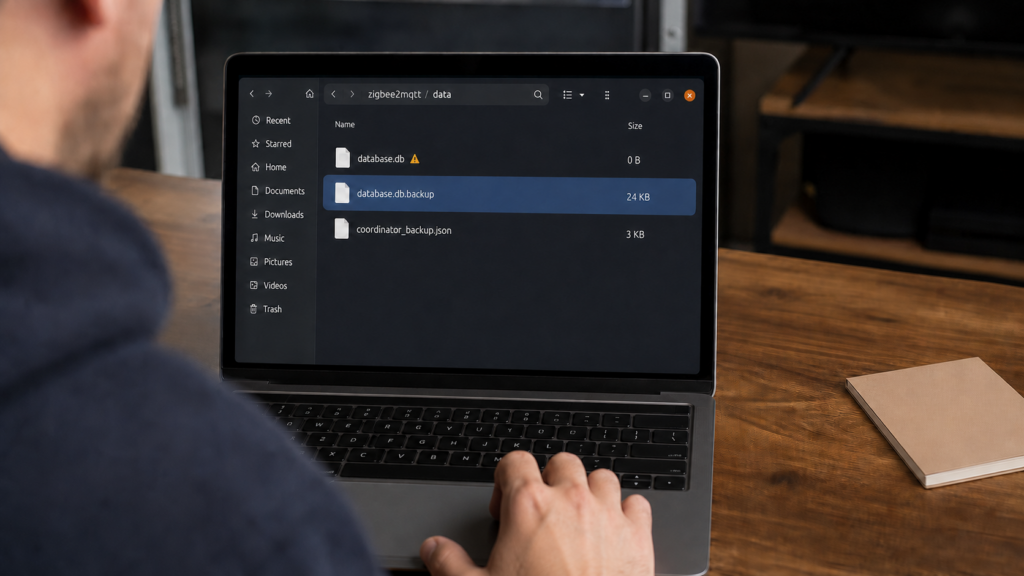
You restart Zigbee2MQTT, maybe just to pick up a config change, and every paired device is gone. Or you go looking for database.db after something felt off and find it sitting at 0 bytes. Neither of these means your Zigbee network is gone. It means the local state file that Zigbee2MQTT keeps about your paired devices has been emptied or corrupted, and that’s a narrower, more recoverable problem than it feels like in the moment.
This piece works from Zigbee2MQTT’s own GitHub discussions and issue tracker, not from a reproduction on this site’s test bench. The reports behind it span several years with no canonical fix, which is why they keep resurfacing. If you’ve already read our ghost device troubleshooting or last_seen pieces, this is the same family of state-integrity failure, one level more severe.
Don’t restart Zigbee2MQTT again while you’re diagnosing this. Before anything else touches the data directory, list it and secure every copy you find. Zigbee2MQTT keeps a database.db.backup alongside the live file, and another restart can overwrite it.
What database.db actually stores, and how it differs from a coordinator backup
database.db is Zigbee2MQTT’s local record of your paired devices: the state that lets it recognize devices, expose their entities, and route messages without re-running the pairing/interview process on every restart. It lives in the data directory alongside configuration.yaml, not on the coordinator hardware itself.
That’s the distinction worth being precise about, because the two get conflated constantly in the threads this piece draws from. A coordinator backup is a separate file, coordinator_backup.json, capturing your Zigbee network’s PAN ID, channel, and key material as read off the coordinator adapter. It records the network. database.db records what Zigbee2MQTT knows about the devices on it. Losing one does not automatically mean losing the other, and treating them as one file leads people to re-pair everything, and sometimes re-form the whole network, when only one side actually needed recovery.
What the two files do share is a location. Zigbee2MQTT writes coordinator_backup.json into the same data directory as database.db, so anything that damages that directory as a whole, such as a filling disk or a dropped network mount, is a threat to both at once. Our coordinator firmware update guide covers the network-side backup in the context where it matters most.
database.db = Zigbee2MQTT’s paired-device state. coordinator_backup.json = the network’s PAN ID, channel, and keys. Losing one is not losing the other, but both sit in the same data directory, so back them up together.
Known triggers: which restarts have been reported to wipe it
| Restart method | Reported database.db behavior |
|---|---|
systemctl restart zigbee2mqtt.service |
GH #28657: live file found truncated to 561 bytes, with a 16 KB database.db.backup intact beside it. Closed as not planned |
| Frontend “Restart Zigbee2MQTT” button | The trigger the reporter actually used in both #28657 and #19924 |
| Container restarted in place (restart policy, or the frontend button inside it) | GH #19924: file emptied on every restart, Zigbee2MQTT 1.33.2 in Docker on a NAS |
docker stop then docker start |
The workaround found in that same thread: stopping and starting the container did not empty the file |
| Data directory on network-mounted or mapped storage | GH #19988: a separate cluster of reports, devices lost and database.db found removed |
Two things are worth pulling out of that. The first is that the frontend restart button appears in both threads, so “restart from the UI” is the common factor rather than any one install method. #19924 is a Docker install on Zigbee2MQTT 1.33.2; #28657 is a systemd service on a much later version, reported in September 2025 and closed as not planned. The cause has outlived several major releases and isn’t confined to one packaging.
The second is the shape of the Docker distinction, which is narrower than it usually gets repeated. The report that found docker stop followed by docker start safe is the same report that found the container being restarted in place unsafe. The useful contrast is restart-in-place versus stop-then-start, not Docker versus systemd. Running in a container is not protection.
Is this corruption, or a different root cause entirely?
“Corrupted” covers more than one failure mode here, and they call for different responses.
In at least one documented case, the actual root cause wasn’t anything Zigbee2MQTT did wrong at all. It traced back to the filesystem: an EXT4 volume that was near capacity with active journal errors. A database file getting truncated or emptied under those conditions is a filesystem-integrity symptom, not a Zigbee2MQTT bug, and the fix is disk space and filesystem health, not a Zigbee2MQTT config change.
One related symptom is worth not conflating with a whole-file wipe: device state failing to persist even after a device interviews and pairs successfully. That’s a per-device failure, not an emptied file, though it looks similar from the frontend.
There is a safeguard against all of this, but it’s a passive one. Zigbee2MQTT writes a database.db.backup alongside the live file, which is what makes the recovery below possible at all. What it doesn’t do is notice that database.db has been emptied or corrupted, or restore from that backup on its own. It starts with whatever state it finds, including none. An open feature request asks the project to detect and recover from a deleted or corrupted database rather than starting silently with an empty one; the detection is the part that doesn’t exist. My own read, and it’s a read rather than a finding: writing a backup and then never checking whether the live file needs it is a strange place to stop.
Recovery: check the backup file first
There are three paths here, and the one people mid-incident skip past is the first.
Look in the data directory before you assume anything is lost. If database.db is empty or implausibly small, and database.db.backup next to it is a sensible size, that backup is your recovery. This is exactly the state #28657 documents: a 561-byte live file beside a 16 KB backup. If you keep your own dated copies and one of those is more recent, restore that instead. If neither exists, re-pairing is what’s left, and it’s the answer the sourced reports actually arrive at rather than a workaround of last resort.
Either way, stop the service first so nothing writes to the data directory while you’re working, and copy the damaged file somewhere safe before you overwrite it:
 # stop the service before touching the data directory
systemctl stop zigbee2mqtt.service

 # look at what you actually have before overwriting anything
ls -la /opt/zigbee2mqtt/data/

 # preserve both the damaged file and the backup, outside the data directory
cp /opt/zigbee2mqtt/data/database.db ~/database.db.damaged
cp /opt/zigbee2mqtt/data/database.db.backup ~/database.db.backup.safe

 # restore whichever copy is the good one
cp ~/database.db.backup.safe /opt/zigbee2mqtt/data/database.db

systemctl start zigbee2mqtt.service
The most damaging thing you can do right now is restart again. If database.db is already empty, restarting gives Zigbee2MQTT another chance to save that empty state, and the save that follows can take database.db.backup with it. Copy both files somewhere outside the data directory before you start anything.
If you do end up re-pairing a large mesh, how you clear the old entries first affects how cleanly the fresh pairing goes. Our guide to remove vs force remove vs factory reset covers that distinction.
Prevention: backup cadence and restart-path choice
Back up the whole data directory on a schedule, not just before changes you expect to be risky. database.db.backup is a single rolling copy sitting in the same directory as the file it protects, which means it survives an application-level wipe but not a failing disk, a bad mount, or a directory you delete by hand. A dated copy kept somewhere else, from cron or from whatever already backs up the rest of the home-automation host, is what covers those cases. Copy coordinator_backup.json at the same time, and keep more than one generation. Zigbee2MQTT has also shipped a backup download in its frontend since version 1.26.0, which is the easiest way to get a copy off the machine if you’d rather not script it.
On restart path: prefer docker stop and docker start over restarting the container in place or using the frontend button. If you’re on a systemd install without that option, the backup habit is the more load-bearing of the two. And if the data directory sits on network-attached or mapped storage, treat it as the higher-risk configuration the reports say it is, and treat low disk space or filesystem errors there as a database.db integrity problem, not general housekeeping.
FAQ
Why did Zigbee2MQTT lose all my devices after a restart?
Almost certainly because database.db, where Zigbee2MQTT keeps its paired-device state, was emptied or truncated during the restart. It’s been reported for restarts from the frontend button, from systemctl restart, and for containers restarted in place. When that file is empty the service starts with no devices to show, even though nothing physically left your Zigbee network. Check for database.db.backup in the same directory before you do anything else.
Is database.db the same thing as a coordinator backup?
No. database.db is Zigbee2MQTT’s local paired-device state. coordinator_backup.json captures the network’s PAN ID, channel, and key material read off the coordinator adapter. Losing one doesn’t mean you’ve lost the other, though both sit in the same data directory, so back them up together.
Does restarting Zigbee2MQTT in Docker also risk wiping the database?
Yes. The most-cited report of this behavior is a Docker install. What that report found safe was specifically docker stop followed by docker start; restarting the container in place, or using the frontend restart button inside it, is where the wipe showed up. The distinction is restart-in-place versus stop-then-start, not Docker versus systemd.
Can a corrupted or empty database.db be repaired instead of re-pairing everything?
Not repaired, but often replaced. Zigbee2MQTT keeps a database.db.backup in the data directory, and in the reported cases that copy was intact while the live file was not. There’s no repair tool and no automatic detection, and an open feature request asks for exactly that. Check the backup file first; re-pairing is the fallback, not the first move.
How often should I back up Zigbee2MQTT’s data directory?
On a regular schedule, not only before changes you expect to be risky. The rolling database.db.backup covers an application-level wipe, but it lives on the same volume as the file it protects, so keep dated copies elsewhere and keep more than one.
What this piece verified, and what to check yourself
This is a research-synthesis piece built from Zigbee2MQTT’s own GitHub discussions and issue tracker, not from reproducing a database wipe on this site’s test bench. No hands-on testing of any restart method against a live Zigbee2MQTT instance was performed for this piece.
What’s traceable directly to those sources: the reports of database.db being emptied on restart (#19924 on a Docker install, #28657 on a systemd service, closed as not planned), the separate report cluster tied to network-mounted or mapped data directories, the one documented filesystem-level root cause of a near-full EXT4 volume with journal errors, the presence of a database.db.backup file alongside the live database, the open feature request for automatic corruption detection, and the distinction between database.db and coordinator_backup.json.
What I couldn’t establish from the record is why the restart wipe happens. None of the threads reaches a root cause, and #28657 is closed as not planned rather than fixed, so the honest version of the prevention advice above is that it’s defensive rather than corrective. Whether the auto-detection request ever ships would change that.
What to check on your own setup before assuming any of this applies: which restart path you use day to day, whether your data directory sits on local disk or something network-mounted, and whether database.db.backup is present and a sensible size. If you’re mid-incident right now, stop restarting and go look at that file.