

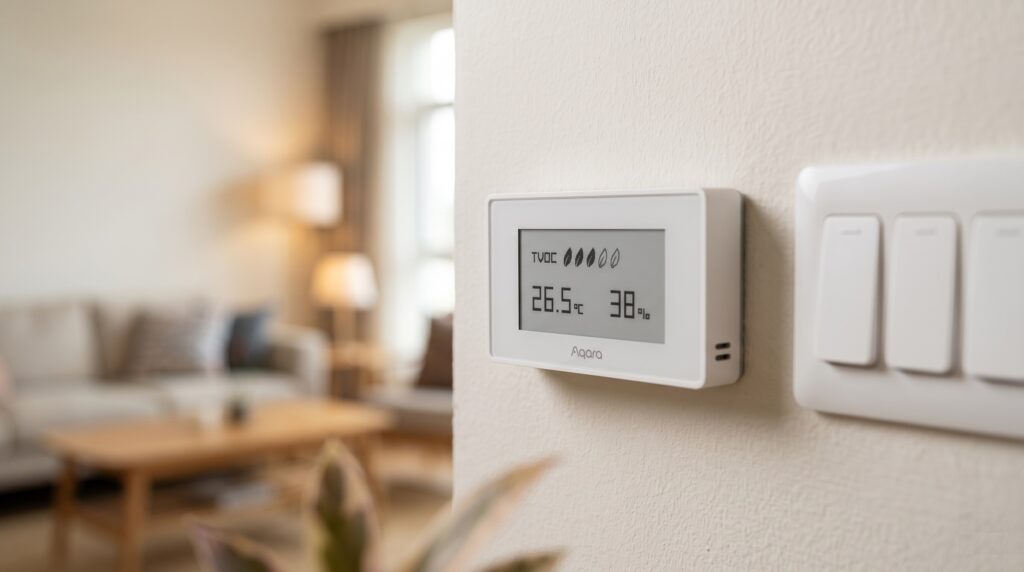
Aqara TVOC Air Quality Monitor: Zigbee2MQTT + HA Setup
This post contains affiliate links. If you buy via a link here, I earn a small commission at no extra cost to you.
The Aqara TVOC monitor puts temperature, humidity and an air-quality reading on an E-Ink display, and can send those readings to Home Assistant through Zigbee2MQTT. It is a battery sensor rather than a continuously streaming instrument. This guide covers direct pairing, display units and alerts without an Aqara hub.
Identify the TVOC monitor
Zigbee2MQTT lists VOCKQJK11LM and its AAQS-S01 alias together. The display can be used without Home Assistant, while the Zigbee connection supplies readings for dashboards and automations.
TVOC means total volatile organic compounds. A change can be useful when investigating room conditions, but it does not identify a particular chemical or prove that the air is safe. It is not a carbon-monoxide, smoke or gas-leak alarm.
Aqara specifies two CR2450 batteries for the AAQS-S01. The CR2032 used by some other Aqara sensors is not the replacement specified for this model.
Prepare Zigbee2MQTT and MQTT discovery
- A supported coordinator with firmware suitable for this device.
- A current stable Zigbee2MQTT installation connected to your MQTT broker.
- Home Assistant’s MQTT integration connected to that same broker, with discovery enabled.
The device entry includes firmware notes for older adapters. They refer to particular radio families, not every adapter with a similar retail name.
Pair the monitor
- Enable Permit join in Zigbee2MQTT.
- Hold the top button until the connection symbol appears, as described in the device notes.
- Wait for the interview to finish and check the reported model.
- Give it a useful friendly name, close joining and find the MQTT device in Home Assistant.
If it does not join, check battery contact and coverage. If it previously belonged to another network, follow the reset instructions for that model before pairing again.
Check the readings and units
| Zigbee2MQTT property | Meaning |
|---|---|
| voc | TVOC reading in ppb |
| air_quality | Reported category, including good, moderate or poor |
| temperature | Ambient temperature in °C |
| humidity | Relative humidity in percent |
| battery / voltage | Battery diagnostics |
| device_temperature | Internal temperature, separate from ambient |
| display_unit | Units shown on the physical display |
Home Assistant’s entity IDs depend on the friendly name and discovery settings. Verify the actual units on the device page. Do not confuse the internal temperature with the room measurement.
If you prefer ZHA, check its current handler and exposed entities for this exact model. Missing entities in an old report do not establish the status of the current release. The M2 hub setup is another route for supported devices.
When readings appear slow to update
A quiet room may produce long periods with little visible change. Distinguish an unchanged value from a disconnected sensor by checking Zigbee2MQTT’s incoming messages and recent reports. Home Assistant may retain the same state timestamp when a repeated reading has the same value.
Do not assume every missing update is normal, or that a short button press guarantees a new measurement. Compare the display with the MQTT payload and check the current device notes. Supported /get requests can ask for readings, but a sleeping battery device may not answer immediately.
Calibration and display units
Zigbee2MQTT offers calibration offsets for ambient temperature, humidity and VOC. These are converter settings applied to reported values, not proof that the instrument itself has been recalibrated. Compare temperature and humidity with a suitable nearby reference before applying an offset; avoid adjusting VOC just to obtain a preferred category.
display_unit changes the monitor’s screen. The options are mgm3_celsius, ppb_celsius, mgm3_fahrenheit and ppb_fahrenheit. Zigbee2MQTT still publishes VOC in ppb and temperature in °C.
For Home Assistant display, first check its unit preferences and entity settings. If you need a separate Fahrenheit template, add this under your existing template: configuration and replace the entity ID:
template:
  - sensor:
      - name: "TVOC Monitor Temperature (F)"
        unit_of_measurement: "°F"
        device_class: temperature
        availability: "{{ has_value('sensor.tvoc_monitor_temperature') }}"
        state: "{{ (states('sensor.tvoc_monitor_temperature') | float(0) * 9/5 + 32) | round(1) }}"
Troubleshooting readings and configuration
Record the model, coordinator firmware and Zigbee2MQTT version before changing anything. Check what the device publishes first, then compare that with the entities in Home Assistant.
Implausible VOC values
First check whether the value is ppb, mg/m³ or another unit in an old dashboard or template. Early integrations had unit-handling problems, so use current software and compare the raw payload with the entity unit. An implausible number is a reason to investigate, not to infer a particular pollutant.
Missing configuration controls
Check the current model entry and the interview log. A message mentioning XiaomiAqaraE1Cluster belongs to ZHA’s device-handler context, so do not treat it as a Zigbee2MQTT setting. Identify which integration produced the error before following a fix.
For an incomplete Zigbee2MQTT interview, improve coverage and retry the supported configuration or pairing flow. Avoid repeated resets when the device is already reporting correctly.
Battery drains sooner than expected
Check both cells, contacts and radio reliability. Battery percentage alone may lag or be misleading, so compare the voltage and reporting history where available. Do not assume fast drain proves a hardware defect or rules out a network problem.
After an adapter firmware change
Check the device notes and the result of the upgrade. Some older adapter-version changes require these devices to be paired again; that is not a rule that every coordinator update always erases the network. Back up the network and follow the adapter’s migration instructions first.
Alerts and room monitoring
The examples below are individual automations for Home Assistant’s YAML editor. Replace the entity IDs and notify.mobile_app_your_phone with the action supplied by your phone’s Companion app. Remote push delivery can depend on internet services.
Alert on a reported category change
alias: "TVOC category alert"
triggers:
  - trigger: state
    entity_id: sensor.tvoc_monitor_air_quality
    to:
      - "moderate"
      - "poor"
      - "unhealthy"
actions:
  - action: notify.mobile_app_your_phone
    data:
      title: "TVOC monitor"
      message: "Reported category: {{ states('sensor.tvoc_monitor_air_quality') }}. VOC: {{ states('sensor.tvoc_monitor_voc') }} ppb."
mode: single
These are the monitor’s category labels. The example alerts on transitions into them; it is not a health assessment or a continuous reminder while a category stays unchanged. Check the history and investigate the source of a sustained change.
Low-battery alert
alias: "TVOC monitor low battery"
triggers:
  - trigger: numeric_state
    entity_id: sensor.tvoc_monitor_battery
    below: 20
actions:
  - action: notify.mobile_app_your_phone
    data:
      message: "TVOC monitor battery is {{ states('sensor.tvoc_monitor_battery') }}%. Check the two CR2450 cells."
mode: single
This triggers when the reading crosses below 20 percent. It does not send a daily reminder or necessarily run when first enabled with an already-low battery. Adjust the threshold to your replacement routine.
Use temperature and humidity alongside VOC
Compare the three histories when deciding whether a room needs attention. For example, a humidity rise may be useful for bathroom ventilation, but a warm room alone does not show that cleaning products caused a VOC rise. Use the measurement relevant to the rule you are building.
A separate room sensor can help check placement and temperature readings. The Aqara T1 temperature and humidity guide covers one option.
What works without internet?
Direct Zigbee reporting through a local coordinator, broker and Home Assistant can continue while the internet is down. The monitor’s screen does not depend on Home Assistant being available. Software downloads, remote access and push notifications are separate from that measurement path.
Frequently asked questions
Is an Aqara hub required? Not for the supported Zigbee2MQTT path.
Why does Fahrenheit on the screen not change the MQTT temperature? Display units and reported units are separate settings. Use Home Assistant’s display preferences or a template when needed.
Which replacement battery should I buy? The AAQS-S01 specification lists two CR2450 cells. Check the label and manual for your exact device.
Does a good category prove the room is safe? No. The sensor cannot identify all hazards or replace a dedicated alarm for a particular gas.