

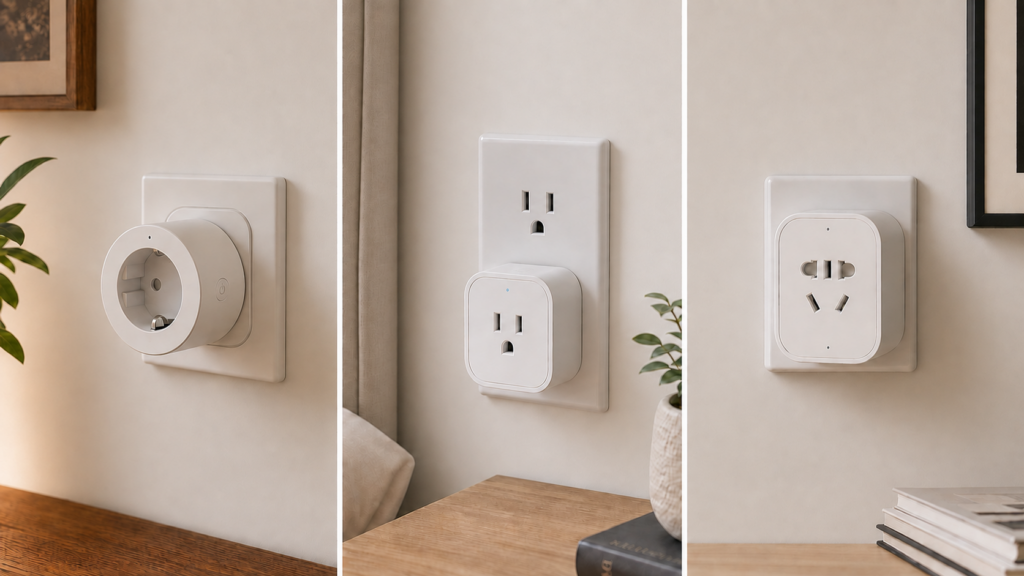
“Aqara Smart Plug” can mean several different devices. This comparison covers three Zigbee versions: SP-EUC01 for Europe, ZNCZ12LM for the US, and ZNCZ15LM, sold in China as 智能插座 T1. All three have Zigbee2MQTT definitions with switching and power monitoring, but their electrical ratings and available settings differ.
Start with the model on the plug’s label. A guide for another regional version can show controls your unit does not have, and a matching list of controls still does not prove that every setting works on your firmware. The comparison below uses Aqara’s exact-model specifications, Zigbee2MQTT’s device pages and released definitions, with issue reports kept separate from those specifications.
Why there are different regional versions
The EU, US and Chinese plugs are separate products for different sockets and electrical systems. The T1 label identifies ZNCZ15LM here; it does not mean that every Aqara plug is a simple upgrade of the previous one. The model naming convention guide covers the wider catalog. For this comparison, the full model number is more useful than the generation name.
These three models can join a supported Zigbee2MQTT coordinator without an Aqara account or hub. That local integration does not change their socket, load or electrical ratings, and it does not guarantee every exposed feature on every firmware revision.
Identifying which one you have
- Read the label on the plug. Look for SP-EUC01, ZNCZ12LM or ZNCZ15LM, then read its voltage, frequency and load information. Keep a photo of the label if the installed position makes it awkward to reach.
- Check the paired device in Zigbee2MQTT. Its model, reported Zigbee identity, firmware and linked device definition should agree with the physical product. The released definitions match
lumi.plug.maeu01,lumi.plug.maus01andlumi.plug.macn01respectively.
A different expose list may mean you have a different model, an older converter or different firmware support. Check those before assuming that a missing setting is hidden somewhere in the interface. Matching the radio identity also cannot establish the safety rating of an unlabelled or mislabelled product.
Feature comparison: what each variant exposes
auto_off is the documented standby cutoff: less than 2W for 20 minutes. button_lock disables the physical switching button. They are separate from a timed-off command or a Home Assistant automation.
| Model | Region | Published electrical rating | auto_off | button_lock |
|---|---|---|---|---|
| SP-EUC01 | EU | 250V AC, 50/60Hz, 10A, maximum 2300W | Exposed | Exposed |
| ZNCZ12LM | US | 100–125V AC, 60Hz, 15A, maximum 1875W | Exposed; historical write failures reported | Not exposed |
| ZNCZ15LM (T1) | China | Aqara’s Chinese specification lists 250V~, 50Hz and 2500W | Not exposed | Exposed |
The ratings come from Aqara’s EU product page, US specifications and Chinese T1 specifications. The Chinese page does not give a universal 220–240V input range; use the exact label and manual when deciding whether a unit is suitable for your installation.
The controls are listed on the corresponding SP-EUC01, ZNCZ12LM and ZNCZ15LM pages. A US plug has no exposed button lock, and the CN T1 has no exposed auto_off. Choosing a different friendly name or Home Assistant entity cannot add either feature.
Exposed is not the same as working
Issue #20430 records ZNCZ12LM auto_off and led_disabled_night writes failing with UNSUPPORTED_ATTRIBUTE on Zigbee2MQTT 1.34.0. The reporter also had null voltage, current and consumer_connected values. This is evidence about those reported units and versions, rather than proof that every current US plug behaves the same way.
The issue closed after inactivity; that does not establish a fix. Its attached log supports those two write failures, not a claim that every exposed overload-protection setting is broken. If your unit rejects a write, keep the exact error, model and firmware version when seeking support. Confirm the physical behavior with a suitable test load before depending on a convenience setting.
The ZNCZ12LM setup guide covers the model in more detail. A Home Assistant automation can watch fresh power readings and switch the outlet off after a low-load interval, but that is a different implementation: it needs working reports, Home Assistant, MQTT and Zigbee2MQTT. It is not a replacement for an electrical safety device or a guarantee of the plug’s own standby behavior.
Zigbee2MQTT exposes an overload threshold of 100–2300W for the EU and US definitions and 100–2500W for the CN T1. A software maximum is not a higher hardware rating. In particular, the US plug’s published maximum remains 1875W. Stay within the plug, socket and appliance ratings; do not use the interface’s upper limit as permission to exceed them.
Shared measurements, different reporting behavior
All three definitions include state, power, energy, voltage, current, device_temperature and power_outage_memory. They also list consumer_connected, led_disabled_night and overload_protection. These are the shared software capabilities, not a promise of identical electronics, calibration or successful reports on every unit.
There are practical differences even within that shared list. The US definition supports a /get request for power; the EU and CN T1 pages list it as report-only. Energy, voltage and current are also report-only on these pages. The EU released converter polls device temperature every 30 minutes. Device temperature describes the plug itself, rather than a room-temperature measurement.
All three expose state reads and switching commands. power_outage_memory, the night LED setting and the overload threshold have documented reads and writes; where present, so do standby cutoff and button lock. Check the exact page for the accepted values and verify the response on your unit. A stale reading or null field is not corrected by merely creating another Home Assistant entity.
If readings are zero, delayed or implausible, the power monitoring troubleshooting guide covers that diagnostic path. Keep the model and firmware in view: shared field names do not make reporting problems interchangeable between these plugs.
The region-swap caveat
Check supply voltage, frequency, socket fit, earthing, local approval and the appliance’s load against the exact model’s label and manual. A plug adapter changes the physical connection; it does not convert voltage or raise a load rating. Successful Zigbee pairing establishes none of those requirements.
For a new purchase, choose the version sold and approved for your installation. Aqara’s Chinese product page also limits its stated sales and service scope to 中国大陆. Direct coordinator support is a separate matter from regional vendor activation, warranty and electrical suitability. A compatible voltage alone does not settle whether an imported plug should be used in another country.
Known friction: SP-EUC01 self-toggle reports
Issue #13903, opened on 7 September 2022, describes an EU lumi.plug.maeu01 outlet toggling when IKEA E1812 or E1743 commands were routed through it. The initial log shows a v32-to-v41 update; the current device-page note mentions v42, and later comments discuss other versions. Calling this exclusively a v42 defect would miss the evidence in the original report.
The thread contains a v32 rollback using a modified OTA version header. It also contains later v45 reports: some participants found that unwanted toggling stopped, while others reported measurement or availability problems. Those observations do not establish one best firmware for every installation. The issue’s closed state is not a vendor assurance that every related fault is resolved.
The SP-EUC01 setup guide discusses the history. Treat the modified-image rollback as a model-specific community procedure with a risk of an unusable device, not a routine first step. The round Aqara maeu01 and square Xiaomi mmeu01 images in the same thread are different. Check your identity, firmware and current guidance before considering any OTA change, and first record what actually triggers your plug.
These reports are useful when diagnosing an affected EU outlet. They do not establish the same fault on ZNCZ12LM or ZNCZ15LM, or guarantee that an unreported firmware revision is free of problems.
Frequently asked questions
How do I tell which Aqara smart plug model I have? Read its physical label and compare it with the Zigbee2MQTT model and reported identity. Record the firmware too when investigating a feature failure.
Is the EU plug the same as the US version? No. SP-EUC01 and ZNCZ12LM have different electrical ratings and feature lists. The EU definition includes both standby cutoff and button lock; the US definition includes standby cutoff, with historical write-failure reports, but no button lock.
Why does auto_off fail on my ZNCZ12LM? Compare the actual write error and firmware with #20430. Its UNSUPPORTED_ATTRIBUTE reports are relevant, but do not prove the cause of every current failure. A separately tested Home Assistant low-power automation may meet a convenience requirement if the measurements and control path work.
Does the CN T1 work outside China? ZNCZ15LM has direct Zigbee2MQTT support. Whether it is suitable for use elsewhere requires the exact electrical label, socket and local requirements, as well as any vendor support restrictions. Its published CN rating is 250V~, 50Hz and 2500W, not a verified universal input range.
Which versions support a physical button lock? SP-EUC01 and ZNCZ15LM expose button_lock; ZNCZ12LM does not. Test the setting on your actual firmware.
Can I interchange EU and US plugs? Choose a locally suitable, approved model rather than treating them as interchangeable. Their published electrical and load specifications differ, regardless of radio support.
Sources and checks for your own plug
This is a documentation-based comparison, without a new hands-on test of the three outlets. Aqara’s regional specifications establish the ratings; Zigbee2MQTT’s pages and released definitions establish software capabilities. The issue threads establish reported behavior in particular setups, not a vendor-confirmed fault on every current unit.
Direct switching and measurements can stay on the local coordinator and MQTT path without an Aqara account. An external broker, remote notifications or OTA-image retrieval can have their own network dependencies. Adding an Aqara hub is not a documented cure for the reported direct-integration write errors.
After identifying your unit, use its matching guide: SP-EUC01 (EU), ZNCZ12LM (US) or ZNCZ15LM/T1 (CN). Check actual switching, fresh measurements and each convenience setting you intend to use before building an automation around it.