

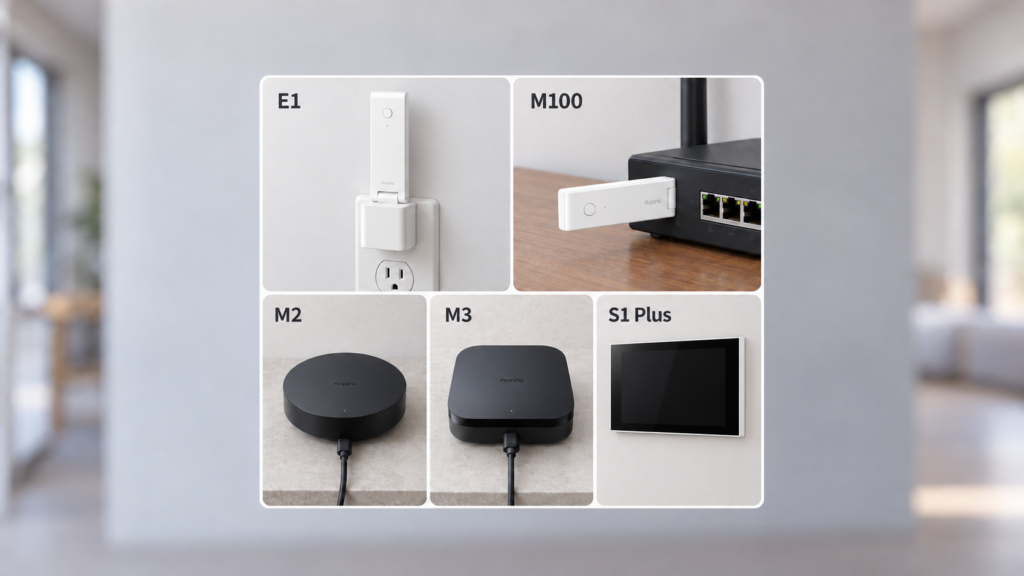
The E1, M100, M2, M3 and Panel Hub S1 Plus solve different problems. Start with the devices you want to connect, the connection you want in Home Assistant, and where your automation rules will run. A Matter bridge exposes supported accessories from another protocol; a Matter controller adds and controls Matter devices; a Thread border router connects a Thread network to the LAN. A hub can provide more than one of those roles.
This comparison covers the five hubs with dedicated guides on this site. It uses Aqara’s product specifications, manuals and support documentation checked on 7 October 2026. It is not a hands-on outage or capacity test. Check the sales region and firmware of the unit you are buying, especially with imported stock.
Quick decision guide
| Hub | Main role | Local-control consideration | Good fit |
|---|---|---|---|
| E1 | Compact Aqara Zigbee hub; HomeKit and supported-firmware Matter bridging | Check the actual automation and bridge support; no Thread border router | A small USB-powered Aqara Zigbee setup |
| M100 | Zigbee hub, Matter controller/bridge and Thread border router | Aqara advertises key local routines; HomeKit bridging is also documented | A smaller setup needing Thread and Matter without Ethernet or IR |
| M2 | Zigbee hub with Ethernet, IR and HomeKit/Matter bridging | Aqara documents local automations that continue during an internet outage | A wired-network bridge or room-level IR control without Thread |
| M3 | Edge hub, Matter controller/bridge and Thread border router | Local automation and coordination of compatible Aqara hubs; cloud-dependent actions still need internet | PoE, dual-band Wi-Fi, IR feedback and a larger Aqara deployment |
| Panel Hub S1 Plus | Touchscreen, wall-switch functions and Zigbee hub/bridge | Check each exposed feature and automation dependency | A physical Aqara control panel where the installation suits it |
This is a five-model comparison, not a complete Aqara catalogue. Other hubs, including M200 and camera models, deserve their own comparison. A model being outside this table doesn’t make it unsupported.
Aqara’s Zigbee hubs are intended for supported Aqara Zigbee accessories. Third-party Matter support on a controller should not be read as permission to pair arbitrary IKEA, SONOFF or other Zigbee devices to it.
| Hub / published model | Power and network connection | Hardware that matters to this decision |
|---|---|---|
| E1 / HE1-G01 | USB-A power, 5 V 0.5 A; 2.4 GHz Wi-Fi | Zigbee 3.0; Wi-Fi repeater for up to two clients; no Ethernet or IR blaster |
| M100 / HM-G02E or HM-G02D | USB-A power, 5 V 0.5 A; 2.4 GHz Wi-Fi 6 | Zigbee and Thread; Bluetooth for setup; no Ethernet, IR or built-in speaker |
| M2 / HM2-G01 | Micro-USB 5 V power (specification allows 1 A or 2 A supply); RJ45 Ethernet or 2.4 GHz Wi-Fi | Zigbee 3.0, IR transmitter and speaker; no Thread border-router role |
| M3 / HM-G01D or HM-G01E | USB-C, 5 V 2 A, or PoE; Ethernet and 2.4/5 GHz Wi-Fi | Zigbee/Thread, IR with feedback, speaker and 8 GB local storage |
| S1 Plus EU / MP-K03D | 200–240 V AC wall installation or USB-C 5 V 2 A power; 2.4/5 GHz Wi-Fi | Touchscreen and Zigbee hub; the wall-switch installation needs live and neutral; USB-powered panel use does not switch mains loads |
These are the published international/EU identifiers. A different label or regional product needs its own manual. The model pages below give the source specifications.
E1: a compact Zigbee bridge
The Hub E1 guide covers the compact USB-powered hub. Aqara’s specifications identify HE1-G01, USB-A power and Zigbee 3.0 with 2.4 GHz Wi-Fi. Its product page advertises up to 128 Aqara Zigbee children, with Zigbee routers such as suitable mains-powered switches or plugs required for that ceiling.
Adding an E1 alongside an M2 normally gives you another hub’s Zigbee network. It does not turn the E1 into a router on the M2’s existing Zigbee mesh. Its separate Wi-Fi repeater function supports up to two clients; Wi-Fi coverage and Zigbee network membership are different things.
E1 supports HomeKit bridging, and Aqara’s developer documentation also lists Matter bridging. Check firmware, regional availability and the exact child device rather than assuming every property crosses the bridge. E1 has no Thread border-router or general Matter-controller role.
M100: compact Matter and Thread support
The Hub M100 adds a Matter controller and Thread border router to its Zigbee hub and Matter bridge roles. Its official support page distinguishes it from E1 and recommends no more than 40 connected devices in total, with up to 20 Zigbee children. Aqara’s current hub comparison presents this as 20 Aqara Zigbee plus 20 Thread devices. Treat those as product limits and planning guidance, not a measured guarantee in every radio environment.
The product page advertises key automations running locally for Zigbee and Matter-over-Thread devices. That doesn’t make a notification or another cloud-dependent action work offline. M100 also supports third-party Matter devices in its controller role; its Zigbee pairing remains restricted to supported Aqara accessories.
The English manual explicitly includes native HomeKit setup as well as Aqara Home setup. Home Assistant can therefore use the appropriate HomeKit Device route where that unit exposes a discoverable, unpaired HomeKit bridge; Matter is not its only possible route. Check the setup code and regional manual. USB-A supplies power here—it does not make M100 a USB Zigbee adapter for Zigbee2MQTT.
M2: Ethernet and IR without Thread
The Hub M2 is useful when you want Ethernet and an IR transmitter without needing a Thread border router. Aqara’s specifications list Zigbee 3.0, 2.4 GHz Wi-Fi, BLE, Micro-USB power and RJ45. The power connection is separate from Ethernet; it is not a PoE-powered M3.
M2 supports native HomeKit bridging and gained Matter bridging through the 2023 firmware rollout. Bridging eligible Zigbee children into a Matter ecosystem does not make M2 a controller for new Matter-over-Thread devices.
Its automations are not universally cloud-only. Aqara’s M2 product page explicitly says local automations continue when the internet goes down, and advertises local IR automations. Rules that need cloud data or push notifications are a separate case. Test the exact trigger and action you rely on before blocking the hub’s internet access.
The M2 supports up to 128 Aqara Zigbee children with suitable Zigbee routers. For the Home Assistant connection choice and a broader M2/M3 discussion, see the Home Assistant buying comparison and M2/M3 local-control article; use the primary specifications here when checking hardware and offline claims.
M3: Edge Hub processing, Thread and PoE
The Hub M3 adds Edge Hub processing, Matter controller and bridge roles, a Thread border router, PoE, dual-band Wi-Fi, IR feedback and 8 GB of local storage. Aqara’s product page and M2/M3 comparison describe those differences. Its specification gives USB-C power at 5 V 2 A or PoE input at 48 V 0.27 A.
M3 can lead compatible existing Aqara hubs or receive a supported migration of their Zigbee devices. Aqara describes most automations moving to local execution, while cloud push notifications still require a cloud connection. Edge Hub describes its processing role; whether a particular rule runs locally depends on its devices, conditions and actions. Check the current hub and automation settings rather than assuming every rule has the same offline behavior.
Aqara’s published M3 FAQ describes 64 direct child connections and expansion to 127 through Zigbee routers or Thread mesh extenders. Aqara’s current support pages give inconsistent capacity information, so confirm the limits for your firmware and network before buying close to these ceilings. Plan the relevant network rather than treating every advertised ceiling as a guaranteed number of direct battery-device connections. Its third-party-device feature is Matter support; it is not a general third-party Zigbee coordinator.
For a Home Assistant user whose rules already run in HA, the decision is mainly about Thread, Ethernet/PoE, IR features, supported bridging and capacity. HA-side automation still needs HA and the connection path running.
Panel Hub S1 Plus: a different category entirely
The Panel Hub S1 Plus combines a touchscreen, wall-switch functions and an Aqara Zigbee hub. The MP-K03D EU manual specifies dual-band Wi-Fi, Zigbee, Bluetooth, USB-C 5 V 2 A input and a 200–240 V AC wall-switch installation. Choose the panel for its physical controls and installation, rather than as a compact plug-in hub. Use a qualified installer for the mains installation.
It can expose supported functions through HomeKit or a Matter bridge. The panel’s hub role does not make it a native Matter controller or Thread border router: Aqara’s product guidance says controlling added Matter accessories requires a controller such as M3 set up in Aqara Home first.
Check the actual Home Assistant entities before expecting camera video, energy data or every screen control through a bridge. A camera view on the panel does not prove that the camera is exported by its Matter bridge. HomeKit and Matter can expose different functions; neither route is a promise of every Aqara-only feature. The dedicated S1 Plus guide covers the integration choices.
Setup and cloud access
Aqara’s normal app-based hub setup and Matter-bridge procedures involve the Aqara Home app, account binding and initial network access. Native HomeKit setup is a separate route documented for supported models, including M100. It would be too broad to say every local-control path on all five hubs must first use the same cloud provisioning procedure.
For Home Assistant, distinguish HomeKit Device, which connects to a native HomeKit accessory, from Matter. Provision and expose the appropriate bridge according to its manual; a Thread border router alone does not import all Thread devices into HA. Matter endpoints need their own commissioning or sharing into HA.
Before a purchase, check the activation-region policy, model and firmware, the supported child-device list, and the entities your selected bridge exports. After setup, disconnect the internet while keeping the LAN and required controllers powered, then test each essential routine. Remote access, vendor push notifications and online update downloads can still depend on internet services.
If none of these fit: skip the hub entirely
If you want a mixed-brand Zigbee mesh in Home Assistant, use a supported dedicated coordinator with Zigbee2MQTT or ZHA and check each device’s support. Many Aqara Zigbee devices pair directly, so you may not need an Aqara hub at all. The trade-off is losing or replacing vendor-hub features you relied on. See Aqara without internet for the broader connection choices.
FAQ
Which Aqara hub should I buy for Home Assistant?
For supported Aqara Zigbee bridging, compare E1, M100 and M2 against the entities and network connection you need. M100 adds Thread and controller roles; M2 adds Ethernet and IR. Choose M3 for PoE, its Edge Hub coordination and wider features. Choose S1 Plus for the physical panel, and a dedicated coordinator for a mixed-brand Zigbee network.
Do I need an Aqara hub at all, or can I skip straight to a Zigbee coordinator?
A supported Aqara Zigbee device can join ZHA or Zigbee2MQTT directly. Check model-specific support and any vendor-only functions before moving it from an Aqara hub.
What is the difference between the Aqara Hub E1 and the other hubs?
E1 is a USB-A-powered Zigbee hub with 2.4 GHz Wi-Fi, a limited Wi-Fi repeater and HomeKit/Matter bridging on supported firmware. It lacks the Thread/controller roles of M100/M3 and the Ethernet/IR hardware of M2/M3.
Which Aqara hub works without the cloud?
Check the route and routine, not just the hub name. Local bridging and supported local automations can work without internet after setup; M2 is not an all-cloud exception. Vendor notifications and other cloud-based actions remain dependent on online services.
Is the Panel Hub S1 Plus a replacement for a regular Aqara hub?
It includes a Zigbee hub, but its screen, power options and wall installation make it a different purchase. Confirm the exact regional version and exported functions before choosing it as your bridge.
Sources and checks before buying
The comparison uses the linked manufacturer specifications, manuals, developer documentation and Home Assistant’s protocol guides. Capacity and local-automation statements are vendor claims, not results from a household test here. Keep model, sales region, firmware, radio protocol and bridge route together when comparing products; then test the actual entities and routines you need.