

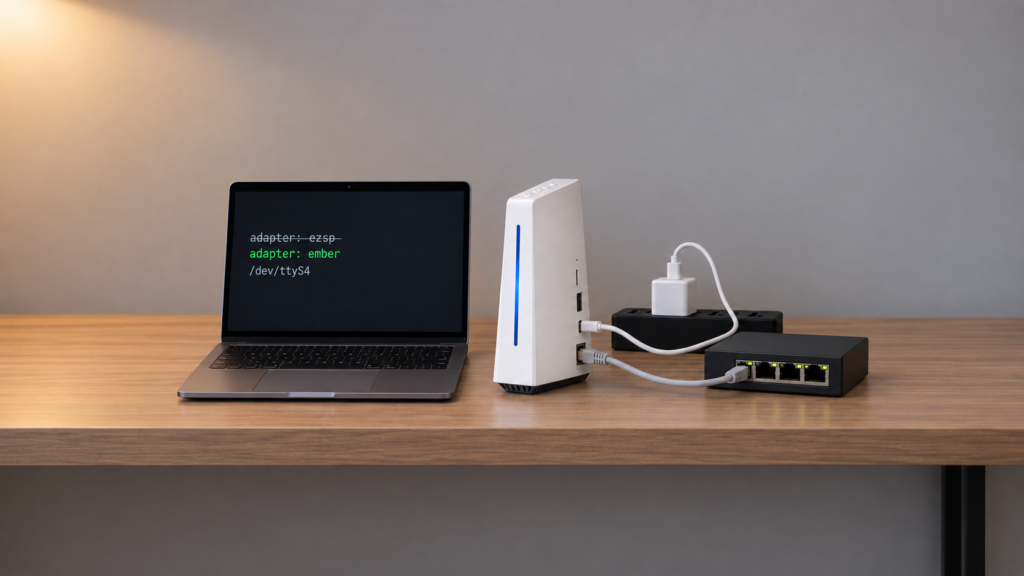
If Zigbee2MQTT on your SONOFF iHost’s on-board radio stopped working and the log shows an ezsp error, your config didn’t break. The radio is now running firmware that Zigbee2MQTT’s old ezsp driver refuses to talk to. The fix is one line in your own configuration.yaml, and everything stays local.
The iHost’s radio is a Silicon Labs EFR32MG21. By default, eWeLink’s own Zigbee2CUBE framework drives it inside the stock CUBE OS. It can also be handed to a Zigbee2MQTT instance you run yourself. This article covers that second case. If you only use the iHost’s built-in Zigbee support and never installed Zigbee2MQTT, this error and fix don’t apply to you.
The symptom: a driver error, not a timeout
GitHub issue Koenkk/zigbee2mqtt #31504 reports the pattern. Zigbee2MQTT was running on an iHost’s on-board radio, the owner changed nothing, and after a CUBE update it no longer started. The log shows a driver compatibility error:
'ezsp' driver is not compatible with firmware 8.x.x or above (EZSP v14+). Use 'ember' driver instead.
That string is Zigbee2MQTT telling you exactly what happened. The radio runs EmberZNet 8.x firmware, and ezsp doesn’t support it. It is not a failing serial port or a corrupted install, so reinstalling won’t help.
Zigbee2MQTT’s EmberZNet adapter docs cover the driver side. ezsp is deprecated, and ember is the current driver for EFR32-family radios (MG21, MG24, MG26). Once the firmware reaches 8.x (EZSP v14 and above), ezsp stops working altogether. Our coordinator firmware guide covers moving any EFR32 adapter onto ember.
Which iHost setup are you running?
The on-board radio can end up in three configurations. The fix only applies to two of them.
| Setup | What it is | Config you control | Does the fix apply? |
|---|---|---|---|
| Zigbee2CUBE (native) | eWeLink’s own Zigbee framework, built into stock CUBE OS | None. It is not Zigbee2MQTT | No. The error is Zigbee2MQTT’s own |
| Zigbee2MQTT container under CUBE | Zigbee2MQTT installed through CUBE’s Docker menu, pointed at the on-board radio | Its own configuration.yaml |
Yes. This is the setup in issue #31504 |
| Zigbee2MQTT under Home Assistant OS on the iHost | Home Assistant OS booted from microSD in place of CUBE, using the on-board radio | configuration.yaml via the add-on’s Configuration tab |
Yes, if the radio is on 8.x firmware |
CUBE’s Docker & Add-on documentation describes the second row: extra applications installed as containers alongside CUBE, which keeps running. eWeLink’s community forum has user threads on running Zigbee2MQTT this way.
The third row is a different operating system. SONOFF’s guide to running Home Assistant over the iHost boots Home Assistant OS from a microSD card, and you switch back to CUBE with a button sequence at power-on. While you’re in Home Assistant, CUBE isn’t running, so a CUBE update can’t reach the radio during that session. SONOFF’s separate on-board chip guide covers pointing the Zigbee2MQTT add-on at the radio and gives its path as /dev/ttyS4. If you see the ezsp error here, the radio’s firmware changed at some other point, for example while the iHost was booted into CUBE. That is our inference; we found no report of it. The fix is the same either way.
The ezsp/ember split and the error above are specific to Zigbee2MQTT. ZHA drives Silicon Labs radios through the bellows library, and its radio type is also called “ezsp”, but it’s a separate codebase. Nothing here is a fix for ZHA, and we found no source on how ZHA on the iHost handles 8.x firmware.
The fix: switch Zigbee2MQTT to the ember driver
Before you change anything, back up Zigbee2MQTT’s whole data folder. Then set the adapter to ember in configuration.yaml. Under Home Assistant, use the add-on’s Configuration tab. In a CUBE container, edit the file in the container’s data folder.
serial:
  port: /dev/ttyS4   # keep whatever port you already have
  adapter: ember
Only the adapter line changes. Leave port as it is. Save, then restart Zigbee2MQTT. It should start with ember on the same radio.
Will your paired devices come back without re-pairing? Neither issue #31504 nor the docs we cite confirm that for the iHost. One detail makes it worth preparing for the worst case. As our coordinator backup guide explains, Zigbee2MQTT’s coordinator backup works only on zstack and ember, not on ezsp. If you were on ezsp, there’s no coordinator_backup.json from before the switch to fall back on. That’s why the data-folder backup matters, and why you should be ready to re-pair if it comes to that. Once you’re on ember, backups are supported, so take one as soon as the network is back.
Does Zigbee2CUBE need this fix?
We found nothing that says so. The error comes from Zigbee2MQTT’s own driver check, and Zigbee2CUBE is different software that doesn’t use that driver.
Don’t go looking for this setting in the iHost’s built-in Zigbee support. There’s no Zigbee2MQTT config there to change, and nothing we sourced ties the native bridge to this error.
Why the firmware changed: what’s documented
CUBE can change radio firmware on its own. Its changelog says v2.10.2 (2026-05-18) added automatic firmware management for connected SONOFF dongles: Ember-based dongles below v7.4.5 are upgraded to v8.0.2, which is past the EZSP v14 line. If that reaches a radio a Zigbee2MQTT instance still drives with ezsp, you get the error above.
The changelog says “dongles” and doesn’t name the iHost’s on-board radio. Issue #31504 blames CUBE 2.9.0 and is dated March 2026, two months before v2.10.2, so the reported break can’t have come from that documented auto-upgrade. We found no source for what moved that reporter’s radio to 8.x. You don’t need to know to fix it: the error string tells you what the firmware is now.
FAQ
Does updating eWeLink CUBE affect my Zigbee2MQTT?
It can if Zigbee2MQTT runs in a container under CUBE on the iHost’s on-board radio, and the update moves that radio to 8.x firmware. Zigbee2MQTT on separate hardware with its own coordinator isn’t touched by an iHost update.
Is the iHost’s built-in Zigbee bridge the same thing as Zigbee2MQTT?
No. The native bridge runs on Zigbee2CUBE, eWeLink’s own framework. eWeLink is the software platform behind SONOFF’s apps. Zigbee2MQTT is a separate program that you install and configure yourself.
How do I check what firmware the iHost’s radio is running?
Zigbee2MQTT logs the coordinator firmware version at startup. If it won’t start, the ezsp error itself tells you the radio is on 8.x or later. We didn’t find a documented way to read it from the CUBE interface.
Will switching to the ember driver disconnect my paired devices?
We couldn’t confirm either way for the iHost. Back up the data folder first and plan for re-pairing as the fallback.
Can Zigbee2CUBE and Zigbee2MQTT use the radio at the same time?
No. A Zigbee radio is the coordinator for one network, driven by one host stack at a time. Under Home Assistant OS the question doesn’t arise, because CUBE isn’t running. For a container under CUBE, our sources don’t document how CUBE hands the radio over, so treat it as one or the other.
What’s confirmed, and what to check
Confirmed from primary sources: the error text and the iHost/CUBE context (issue #31504, closed as “not planned”); the deprecation of ezsp and ember as the current EFR32 driver (Zigbee2MQTT docs); the v2.10.2 dongle-firmware auto-upgrade and its thresholds (CUBE changelog); the on-board chip’s /dev/ttyS4 path and the Home Assistant OS microSD boot (SONOFF’s guides); Docker add-ons under CUBE (CUBE docs).
Not confirmed: what upgraded the reporter’s radio on 2.9.0; whether CUBE’s dongle policy covers the on-board radio; whether devices need re-pairing after the switch on this hardware; how ZHA on the iHost behaves on 8.x firmware. No hands-on testing was done for this article, and there’s no iHost on this site’s test bench.
After the switch, check three things: the startup log names ember with no driver error, your devices report state again, and a fresh coordinator backup exists. The whole fix stays local. What still depends on the vendor is the firmware itself: if you run your own Zigbee2MQTT on CUBE-managed hardware, read the CUBE changelog before applying updates. It’s the same question we asked of SONOFF’s OpenEdge line: which parts of the stack you actually control.