

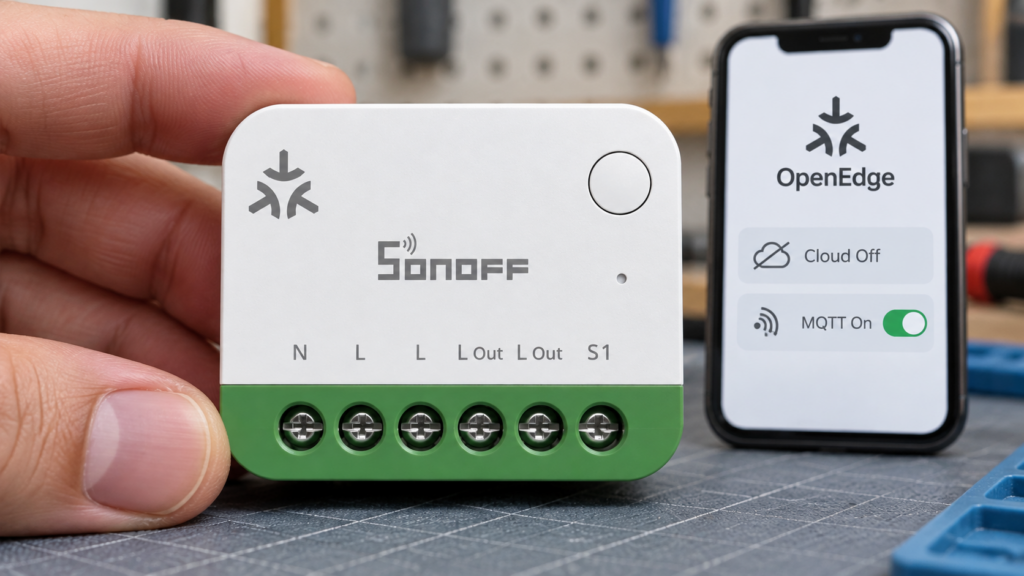
SONOFF OpenEdge offers a browser-based way to set up and control compatible devices on your own network. That is useful for a Home Assistant installation: the documented MQTT route uses a local broker, without an eWeLink account in the setup flow. It does not, by itself, establish that the device never contacts an internet service.
This article separates the documented local workflow from the broader privacy and offline claims. It draws on SONOFF’s OpenEdge overview, product documentation and Home Assistant’s MQTT implementation. It is a documentation review, not a hardware or network-traffic test.
Checked on 7 October 2026. OpenEdge is model-specific, and SONOFF’s overview and integration guides do not always list the same products. Check the exact model and firmware before buying around a particular feature.
What OpenEdge actually is
OpenEdge combines a local web console with HTTP, WebSocket and MQTT interfaces. SONOFF describes it as an architecture for configuring, monitoring and controlling supported devices locally. Console features depend on the model; a power meter and a relay switch do not expose identical controls.
The MINI-1GSP product page names Home Assistant, openHAB, ioBroker and Node-RED as possible integrations and describes a JSON-RPC 2.0 API. That establishes an interface for integration, rather than a guarantee that every feature has a finished integration in every platform. SONOFF publishes the MINI-1GSP API documentation for developers.
SONOFF and eWeLink also need to be distinguished. SONOFF’s current company page identifies Shenzhen Sonoff Technologies; eWeLink identifies its provider as Shenzhen CoolKit. The hardware brand and the app/cloud platform are separate parts of the setup. Our article on that relationship explains the background. For this review, the practical question is whether a particular workflow needs the eWeLink platform.
What “local” is verified to mean today
The MINI ONE PM, model MINI-1GSP, is a Matter-over-Wi-Fi power-monitoring switch rated for resistive loads up to 16A. SONOFF documents a console for relay control, energy history, timers, Matter pairing, networking and firmware updates. Those are documented features; their presence in a local console does not establish where an update file or time service comes from.
For first setup, SONOFF’s MQTT guide uses the device hotspot SONOFF_1GSP_xxxx, then http://192.168.33.1 and a new console password of at least eight characters. Configure home Wi-Fi under Network Settings → Wi-Fi Settings. After it joins, use its LAN IP or MINI-1GSP.local where local hostname resolution works. A DHCP reservation makes the IP convenient to bookmark.
The hotspot times out after roughly ten minutes. If the device has joined Wi-Fi, continue through its LAN address; otherwise, holding its button for five seconds reopens pairing. A ten-second hold is a factory reset, so it is not the same recovery step.
The console’s Connectivity Settings covers cloud access, MQTT, TLS and outbound WebSocket connections. Keeping MQTT on the LAN is a deliberate choice: configuring a remote broker or WebSocket endpoint creates an external path even if the eWeLink app is absent.
The Home Assistant path: MQTT broker in the middle
In SONOFF’s MQTT guide, the device and Home Assistant are separate clients of the same broker. With that broker on your LAN, their command and state messages do not need an internet relay. This is also the basic messaging pattern used by Zigbee2MQTT. Our broker hardening checklist covers access controls for the shared broker.
SONOFF OpenEdge device → local MQTT broker ← Home Assistant
- Start a broker. Home Assistant OS users can install the Mosquitto broker app; Container users need a separate broker service. Create credentials that the device can use.
- In Home Assistant, open Settings → Devices & services → Add integration → MQTT and connect it to that broker.
- In the device console, enable MQTT under Connectivity Settings. Enter the broker address and port, credentials and the TLS option matching the broker. Save.
- Check both clients are connected. Enable Home Assistant MQTT discovery and retain the default
homeassistantdiscovery prefix for this documented setup. - Open the discovered MQTT device in Home Assistant. Confirm available controls and readings, then operate the relay and check that its state updates.
Native MQTT discovery supplies the supported entities, so you do not need to write their topic definitions by hand. SONOFF’s feature matrix distinguishes MQTT from Matter: for the MINI-1GSP, MQTT exposes additional configuration and protection functions. The two routes need not create the same entities.
Configure Home Assistant’s broker connection in the MQTT integration, rather than copying an old mqtt: broker: configuration. MQTT entity definitions and automations can still use YAML; automatic discovery simply makes manual entity definitions unnecessary for this workflow. Home Assistant’s current MQTT instructions describe the supported setup.
If the device says MQTT is connected but nothing appears, first check Home Assistant’s connection to the same broker. Then check discovery, prefix and broker permissions. Reload the MQTT integration after correcting discovery settings. A device-side connection indicator proves only the first connection, not the complete path to Home Assistant.
OpenEdge vs. SONOFF’s existing local paths
DIY Mode and eWeLink LAN mode predate OpenEdge, but they are different mechanisms. ITEAD’s DIY tools and protocol documents describe an unencrypted local REST interface for specified models and firmware. Our DIY Mode guide covers that route. A device being supported by SonoffLAN does not automatically mean it supports official DIY Mode.
SonoffLAN’s documentation describes encrypted LAN control using device keys, normally retrieved with an eWeLink account; it also documents manual key retrieval for some devices. DIY devices use an unencrypted protocol without those account credentials. Key retrieval and continuing cloud use should therefore be checked for the specific device and setup.
| DIY Mode | OpenEdge | |
|---|---|---|
| Local interface | HTTP REST; unencrypted DIY protocol | Local console and HTTP/WebSocket/MQTT interfaces |
| Discovery/access | mDNS, including _ewelink._tcp in the DIY protocol |
Console by local address; Home Assistant discovery over MQTT |
| Home Assistant route | For example, the community SonoffLAN integration | MQTT integration and device-published discovery |
| Account requirement | DIY commands do not require eWeLink credentials | No eWeLink login in the documented MINI-1GSP console/MQTT flow |
| Documented scope | ITEAD’s tools name BASICR3, RFR3 and MINI; check later models separately | MQTT guides document MINI-1GSP and MINI-1GP; overview lists more models |
| Evidence used here | Vendor protocol and community integration source | Vendor product, console and integration documentation; no new bench test |
OpenEdge has a broader interface than the older DIY API. Matter is also available on the example Wi-Fi products, but OpenEdge is not another name for Matter and should not be assumed to work identically on every SONOFF product. Neither these documents nor this comparison establish a retirement schedule for DIY Mode.
Where the “no cloud required” claim needs scrutiny
The supported local console and local-broker workflow are more concrete than a privacy slogan. They show how setup and control can avoid an eWeLink login and cloud relay. They do not show that disabling cloud connectivity suppresses every external request, or that every timer, time-sync operation and update remains available without the internet. This review has no traffic capture or reboot test establishing those broader claims.
Account-free local control, offline reliability and absence of external traffic are separate questions. An update control in a local interface may still download from an internet service. If you enable eWeLink, its services have their own data practices; our eWeLink privacy review covers those separately.
Product scope has also expanded beyond a single example. The Home Assistant feature matrix documents MINI-1GSP and MINI-1GP. The OpenEdge overview additionally lists MINI-1GS and CAM-S3W with shop links, while marking MINI-1GS10 as coming soon. The MQTT guide still labels MINI-1GS as upcoming. That mismatch is a reason to confirm the specific product’s current documentation and firmware, not to claim that the whole catalog already exposes the same MQTT functions.
To assess an installation yourself, record its firmware and enabled connections, then block the device’s internet access while keeping LAN access to the broker. Test console access, commands, state updates and the timers you rely on. Repeat after a device power cycle, broker restart and Home Assistant restart; check clock-dependent schedules too. Record which operation fails and compare with internet access restored.
A successful test supports those workflows on that firmware. It does not prove the device made no external attempts before the block, or that an untested feature will work indefinitely offline. Firewall logs can reveal attempted destinations; a complete traffic assessment needs broader evidence than DNS queries alone.
FAQ
Does SONOFF OpenEdge work without an eWeLink account? The documented MINI-1GSP local-console and MQTT procedure has no eWeLink login step. That supports the account-free setup claim for that route; it is not a test of every device feature.
Which devices support OpenEdge? SONOFF’s current pages list several models. MINI-1GSP and MINI-1GP have explicit MQTT/feature documentation; other overview entries need their own model-specific checks. A coming-soon label is not proof of release.
Can it integrate with Home Assistant without a cloud relay? Yes, according to the documented local MQTT route, provided the device and Home Assistant reach the same local broker. Both connections and discovery must work.
Is OpenEdge the same as DIY Mode? They are separate interfaces. DIY Mode is a model-specific local REST route; OpenEdge adds a console and several integration protocols. Support for one does not imply the other.
Does it require iHost? The MINI-1GSP console/MQTT route does not require a SONOFF hub. It requires Wi-Fi and a broker. Connecting through a Matter ecosystem instead requires that ecosystem’s controller; that is a separate setup.
What this piece verified
The primary sources establish the documented interfaces, model scope, console access sequence and Home Assistant messaging route. They also expose differences between SONOFF’s product lists and between Matter and MQTT features. These distinctions are useful even before a device is tested.
Offline reboot behavior, firmware-update requirements, time synchronization and the exact effect of the cloud setting still need device-level testing. This article does not claim a zero-traffic result. Keep the firmware version with any test notes, so a later change can be checked against the same workflow.