

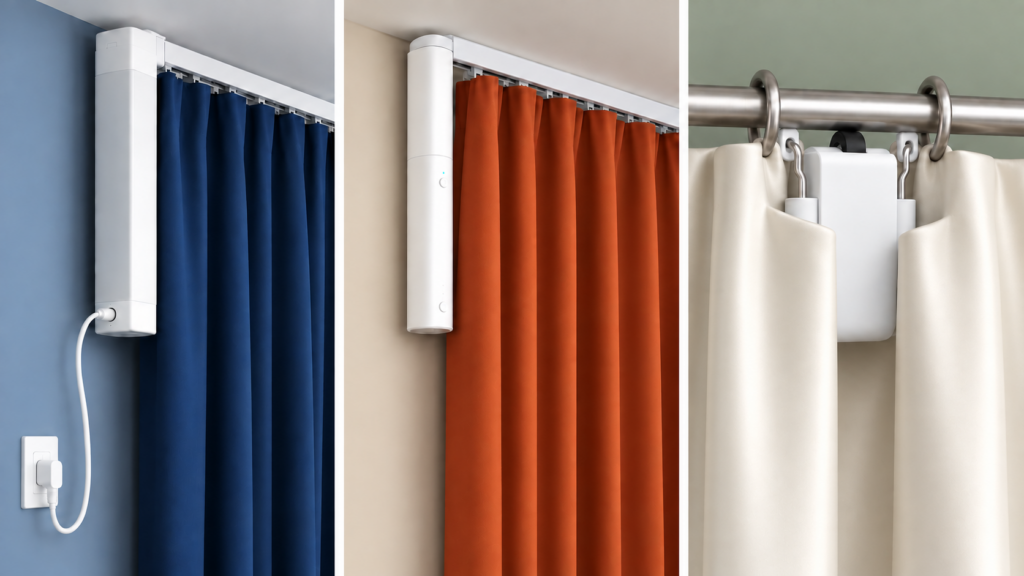
Aqara has shipped three different curtain motors under names that don’t obviously tell you which is which: the original ZNCLDJ11LM, its battery-powered successor the ZNCLDJ12LM (marketed as “B1”), and the Curtain Driver E1 (ZNCLBL01LM). If you already own one and are working out which model it is before pairing it to Zigbee2MQTT or Home Assistant, or you’re comparing them before buying, the model numbers alone won’t help. The three differ in how they attach to your window, how they’re powered, and what they expose once paired. Everything below comes from the official Zigbee2MQTT device pages, Aqara’s own product listings, and this site’s individual setup guides for each model.
All three are Zigbee, not Wi-Fi, and all three pair to Zigbee2MQTT without the Aqara hub or the Aqara Home app. ZHA is not an equal path for all three, though: the E1 driver has a documented history of unreliable pairing there, covered in the buying section below. The rest of the differences are mechanical and electrical, not cloud versus local.
Mechanism: Aqara’s own track vs a driver you clip on
The ZNCLDJ11LM and the ZNCLDJ12LM (“B1”) are motors built for Aqara’s motorised curtain track. The motor rides the track and pulls the curtain along it, so the track is part of the product. If your window has an ordinary manual rail, you take it down and put the Aqara track up in its place.
The Curtain Driver E1 (ZNCLBL01LM) is a different kind of product: a standalone driver that grips curtain hardware you already have. Aqara sells it in two variants, a Rod Version and a Track Version, for the two things it can attach to. Our Curtain Driver E1 setup guide covers the rod model in detail. That is the practical split. The E1 motorises an existing window; the other two arrive with a track of their own.
Power: one mains motor and two rechargeables
The original ZNCLDJ11LM has no battery entity in its Zigbee2MQTT definition at all. It is a mains-powered unit, which in practice means a socket within reach of the window, and our ZNCLDJ11LM setup guide records the same thing.
The B1 is the battery version of that motor, which is literally how Aqara sells it: Smart Curtain Motor Battery Version. It charges over USB-C, exposes a battery percentage and a power_outage_count counter in Zigbee2MQTT, and accepts an optional DC adapter if you would rather leave it permanently powered. Our B1 setup guide covers the pairing and calibration side of it.
The E1 driver is also rechargeable over USB-C, and reports a power_source of either battery or dc_source depending on how it is running at the time. Aqara’s product listings quote a 6000 mAh cell, with 6400 mAh appearing on some EU listings, and up to a year between charges. Treat the runtime figure as a vendor estimate with no published test conditions rather than a measured number.
So battery-versus-mains is not the axis it looks like. Only the original is mains-only. The B1 and the E1 are both rechargeable, both accept permanent DC power, and on both of them a full discharge is expensive: the motor loses its calibrated end stops and you have to run the calibration sequence again from scratch. That, rather than the charging interval, is the real argument for running a USB-C lead to whichever one you buy.
Zigbee2MQTT exposes compared
The three device definitions publish meaningfully different entity sets, and one entry on the E1’s list causes more confusion than the rest combined.
| Model | Key exposes | Worth knowing |
|---|---|---|
| ZNCLDJ11LM (original) | cover (state, position), running, motor_state | No battery entity at all, consistent with a mains-powered unit. Has a long-running quirk where the open/closed cover state sticks while the numeric position keeps working (GitHub issues 12025, 15926 and 15954, with no canonical fix) |
| ZNCLDJ12LM (“B1”) | Same cover exposes, plus battery, voltage, power_outage_count | Some firmware and Z2M version combinations drop battery, voltage, motor_state and running (GitHub issue 19780); check your Z2M version before assuming a hardware fault |
| ZNCLBL01LM (“E1 driver”) | cover with target_position, battery, charging, power_source, illuminance, device_temperature, voltage, hooks_lock/hooks_state, hand_open | The only one of the three with a built-in lux sensor, which is worth an automation on its own |
hooks_lock and hooks_state appear on the E1 because they are in its device definition, not because your particular unit has the hardware. They map to a physical hook arrangement used on certain track mountings, so on a Rod Version driver the entity sits in Home Assistant with nothing to lock. It is still a reliable way to identify the model, because neither of the other two definitions publishes it.
How to tell which one you already have
The fastest check is the hardware. If the motor runs along a track that came with it, you have the ZNCLDJ11LM or the B1. If it clamps onto a rod or a rail you already owned, it is the E1 driver.
Once it is paired, the exposes list settles it. hooks_lock present means E1. A battery entity and no hooks_lock means B1. Neither means the original ZNCLDJ11LM. Telling the first two apart by eye is harder, since they share a track design, so the model code printed on the unit is the authority; the B1 is the one with a USB-C charging port on it.
Aqara’s cover lineup is wider than these three. Zigbee2MQTT also publishes device pages for the ZNCLDJ01LM, one character away from the two codes above and listed in third-party device databases as a Curtain Controller C3, and for the ZNJLBL01LM Roller Shade Driver E1, which drives roller blinds rather than curtains. If the sticker on your unit reads either of those, this comparison is not about your device.
Which one to buy for a local-only, no-hub setup
None of the three needs the Aqara hub, so “local” is not the differentiator here. The integration path is. The B1 and the original behave like ordinary Zigbee devices on either Zigbee2MQTT or ZHA, while the E1 does not pair reliably with ZHA, particularly on the EZSP radios used in some Home Assistant hardware. Buying an E1 for a ZHA setup means planning to move that device to Zigbee2MQTT. The E1 also sets a floor on coordinator firmware that the other two don’t: CC2652 and CC1352 adapters need build 20211114 or newer, CC2530 and CC2531 adapters 20211115 or newer, and a ConBee II needs 0x26720700, so an old stick may need flashing before the driver will join.
After that it comes down to installation. If you have no curtain track worth keeping, the B1 is the better of the two track units: the same mechanism as the original, but rechargeable instead of tied to a socket by the window, which is the constraint that usually decides where the original can go. If you already have a rail you are happy with, the E1 is the only one of the three that will use it.
I would take the E1 for most windows, because replacing a working curtain track is a bigger job than adding motorisation is worth to most people, and the E1 skips it entirely. What that choice does not buy is freedom from charging, since the B1 is rechargeable too. Whichever you pick, plan a USB-C run to the window if the geometry allows it: on both battery models a flat cell costs you the calibration, not just the motion.
What this comparison verified
This was built from the Zigbee2MQTT device reference pages for all three models, Aqara’s product listings for the E1’s capacity and variant names, and this site’s own setup guides for each motor. No hardware was purchased or paired for this piece. Two claims rest on weaker sourcing than the rest, and both are flagged where they appear: the E1’s 6000 mAh cell and one-year runtime are vendor and retail figures with no published test conditions, and the missing-attribute behaviour on the B1 is a firmware and version-combination report rather than a fault of the model line. If you are untangling another Aqara range with the same naming problem, the door and window sensor generations get the same treatment, and the T1/E1/P1 code scheme itself is explained separately.