

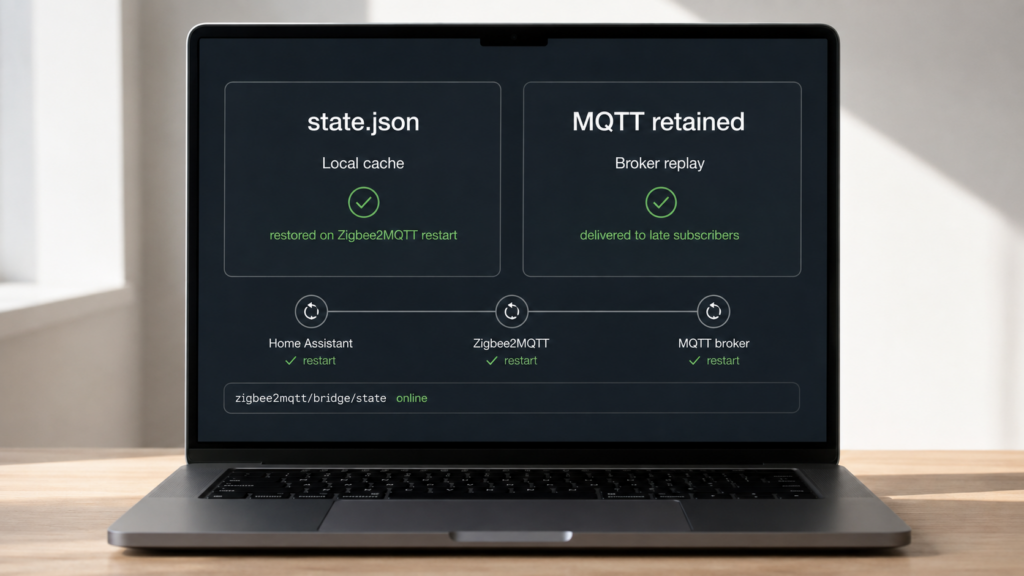
MQTT retain and Zigbee2MQTT’s state.json cache preserve different copies of information. Retain tells the broker what to deliver to a later subscriber. The cache lets Zigbee2MQTT merge and replay previously known state. Neither makes an old reading a fresh measurement or proves that a device is online.
Identify what restarted before changing settings: Home Assistant, Zigbee2MQTT or the broker. This guide follows Zigbee2MQTT 2.14.2, including its current bridge refresh and cache behavior. If devices disappear from Zigbee2MQTT itself, investigate the actual instance/data directory and database recovery separately from a missing MQTT value.
Which service restarted?
| What restarted | Current Zigbee2MQTT behavior | Checks when state is missing |
|---|---|---|
| Home Assistant | Its online birth message starts a 30-second handler that publishes bridge online and cached device/group states. | Same broker, matching status topic, enabled integration, discovery replay and actual availability payloads. |
| Zigbee2MQTT | Loads state.json if present; startup publishes existing device/group cache when cache_state and cache_state_send_on_startup are enabled. | Correct persistent path, readable cache, enabled settings, supported output and fresh reports afterward. |
| MQTT broker | Zigbee2MQTT reconnects and publishes bridge online. Broker-retained data and the bridge’s retained-message recovery have separate roles. | Broker persistence, subscriptions, retained discovery/state, permissions and both clients reconnecting. |
Home Assistant normally announces online on homeassistant/status. Zigbee2MQTT’s effective status topic must match. The current handler republishes cached state and bridge availability; it does not republish every discovery configuration. Discovery is a separate retained/startup path.
Issue #27458 already used a matching topic, so it does not establish that an old hass/status value caused that particular report. A custom topic can still work when both ends agree. If messages arrive but entities stay unavailable, inspect their actual discovery and bridge/device availability rather than assuming one cause.
What retain controls
Retain is an MQTT publication flag. A broker keeps the retained message for an exact topic and delivers it to later matching subscribers, subject to the protocol’s subscription rules. A new non-retained publication does not erase an older retained copy. Clearing a retained topic uses an empty retained publication; do that deliberately, not as a blanket reset of your broker.
The device option defaults to retain: false. Enabling it changes subsequent state publications; it does not fetch a measurement or guarantee that a message is immediately republished. Existing retained data, broker expiry settings and consumer caches can also explain a value that appears on connection.
Retain is useful for a Node-RED flow, MQTT Explorer session or dashboard that needs a last-known value without waiting for another publication. It is not their only possible recovery mechanism: a client can also implement a supported read, its own cache or another state-refresh workflow. The community retention discussion describes that practical need, rather than establishing a rule for every consumer.
A retained availability message does not imply retained device state. Likewise, a retained device reading is not a liveness check. The MQTT topic guide maps those publications separately.
mqtt.force_disable_retain strips retain from outgoing Zigbee2MQTT publications and its configured will. It does not delete copies already stored at the broker. Disabling the per-device option has the same important limitation: old retained data may still exist.
state.json and cached replay
Zigbee2MQTT keeps an internal state map for devices and groups. In 2.14.2, advanced.cache_state controls merging cached properties into published messages and gates startup replay. cache_state_persistent controls saving the map to state.json in the actual data directory, and cache_state_send_on_startup controls startup publication. All three default to true in the settings reference.
The released state implementation loads an existing file at startup, saves on a five-minute timer and saves during a normal stop. A crash or failed write can leave an older on-disk copy; this is not a transactional history of every report. The map also excludes transient properties such as action and supports per-device filtered_cache. It is not an archive of every button press or every MQTT field.
Issue #3496 is an older discussion of retaining and replaying state. The released implementation, rather than that thread alone, establishes current defaults and exclusions. A cache publication can contain hours-old sensor values or optimistic command results. Follow it with fresh device traffic before treating the displayed value as confirmed.
Setting cache_state_send_on_startup: false stops that startup replay. It does not disable the Home Assistant birth handler, broker-retained delivery or every internal cache use. An entity therefore need not stay unknown until the next physical report. Evaluate all replay paths if an automation must ignore stale values.
If you deliberately clear the cache, preserve a copy and stop the instance first; removing a live file can be undone by the next save. Deleting state.json does not remove device pairing, but it also does not clear broker-retained messages or Home Assistant state. A new report can repopulate the map.
Bridge availability after a restart
Issue #4854 describes broker-reconnect behavior on 1.15/1.16 in 2020. Issue #32067 describes a missing birth-handler bridge refresh on 2.10.1 in 2026. They are historical reports, not proof that 2.14.2 still omits those publications.
In 2.14.2, MQTT connection/reconnection publishes retained {"state":"online"} on bridge/state. The enabled Home Assistant extension also publishes it before cached states after its 30-second online-birth delay. A retained offline value can still be delivered before a new online message, or a connection, ACL or configuration failure can prevent the expected update.
Check the actual bridge payload, Home Assistant MQTT connection and one affected entity’s availability configuration. Restarting Zigbee2MQTT can republish online and startup data once the connection is correct, but is not a guaranteed cure. Do not fake online state or re-pair a working mesh merely because a broker client disconnected.
Broker persistence decides whether stored data survives restart; retain alone does not. Check the running broker’s storage and permissions. Zigbee2MQTT’s own retained-message recovery is useful but does not replace a checked broker persistence setup or establish fresh physical device state.
Group retain and the older report
Issue #28171 reports group retain being removed after restart in a Home Assistant app installation on 2.6.0-1. Its only later comment is a stale bot notice. Closure does not establish a universal current limitation or explain every cause of configuration replacement.
The 2.14.2 group schema explicitly contains retain, and state publication reads this option for groups as well as devices. Use the effective configuration for your running instance, including any separate groups file. Check the available controls in your frontend rather than assuming an old absence still applies. This is a representative file configuration; merge it into your existing group:
groups:
  '1':
    friendly_name: living_room_lights
    retain: true
After applying the option, observe a new group-state publication and then reconnect a test subscriber to check replay. Repeat after a planned restart if the application rewrites configuration. Retained group state can still be optimistic or differ from an individual member’s physical state. The groups/scenes guide explains that separate limitation.
Retain, state cache and device availability
Availability evaluates recent communication; it is not a state-storage setting. The current availability configuration uses availability.active.timeout, availability.passive.timeout and optional per-device availability.timeout. Older availability_timeout advice should not be copied into current configuration.
Default active/passive timeouts are 10 minutes and 1500 minutes respectively. Active devices can be pinged, while passive devices are judged by check-ins. The last-seen basis persists across restarts; the timeout does not simply reset to a fresh grace period. A message reaching Zigbee2MQTT can count even when it produces no visible state change. See last_seen for that distinction.
| Retain | State cache / state.json | Availability | |
|---|---|---|---|
| Purpose | Broker copy for later subscribers | Instance’s last-known state map and optional disk copy | Communication-based online/offline assessment |
| Restart behavior | Replay depends on retained data and broker storage/subscription rules | Existing cache can be loaded/replayed; settings and other paths matter | Uses persisted communication history and current timeout/ping rules |
When to enable retain
Choose retain per consumer and property. It can give a dashboard a useful last-known switch state, but the physical switch may have changed while disconnected. Motion, contact and button-driven automations need particular care if an old payload could trigger an action. Neither a retained sensor state nor cached replay should be treated as a newly observed event.
The cache setting goes under advanced; per-device retain goes under the device’s IEEE-address key. Use the documented address key and inspect validation/startup errors instead of expecting a friendly-name key to silently work:
advanced:
  cache_state_send_on_startup: true

devices:
  '0x00158d0001aabbcc':
    friendly_name: bedroom_motion
    retain: true
Replace the example address with your actual device and avoid duplicate YAML sections. Keep Home Assistant’s required cache/output settings, then test the behavior that matters to your consumer: initial subscription, Home Assistant birth, Zigbee2MQTT startup and broker restart. A supported GET or fresh physical report can establish newer information where the device offers that path.
FAQ
Does retain fix unavailable entities? It can supply last-known state, but availability and discovery are separate. Check bridge and device availability, connection and actual discovery payloads.
Where is state.json? In the running instance’s data directory. It stores the filtered device/group state map, not pairings or a complete event history.
Does a broker restart still need a bridge-refresh workaround? Current 2.14.2 reconnect code publishes online. If it fails in your setup, inspect current logs and topics rather than assuming an older report remains the cause.
Does disabling startup replay prevent all stale values? No. Home Assistant birth handling, existing retained messages and other cache paths remain. Test those separately.
Can a group retain its state? Current schema and publication code support the option. Check a new publication and subscriber replay in your actual deployment; the 2.6.0-1 report is historical.
Is availability another name for retain? No. Availability assesses communication; retain and the cache preserve information that may already be old.
Sources and checks
The defaults, save/replay paths and group support were checked in the 2.14.2 state implementation, its controller, schema and MQTT/Home Assistant extensions. Issue and community observations remain tied to their reported setups. No hardware or broker-restart failure was reproduced here.
A local broker and instance can perform these functions without a device vendor’s cloud. Broker hosting, remote dashboards and automation targets can introduce other dependencies; that is separate from MQTT’s retain flag.