

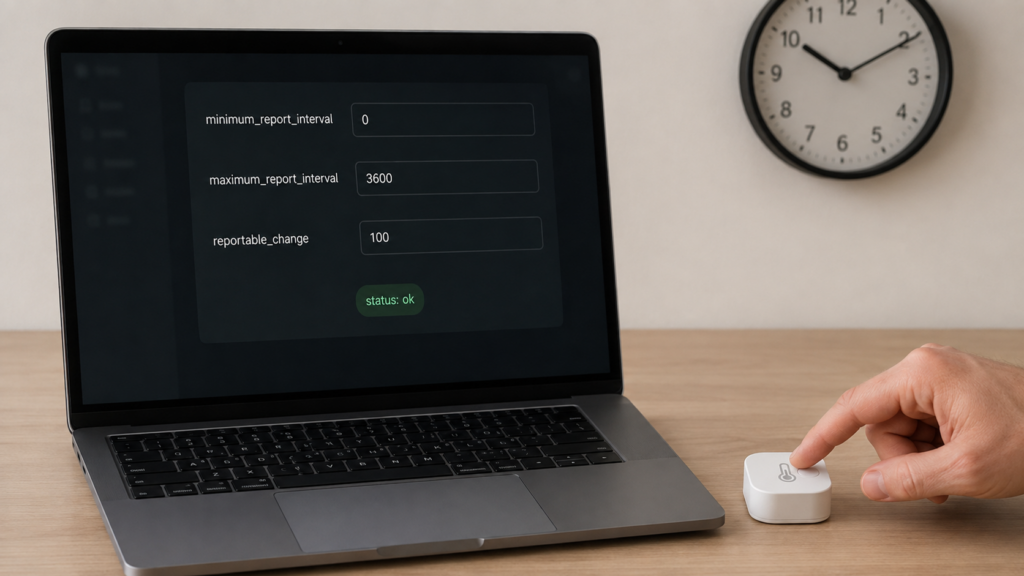
Two complaints that sound like opposites usually turn out to be the same problem. One reader wants to know why a Zigbee2MQTT temperature sensor takes half a minute to update in Home Assistant. Another wants to know why a different sensor is flooding the MQTT broker with an update every few seconds for a change nobody cares about. Both are describing Zigbee attribute reporting, and both are fixed in the same place — Zigbee2MQTT’s reporting configuration, which comes down to three numbers per attribute.
The documentation does cover this. It just doesn’t cover it anywhere you would think to look. The binding guide mentions in one sentence that Zigbee2MQTT “will automatically configure reporting” for bound devices, with no detail on what that means or how to override it, and the general configuration page doesn’t touch reporting at all. The actual reference sits inside the MQTT topics documentation, under a request/response endpoint most people never find until they go looking for exactly this.
What “reporting” means in Zigbee
Zigbee devices don’t get polled the way you might poll an HTTP API. Instead, a device is configured to report a given attribute (temperature, power draw, on/off state) on its own schedule, pushing the value up through the mesh when it decides conditions are met. Zigbee2MQTT relays whatever the device sends. If updates feel slow or come too often, the fix usually isn’t in Zigbee2MQTT’s handling of the message. It’s in how the device was told to report in the first place.
The three parameters, and a worked example
Every reportable attribute has three tunable settings behind it:
- Minimum report interval (
minimum_report_interval) – the number of seconds that must pass after a change before the device is allowed to report again. This is a floor, not a trigger. - Maximum report interval (
maximum_report_interval) – the device sends a report on this cadence regardless of whether anything changed, working as a heartbeat. Set it to 65535 and reporting for that attribute is switched off entirely. - Reportable change (
reportable_change) – the minimum delta a value has to move before it counts as a real change worth reporting.
A maintainer laid out how the three interact in a GitHub discussion on default reporting behaviour (last updated 2025-06-29): a minimum interval of 0 seconds, a maximum interval of one hour, and a reportable change set high enough that only meaningful swings count. A device configured that way reports as soon as the value moves past the threshold, and still sends a status update at least once an hour even if nothing has moved at all.
{
  "id": "living_room_temp_sensor",
  "endpoint": 1,
  "cluster": "msTemperatureMeasurement",
  "attribute": "measuredValue",
  "minimum_report_interval": 0,
  "maximum_report_interval": 3600,
  "reportable_change": 100
}
minimum_report_interval and maximum_report_interval are always in seconds, which is the easy part. reportable_change is where people get burned, because it isn’t expressed in the unit you read on your dashboard. It’s in the raw unit of the underlying Zigbee attribute. On the ZCL Temperature Measurement cluster, measuredValue is stored in hundredths of a degree — 25.34°C goes over the air as 2534 — so the 100 above is 1.0°C, and a value of 10 would be 0.1°C. That’s a tenfold difference in how chatty the device becomes, produced by two numbers that both look perfectly reasonable sitting in a payload. Humidity, power and illuminance each carry their own scaling, so check what the cluster actually stores before picking a value rather than assuming degrees, percent or watts.
Why two identical-looking sensors update on completely different schedules
There’s no single Zigbee2MQTT-wide default for these three values. Each device’s defaults live inside that device’s own configure() method in Zigbee2MQTT’s converter code, so two sensors that look identical on the shelf, or even two variants from the same manufacturer, can ship with different out-of-the-box reporting behaviour. That’s a direct answer from a maintainer to a question that comes up often enough to have its own discussion thread, and it’s worth knowing before assuming a “default” you read about for one device applies to another.
I think the real usability problem here is an asymmetry. Setting these values is well supported once you find the controls. Reading back what a device is currently configured to do isn’t obvious anywhere, which is why the same question keeps reappearing in forum threads from people who only want to know whether their sensor’s shipped defaults are the thing they should be blaming. The mechanism works. Knowing where you’re starting from is the hard part.
How to change it yourself
There are two routes to the same Zigbee command, and for a one-off change the easier one is enough.
In the frontend. Open the device in Zigbee2MQTT’s web frontend and use its Reporting tab, which presents the same three values as form fields — labelled Min rep interval, Max rep interval and a reportable-change field — alongside the endpoint, cluster and attribute they apply to. Frontend layouts move between releases, so if the tab isn’t where you expect it, the MQTT route below is the stable fallback.
Over MQTT. The current topic is zigbee2mqtt/bridge/request/device/reporting/configure, taking the payload shape shown above: id, endpoint, cluster, attribute, minimum_report_interval, maximum_report_interval, and reportable_change. Publish to that topic and Zigbee2MQTT sends the corresponding Zigbee configure-reporting command to the device. This is the route to use when you want the change scripted, kept in version control, or repeated across a batch of devices.
An older topic name, zigbee2mqtt/bridge/request/device/configure_reporting, is kept as a deprecated alias. It still works, so a copy-pasted snippet from an older forum post using that name isn’t necessarily wrong, just out of date. Prefer the current name in anything you write yourself.
Unlike a device’s /set topic, which gives you no acknowledgement on the topic you published to — as our MQTT topics and attribute output explainer covers — bridge requests answer. Zigbee2MQTT replies on the matching zigbee2mqtt/bridge/response/... topic with the values it applied and a status of ok or error. Subscribe to that before you publish. When a configure request seems to have done nothing, the response payload is the first thing to read, not the device’s state topic.
Two gotchas worth knowing before you troubleshoot
reportable_change only applies to numeric or measurement-type attributes, like temperature or power. Enum-type attributes, such as an on/off state, generally don’t support it — set it on one of those and the value is ignored rather than rejected. A response status of ok confirms the command was accepted, not that every field in it took effect, so a misconfigured request can look like it worked.
The second friction point shows up with sleepy end devices: battery-powered sensors that spend most of their time in a low-power state and only wake briefly to transmit. A configure-reporting command sent while the device is asleep can be rejected outright. This isn’t community folklore — Zigbee2MQTT’s own reference tells you that if configure reporting fails on a battery-powered device, you should wake it up right before sending the command. A discussion thread (last activity 2025-02-12) shows what that looks like in practice: a Tuya temperature and humidity sensor that only accepted a new reporting interval after being woken with a short press of its physical button.
When you actually need to touch this
Most devices’ shipped defaults are fine. Reaching for manual reporting configuration makes sense in a narrower set of cases:
| Symptom | Parameter to adjust | What to check first |
|---|---|---|
| Updates feel slow, value only changes every 30-60+ seconds | Lower maximum_report_interval and/or reportable_change |
Confirm the attribute supports reportable_change before assuming it’s ignoring your setting |
| Broker or logs flooded with near-identical updates | Raise reportable_change, and/or raise minimum_report_interval |
Check the attribute’s raw unit — a value that looks sane in degrees may be ten times too small |
| Value never updates at all with no changes present | Lower maximum_report_interval so a heartbeat report arrives even without a change |
Whether the device is sleepy and needs waking before it accepts the new configuration |
| Command appears to do nothing | N/A – not a parameter problem | Read the bridge/response payload for a status of ok or error, then rule out a sleeping device or an attribute type that doesn’t support reportable_change |
An early feature request asking for a way to change a device’s reporting interval without reflashing firmware was closed back in January 2021 without becoming a separate feature, because the mechanism above already covers it. That’s worth knowing if you turn it up while searching: the ability to set intervals isn’t a missing feature. Later requests for adjacent conveniences — changing a device’s default reporting settings rather than its current ones, for instance — are separate questions, and shouldn’t be read as evidence that the basic mechanism is absent.
What this isn’t: availability, last_seen, and battery percentage
Reporting configuration governs how often a device sends attribute updates. It’s a different mechanism from a few adjacent things that get confused with it. Whether Home Assistant marks an entity available or unavailable is a separate liveness check, covered in our explainer on entities going unavailable after a bridge restart. Whether last_seen looks stale is a related but distinct symptom with its own causes, which our last_seen explainer covers on its own. And a battery percentage that’s stuck or reads oddly is almost never a reporting-interval problem — it’s usually about how the percentage itself gets calculated, which our forthcoming battery-percentage explainer walks through separately. If you came here chasing one of those symptoms, the fix isn’t in minimum_report_interval or maximum_report_interval at all.
What this covers, what stays local, and what to check
This is built from Zigbee2MQTT’s MQTT topics documentation and a maintainer’s worked example in a GitHub discussion on default reporting behaviour, plus a separate discussion documenting the sleepy-device wake requirement. Nothing here rests on bench testing; it’s a synthesis of documentation and issue-tracker material. The frontend’s Reporting tab is the documented GUI route to the same command, but frontend layouts change between releases, so treat the tab’s exact position as version-dependent rather than fixed.
What stays local: entirely. Reporting configuration is a Zigbee-layer command sent from Zigbee2MQTT to the device over your own coordinator, requested and confirmed over your own MQTT broker. Nothing about tuning these three values touches a cloud service.
What still depends on the device: whether a given attribute supports reportable_change at all, what interval and change values it ships with by default, and whether it’s a sleepy device that needs waking before it accepts a new configuration. None of that is something Zigbee2MQTT controls, since the defaults and support live in each device’s firmware and converter definition.
What to check on your own setup: confirm the attribute you’re targeting is numeric before setting reportable_change, and confirm what unit the cluster actually stores it in, since a temperature attribute counting hundredths of a degree will behave nothing like the whole degrees you had in mind. Subscribe to the bridge/response topic so you can see whether the command was accepted at all. And if a request still seems to do nothing, wake the device and resend before concluding the payload is wrong.