

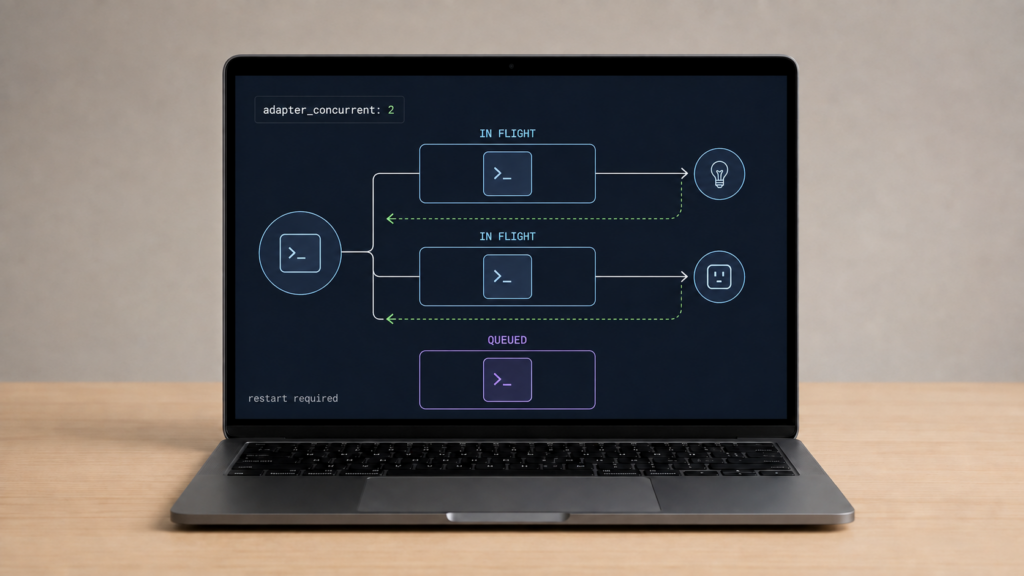
If several lights respond at different times, adapter_concurrent may look like a useful setting to try. It controls concurrent work in adapters that implement it, but staggered commands can also come from retries, a slow device, routing problems or the automation itself. A buffer error does not identify this setting as the cause.
This guide follows Zigbee2MQTT 2.14.2 and its bundled zigbee-herdsman 10.10.0. The adapter settings guide gives example defaults; the released adapter code shows the actual queue behavior and why a global settings field can have different effects across adapters.
What adapter_concurrent controls
For the Z-Stack and Ember implementations checked here, the number limits concurrently running adapter queue tasks. It is not the total number of waiting tasks, the number of packets physically on air, a signal-strength setting or a guaranteed commands-per-second rate.
A task can span a command, its response wait and retries. It keeps its slot until that operation finishes. The shared Queue implementation also serializes tasks with the same key; normal device-addressed send paths use the device’s network address. Increasing concurrency therefore does not make all commands to one device run at once.
In discussion #10664, Koenkk gives a simplified example: with concurrency 2, work for two devices starts and the third waits until a slot is free. His later clarification says this concerns sending rather than receiving. Incoming frame handling is not a device-report quota set by this option.
If one task spends time waiting for a response, other queued work can wait too. That makes queueing a plausible explanation to investigate, not a diagnosis for every slow room command. Capture the command timestamps and any delivery or response errors before changing a value.
Where it is set and what null means
Set adapter_concurrent under advanced in Zigbee2MQTT’s own configuration.yaml, or use the frontend setting. The settings reference and 2.14.2 schema accept a number from 1 to 64 or null, with null as the default. A change requires a Zigbee2MQTT restart.
advanced:
  adapter_concurrent: null
Null leaves selection to the adapter implementation. It does not mean zero work or a universal default of one. The driver may expose the selected value in debug logs; Z-Stack logs Adapter concurrent: during startup. You can inspect the effective advanced config as well, including environment overrides such as ZIGBEE2MQTT_CONFIG_ADVANCED_ADAPTER_CONCURRENT.
If Home Assistant’s app configuration page rejects a key, check whether you put a Zigbee2MQTT option into the wrapper’s separate schema. Verify the app’s data-directory setting and edit the file it actually reads, or use Zigbee2MQTT’s frontend. The current standalone schema supports this key; a wrapper validation failure is a different layer.
Defaults depend on the driver
The adapter guide illustrates 2 for CC2531 and 16 for CC26X2R1. Those examples are not the allowed range or a complete table for every radio. Released source gives a more precise version boundary:
In herdsman 10.10.0, Z-Stack chooses 16 when its detected firmware product is ZStack3x0, and 2 otherwise, unless an explicit value is supplied. Ember chooses 16 unless explicitly configured. Those are software defaults in this release, rather than values to infer from an RF chip’s data sheet. Record both the driver and detected firmware when comparing installations.
Does your adapter use it?
Z-Stack coordinators include devices such as the Sonoff ZBDongle-P. The Ember family includes EFR32 coordinators such as Connect ZBT-1 and ZBDongle-E when running appropriate coordinator firmware. Both released implementations use the shared queue.
The current deCONZ implementation is different: it does not consume adapterOptions.concurrent for this queue setting. That conclusion comes from the released code, not from the absence of a mention on its documentation page. The option being present in the global schema or frontend does not show that a ConBee or RaspBee will use it.
| Adapter / example | Documentation example | Behavior in herdsman 10.10.0 |
|---|---|---|
| Z-Stack, CC2531 | 2 | Z-Stack driver fallback is 2 for detected products other than ZStack3x0. |
| Z-Stack, CC26X2R1 | 16 | Driver fallback is 16 for detected ZStack3x0. |
| EmberZNet, EFR32 | Supported; no number on the adapter page | Driver default is 16. |
| deCONZ, ConBee/RaspBee | No example for this option | Does not use this configured concurrency option in the current implementation. |
Check the released adapter code for the software you run if it differs from this version. A future driver revision can change a default or implementation without changing your YAML.
When to try changing it
Leave null as a useful starting baseline. If logs and controlled observations suggest independent outgoing operations are waiting, record the existing behavior and test one modest change supported by your adapter. Restart, repeat the same automation with the same devices, and compare completion times, response errors and missed commands. Revert if it adds errors or makes no useful difference. There is no universal best value for every network.
For operating several devices together, Koenkk recommends Zigbee groups in discussion #10664. A group command addresses the group rather than creating an individual command for every member. It can reduce separate queued operations, but does not guarantee every light changes at the same instant or receives every command.
Use the groups documentation for setup. Group broadcasts do not get APS end-to-end acknowledgments from each member, as explained in Silicon Labs’ Zigbee Fundamentals. Check each member’s physical response and reports. The groups and scenes guide explains which approach fits shared commands and stored lighting states. A concurrency increase and a group-addressed command solve different parts of the problem.
Buffer errors need a separate diagnosis
Issue #28584 describes an SLZB-MR4 EFR32MG26 coordinator on Zigbee2MQTT 2.6.1-dev in September 2025. The reporter suspected a burst of about 69 Home Assistant commands, then saw repeated “adapter has run out of buffers” messages and failed pairing. Power cycles and reflashing had already been tried without resolving their report. They also observed the error returning after another set of repeaters was powered on.
That report was closed as not planned, without establishing adapter_concurrent as the cause or cure. Its firmware and network observations belong to that installation. Neither the command count nor the error alone proves that increasing or decreasing this option will solve another network’s buffer exhaustion.
For a similar fault, keep a log of the first errors, command sources, repeated device reports, adapter firmware and connection type. Temporarily reduce a burst-producing automation and compare traffic while it is stopped. A slow operation can be caused by incoming traffic, transport trouble or repeated radio delivery attempts even though this setting limits outgoing queue work. Preserve backups before firmware changes or any proposed network rebuild.
FAQ
What does adapter_concurrent do?
It limits active queue tasks in adapters that use it. Tasks can include response waits and retries; same-address work may stay serialized. It is not a count of radio packets or a limit on incoming device reports.
What is the default for my coordinator?
The YAML default is null. In herdsman 10.10.0, Z-Stack chooses 16 for ZStack3x0 and 2 otherwise; Ember chooses 16. Check your released driver and startup logs for the selected behavior.
Does raising it fix “adapter has run out of buffers”?
The cited historical report does not establish that. Diagnose the traffic, errors and firmware first. Increasing active work can change the load rather than remove its cause.
Does deCONZ/ConBee use it?
Not through this option in the herdsman 10.10.0 implementation checked here. The global schema’s presence is not per-adapter support evidence.
Should I raise concurrency or use groups?
For shared commands, consider a Zigbee group and test every member’s response, bearing in mind the lack of per-member APS end-to-end acknowledgments. Tune concurrency only when your adapter uses it and the observed outgoing workload justifies a controlled test.
Sources and checks on your network
The setting syntax and restart requirement come from Zigbee2MQTT 2.14.2; queue behavior and defaults were checked in herdsman 10.10.0. The maintainer discussion explains the sending model and group option. The buffer case is a historical user report with an unresolved cause.
No hardware was reconfigured for this article. Test timing and reliability on your own installation, and keep the original setting available to restore. A source-defined default tells you what the software selects; it does not establish the ideal workload for your devices.