

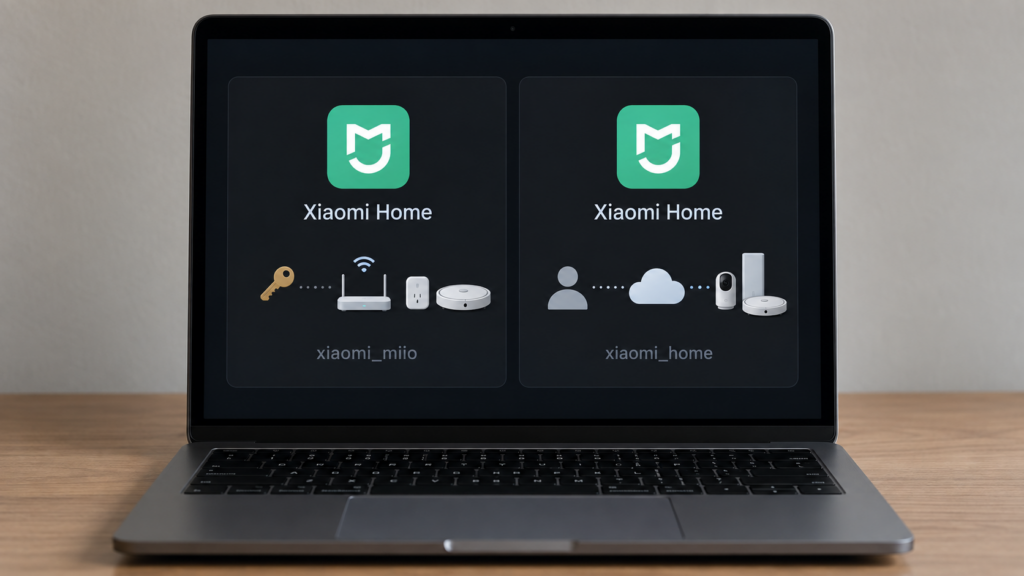
Home Assistant’s built-in xiaomi_miio integration uses the display name “Xiaomi Home.” Xiaomi’s separate official project, xiaomi_home, uses the same name. If you install the latter, the label alone becomes an unreliable way to tell which setup you are looking at.
The two integrations have different installation paths, device support and connection options. A third project, Xiaomi Miot, adds another choice. This comparison explains how to identify them and choose a route without replacing a working setup merely because another entry looks like an update.
The three real options
Built-in xiaomi_miio ships with Home Assistant core. It uses the community-maintained python-miio library for supported device APIs. Its direct LAN route needs the device’s address and local token, often obtained using the Xiaomi Cloud Tokens Extractor. The account-assisted setup can discover devices and tokens; some gateway workflows also use cloud information to discover subdevices. It is therefore inaccurate to describe every Miio configuration as having no account or cloud dependency after token extraction.
Home Assistant documents gateways and supported subdevices, vacuums, fans, purifiers, humidifiers, air-quality monitors, IR remotes, some Philips lights, Wi-Fi plugs/power strips and a Wi-Fi repeater tracker. Support is model-specific. A category name or the wider python-miio library’s capabilities does not establish that Home Assistant implements every model. The library handles both older miIO devices and some MIoT devices, so “Miio versus MIoT” is not a clean old/new protocol boundary.
Official xiaomi_home, from XiaoMi/ha_xiaomi_home, is supported by Xiaomi but installed as a custom integration. The repository documents HACS, Git installation and manual copying of custom_components/xiaomi_home into Home Assistant’s configuration directory. It requires Xiaomi-account OAuth authorization and selection of the account region and imported devices. It supports many MIoT device categories, with Bluetooth, infrared and virtual devices explicitly excluded in its current FAQ.
Community Xiaomi Miot, domain xiaomi_miot, is another custom integration installed through HACS or manually. It offers direct host/token setup for compatible LAN MIoT devices, or account-assisted discovery with Automatic, Local and Cloud connection modes. Its documented Bluetooth and Zigbee coverage does not mean it pairs those radios directly: the project recommends the cloud mode for such devices. The built-in Miio gateway route also covers some Zigbee devices, so Xiaomi Miot is not the only option with any Zigbee support.
Use the domain and installed repository, not just the “Xiaomi Home” label: xiaomi_miio is built into core; xiaomi_home is Xiaomi’s official custom integration; xiaomi_miot is the community Xiaomi Miot project.
Why they’re both called “Xiaomi Home”
The built-in integration’s manifest sets the name to “Xiaomi Home,” and its documentation uses that title. The same fields are present in the released 2026.9.4 manifest:
{
  "domain": "xiaomi_miio",
  "name": "Xiaomi Home"
}
Xiaomi’s official project’s manifest also sets “Xiaomi Home,” under the different domain xiaomi_home. This confirms the overlap without needing to guess why the name was chosen. Sharing a display name makes setup instructions easy to misread; it does not make the codebases interchangeable.
To check an existing installation, open Settings → Devices & services and identify the integration supplying a device’s entities. Check HACS for an installed Xiaomi Home or Xiaomi Miot repository. For a less ambiguous view, the integration details URL and a downloaded integration diagnostic, where available, identify its domain. Review diagnostics locally and keep tokens and account information private. Do not edit Home Assistant’s internal storage files to rename or convert an entry.
Adding the official custom integration may create another set of entities for devices already represented by Miio. Check device coverage, controls and automation references before removing the working entry. Installing a separate project does not migrate those references automatically.
Decision framework: which one actually fits
| Integration | Account/setup | Local path | Device coverage |
|---|---|---|---|
Built-in xiaomi_miio |
Direct token setup or optional account-assisted discovery; some gateway discovery uses cloud credentials | Supported device control over LAN; gateway/subdevice details vary | A documented model list across appliances, gateways/subdevices, lights and other categories |
Official xiaomi_home |
Xiaomi-account OAuth; custom integration via HACS/Git/manual installation | Compatible Central Hub Gateway route; limited optional IP-device LAN control | Many MIoT categories; current FAQ excludes Bluetooth, infrared and virtual devices |
Community xiaomi_miot |
Compatible host/token setup or Xiaomi-account import | Local-capable MIoT devices; Automatic and Local modes have device limits | Broad project-documented coverage, including account/cloud routes for BLE and Zigbee |
Start with the exact model and the functions you need. If it is supported by built-in Miio and the LAN controls work, that is a useful baseline. If it is absent or missing an essential function, compare the official and community projects’ current support. Their broader category descriptions are not a promise that every sensor, action or event will be exposed.
For the built-in route, provision the device in Xiaomi Home/Mi Home as its documentation requires, rather than assuming a separate Roborock app will work. Most supported device types use the UI: add Xiaomi Home in Home Assistant, then choose direct address/token setup or account-assisted discovery. The IR remote and repeater tracker have separate YAML instructions in the same Home Assistant documentation. Use the region where your devices are registered. A token is a device credential: keep it private, retain a stable local address and test actual control.
For the official custom route, install the XiaoMi/ha_xiaomi_home repository through HACS or copy its xiaomi_home folder into config/custom_components. Restart Home Assistant so it loads, add the integration, choose the region, complete the Xiaomi OAuth page and select the home/devices to import. Its configuration guide documents adding further accounts and updating imported devices. OAuth avoids storing your account password, but the project warns that credentials and device data are saved in Home Assistant’s configuration; protect backups accordingly.
For Xiaomi Miot, install its repository, restart, then add “Xiaomi Miot.” Direct host/token setup is for LAN-capable MIoT devices. Under account setup, Automatic chooses local control for supported models; Local forces the LAN route and leaves incompatible devices unavailable; Cloud uses the account’s cloud route. Forcing Local does not add a device protocol that the hardware lacks.
If you already have a working legacy setup, should you migrate?
A name collision is not a reason to migrate. Keep a working Miio setup unless another route solves a specific problem, then compare one device before moving the rest. Check control, state updates, extra settings and offline behavior, along with the entity IDs used by automations and dashboards.
The Smartmi Humidifier 2 guide on this site is an example of a local-token workflow. Home Assistant’s released model definitions include zhimi.humidifier.ca4; that model-specific evidence is more useful than assuming every Smartmi humidifier has the same interface. Local commands also do not establish that a device has stopped making its own internet requests. Home Assistant warns that blocking the internet can make some device firmware hang or reboot, so test the exact device rather than assuming that LAN control guarantees reliable operation with all internet access denied.
For compatible robot vacuums, Valetudo is a separate option. It replaces the cloud service on a supported rooted robot while retaining the vendor firmware; it is not simply a replacement firmware or a universal one-way flash. Check the exact supported model and rooting procedure before choosing it. That is a larger device-level change than installing another Home Assistant integration.
What “local” actually means if you pick the official integration
Xiaomi documents a local gateway route through a Central Hub Gateway with firmware 3.3.0_0023 or newer, or a device with compatible built-in central-hub software 0.8.9 or newer. It describes the standalone central hub as available in mainland China. Check the supported built-in-hub models separately; a generic Xiaomi gateway is not automatically this central hub.
Its optional LAN-control mode is narrower: Wi-Fi/Ethernet IP devices on the same LAN, not BLE Mesh or Zigbee devices. Xiaomi warns of possible abnormalities and recommends against using this option. It also says the option does not take effect when a central gateway is present on that LAN. Without a compatible local path, commands use Xiaomi Cloud.
The supported account regions are mainland China, Europe, India, Russia, Singapore and the US, with cloud device lists separated by region. Selecting one region does not move devices registered in another. The official integration still requires account authorization even when a local command route is available. Local transport is not a blanket statement about account services, metadata or every device’s external traffic.
Our guides on the official integration’s local modes and its data flows cover those distinctions. Home Assistant’s own automations run in Home Assistant, but their actions may travel over either a local or cloud device route. Xiaomi app automations have their own execution rules; the integration name does not settle that question.
FAQ
Why does Home Assistant show two different “Xiaomi Home” integrations?
Both projects use that name in their manifests. The domains differ: built-in xiaomi_miio and official custom xiaomi_home. Check the domain/repository when following instructions.
Is xiaomi_miio the same as the official Xiaomi Home integration?
No. Miio ships with Home Assistant core and uses python-miio. Xiaomi’s official project is separately installed and uses account authorization plus its own cloud/gateway/LAN routes.
Do I need a Xiaomi account to use my Xiaomi Wi-Fi devices in Home Assistant?
Some supported devices can use a direct address and token without an ongoing account login for commands. Provisioning and token retrieval may still involve the app/account. Official Xiaomi Home requires OAuth. Gateway discovery and unsupported local devices need their own checks.
Which Xiaomi integration should I use: Miio, official Xiaomi Home, or MIoT Auto?
Choose by exact device and required features, then check the actual command route. Built-in Miio is a reasonable starting point for supported models; the official and community projects offer different coverage. Bluetooth/Zigbee support does not automatically mean direct radio access or account-free control.
Will the legacy xiaomi_miio integration keep working?
It is present in released Home Assistant 2026.9.4, but that does not guarantee future device or API compatibility. Specific legacy platforms and attributes can change independently of the whole integration. Check release notes and Repairs for your version rather than using an unverified removal date as a migration deadline.
What this confirms, and what to check on your own setup
The name collision is confirmed by the manifests. The installation, authentication, support and local-route distinctions come from the projects’ current documentation and released Home Assistant code. Gateway discovery, compatible local transports and device-specific firmware behavior need separate checks.
No device was paired or reconfigured for this comparison. Verify the integration domain, exact device model and essential controls on your own setup, and test any offline requirement before retiring a working route.