

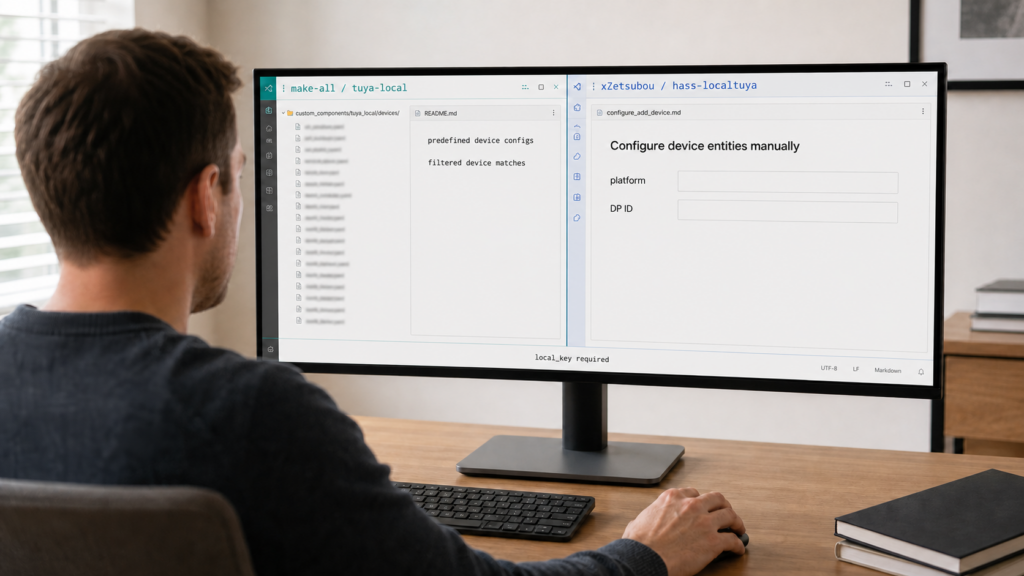
If you’ve decided you want your Wi-Fi Tuya or Smart Life devices talking to Home Assistant without routing every command through Tuya’s servers, the first page of search results doesn’t make it easy. There’s LocalTuya. There’s Tuya Local. There’s also the official tuya integration built into Home Assistant core, which sounds local and isn’t. Multiple Home Assistant community forum threads carry near-identical titles asking which one to actually use, spread across different years, which is a good sign this confusion is structural, not a one-off.
This article sorts out what each project actually is, how they differ in setup approach, and which one fits your situation depending on whether your device is common or an oddball nobody’s written a config for. None of this comes from installing the integrations ourselves. It’s a synthesis of each project’s own GitHub release history, README documentation, and Home Assistant community discussion, cited throughout.
If your device is common, start with tuya-local (make-all) and its guided setup. If it’s an oddball model tuya-local doesn’t recognize, LocalTuya’s manual datapoint setup is the fallback — but install a maintained fork, not the original repository. Either way, you still need your device’s local_key.
Three names, three different things
Part of the confusion is that these aren’t variants of one project. make-all/tuya-local and rospogrigio/localtuya are two independent codebases, and make-all’s README explicitly describes the other as a similar but unrelated integration rather than a fork. Then there’s the official, first-party tuya integration that ships in Home Assistant core, which is a third thing entirely and routes every command through Tuya’s cloud regardless of what its name implies.
The practical upshot: someone asking “LocalTuya or Tuya Local?” is usually choosing among three separate projects, not two flavors of one. Worth sorting out before touching a config flow.
tuya-local (make-all): predefined configs, active in 2026
make-all/tuya-local ships with a large catalog of predefined device configuration files. During setup, it queries the device, compares what it finds against every available config, and shows you a filtered list of matches from a catalog of 1,000-plus entries. You pick the one for your hardware rather than mapping anything by hand.
As of this writing (checked 2026-07-30), the project has shipped a steady run of 2026 releases: 2026.6.3, 2026.6.4, 2026.7.0, 2026.7.1, and 2026.7.2 (dated 2026-07-18), each adding somewhere between 23 and 32 new device configs and fixing protocol-communication issues along the way. That’s an active, current project, not something coasting on a config catalog built years ago.
tuya-local also offers a cloud-assisted setup path. With it, the device ID and local key are pre-filled from your Tuya account instead of being typed in by hand, which is what lets the project describe setup as possible without a Tuya IoT Platform developer account for at least some devices. Two caveats worth stating rather than glossing over. It still involves a Tuya account, so it removes the developer-portal step, not the cloud relationship. And how consistently it holds across device families and account regions is the project’s own documented behavior, not something we’ve measured.
The maintenance picture is the clearest single differentiator right now. tuya-local is shipping tagged stable releases on a roughly monthly rhythm, while the better-known LocalTuya name is spread across forks with older tags. That’s worth weighing even though LocalTuya still carries far more accumulated community mindshare.
LocalTuya (rospogrigio) and its forks: manual setup, but pick the fork deliberately
rospogrigio/localtuya takes the opposite approach. Instead of a predefined catalog, you configure each entity (switch, sensor, and so on) manually against the device’s raw datapoint (DP) IDs. That’s more work up front, but it’s also the path that covers devices no predefined config exists for.
The thing most older guides don’t tell you is that “LocalTuya” is no longer one repository. The original rospogrigio project has stalled: community reports describe it as going years without substantive updates, carrying a backlog of well over a thousand open issues and around a hundred open pull requests, and an issue on the HACS integration tracker (#4424) asks for it to be replaced in HACS with a maintained fork. It has been forked more than once as a result, including by xZetsubou (published as hass-localtuya) and by leeyuentuen.
Of those, xZetsubou/hass-localtuya is the one the community generally points at, reported as more than 500 commits ahead of the upstream project and actively managed. Worth being precise about what “active” means here, though: its most recent tagged release we could find is 2025.11.0, so it has gone longer without a stable version tag than tuya-local has, even while carrying more development work. leeyuentuen/localtuya, the other fork, is on betas, most recently 3.7.0-beta.15, with earlier betas from January and March 2026.
So LocalTuya isn’t abandoned. It’s fragmented, and the practical consequence is that “install LocalTuya” is an ambiguous instruction in 2026. If you go this route, choose the fork deliberately instead of taking whatever repository a three-year-old forum post happens to link to.
Where LocalTuya’s reputation comes from
The Chinese-language Home Assistant community forum 瀚思彼岸 (bbs.hassbian.com, “Hanssense”) has run long-standing threads on LocalTuya under the banner of 本地化 (localization), including one describing LocalTuya as a 局域网涂鸦的解决方案 (LAN-based solution for Tuya) aimed at cutting the delay in Tuya’s cloud feedback loop, alongside several dedicated threads on local_key extraction. Those threads run to many archived pages. We’re reading them through search-result titles and snippets rather than the pages themselves, since the forum wasn’t reachable directly when we looked, so treat this as a signal about which name has mindshare, not a measurement of thread activity.
tuya-local (make-all) didn’t come up by name in the same search pass. There are early signs that’s starting to shift: a Chinese technical blog on CSDN has begun covering the make-all project directly, framing it as a way to free more than 1,000 Tuya devices from cloud dependency. That’s a newer signal, not yet the dominant one, and it lines up with the same fork and lineage split found in English-language forums.
What both still require: the local_key step
Neither project sidesteps the need for your device’s Tuya local_key. That requirement is the same regardless of which integration you pick. The difference is only in how each guides you through obtaining it, not whether the step exists at all. If you haven’t been through that process, our own walkthrough of getting a Tuya local key covers the account and cloud-project mechanics either path may require. If you’d rather confirm a key works before committing to an integration at all, tinytuya does that from a script with no Home Assistant in the picture.
Worth knowing: this whole comparison applies to Wi-Fi Tuya devices specifically. Tuya-branded Zigbee devices running on Zigbee2MQTT or ZHA skip the local_key step entirely, because Zigbee pairing doesn’t go through Tuya’s cloud in the first place.
What neither is: the official, cloud-only Tuya integration
Home Assistant’s built-in `tuya` core integration is fully cloud-dependent. It routes every command through Tuya’s servers, with no local fallback. It is not a variant of LocalTuya or tuya-local, and its name is exactly why readers searching for a local option end up confused.
If your goal is keeping these devices working without Tuya’s cloud in the loop at all, the core integration isn’t the tool for that job regardless of how “local” the branding sounds elsewhere in the Tuya ecosystem. For the broader question of what Tuya’s cloud actually collects, and why a reader would want either local integration in the first place, see our existing coverage.
Which one for your situation
| Your situation | Pick | Why |
|---|---|---|
| Common Wi-Fi Tuya/Smart Life device | tuya-local (make-all) | Guided setup from a 1,000+ device catalog, no manual mapping, active 2026 release cadence |
| Obscure or unsupported device | LocalTuya, via a maintained fork (xZetsubou/hass-localtuya) | Manual per-entity datapoint mapping covers devices no predefined config exists for. Install the fork, not the stalled original repository |
| Tuya-branded Zigbee device | Neither | Use Zigbee2MQTT or ZHA directly; no local_key needed |
| Fine with cloud, want the stock Tuya app experience | Core `tuya` integration | Cloud-dependent by design; not a local option at all |
If a device works with both tuya-local’s catalog and LocalTuya’s manual setup, tuya-local’s guided flow and current release pace make it the easier starting point. Fall back to a maintained LocalTuya fork when tuya-local’s catalog doesn’t recognize your model. Blocking these devices from reaching the internet entirely, once local control is working, is a separate step covered elsewhere on the site.
FAQ
What’s the difference between LocalTuya and Tuya Local in Home Assistant?
They’re two separate, unrelated codebases. tuya-local (make-all) uses predefined device configs picked from a large catalog. LocalTuya (rospogrigio and its forks) has you manually map each entity to the device’s raw datapoint IDs.
Do I need a Tuya developer account for LocalTuya or tuya-local?
Both integrations rely on the same underlying local_key, which is usually obtained through a Tuya IoT Platform cloud project. tuya-local’s cloud-assisted setup pre-fills the device ID and key from your Tuya account, which its documentation describes as avoiding a full developer account for some devices. That removes the developer-portal step, not the Tuya account itself, and we haven’t independently verified how consistently it holds across regions.
Which Tuya integration supports the most devices?
tuya-local’s predefined catalog lists 1,000-plus device configs and is actively growing with each 2026 release. LocalTuya doesn’t rely on a fixed catalog at all, since its manual datapoint mapping can, in principle, cover devices neither project has a named config for.
Is the official Tuya Home Assistant integration actually local?
No. The core tuya integration is fully cloud-dependent and routes all commands through Tuya’s servers. It’s a different project from both LocalTuya and tuya-local.
Is LocalTuya still maintained in 2026?
Not at the repository most guides still link to. The original rospogrigio project has stalled, and there’s a request on the HACS tracker to replace it there with a maintained fork. Development continues in forks instead: xZetsubou/hass-localtuya is the one most often recommended, reported as 500-plus commits ahead of upstream, though its latest tagged release we found is from late 2025. leeyuentuen/localtuya is on betas.
What this comparison verified
This article is built entirely from each project’s own GitHub README and release history (make-all/tuya-local and rospogrigio/localtuya plus its xZetsubou and leeyuentuen forks), Home Assistant community discussion about the choice between them, including the HACS tracker request to replace the original LocalTuya repository, and Chinese-language community discussion (bbs.hassbian.com forum threads and one CSDN blog post) read through search results rather than fetched pages. No integration was installed or tested against real hardware for this piece, and the article doesn’t claim otherwise. Two things are flagged in the text rather than asserted: tuya-local’s claim about skipping the developer-account step, which comes from the project’s own docs, and the exact current release state of the LocalTuya forks, where commit-activity reports and tagged-release dates point in slightly different directions. If you’ve set either one up recently and hit something that contradicts what’s here, the linked release notes are the first place to check for what’s changed since this was written.