

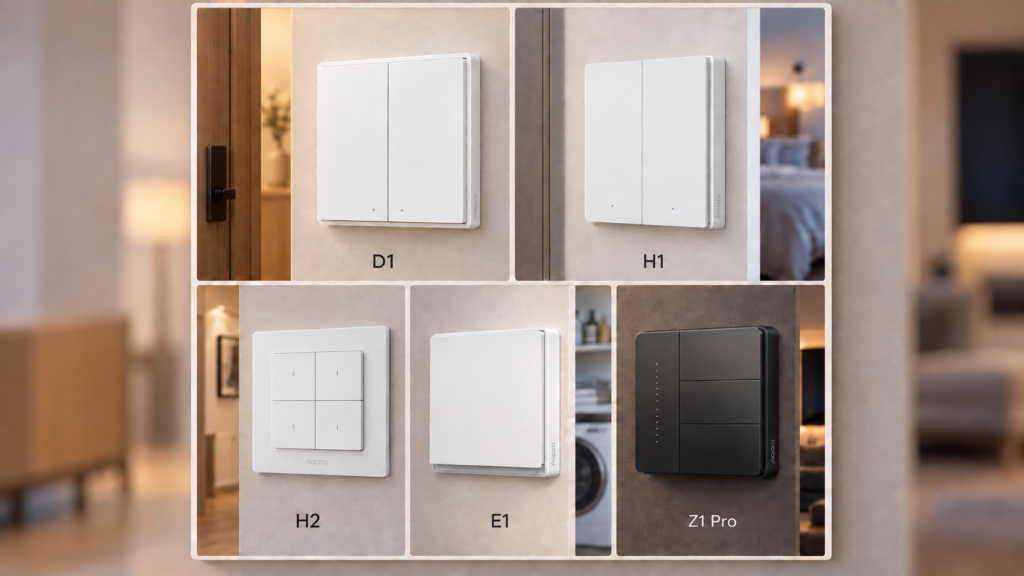
Aqara currently sells five wall-switch families, named D1, H1, H2, E1 and Z1 Pro. None of those names tells you what you need to know before buying. You still have to work out whether your wall box has a neutral wire, what happens if it doesn’t, and whether the switch reports power at all.
Why five families exist, and what actually varies
The letter codes are not generation numbers. As this site’s naming-convention explainer lays out, Aqara reuses tier labels like “E1” across unrelated product categories, so “which one is newest” is the wrong question to bring to this decision.
What actually varies across the five is narrower than the marketing suggests: how the family handles the neutral wire, whether it reports power, which radio it speaks, and what is currently broken on it.
This comparison covers wall switches only. A wall-switch E1 and a radiator-thermostat E1 have nothing in common beyond the tier label. If you are trying to place an Aqara SKU from a different product category, start with the naming-convention explainer instead.
Quick-decision comparison
| Family | Protocol | Wiring | Power monitoring | Known issue |
|---|---|---|---|---|
| D1 | Zigbee 3.0 | Split SKUs: no-neutral (end device) or with-neutral (router) | With-neutral SKUs only | State-reporting reports on QBKG25LM/26LM, no fix on record |
| H1 | Zigbee 3.0 | Split SKUs: WS-EUK01 no-neutral, WS-EUK03/WS-EUK04 with-neutral | With-neutral SKUs only | No-neutral variants carry documented Zigbee2MQTT quirks (decoupled mode, anti-flicker, minimum load) |
| H2 | Zigbee 3.0 or Thread/Matter on one SKU, factory reset to change | Unified SKU, neutral optional | With-neutral wiring only | Configure-fail bug on WS-K07E/WS-K08E fixed in Zigbee2MQTT 2.6.1, with a later regression reported on 2.6.2. No decoupled-mode toggle on the Matter path |
| E1 | Zigbee 3.0 | 4 SKUs split across rocker count and neutral | None, on any variant | No-neutral decoupled-mode bug, fixed in 2023, requires a full re-pair |
| Z1 Pro | Zigbee 3.0 | Unified SKU, neutral optional (3 W minimum load without) | Full set on every model | 4-gang decoupled mode unreliable on centre and bottom buttons (Zigbee2MQTT #23767, closed without a fix) |
The neutral wire decides more than you think
Every family above except E1 gates power monitoring behind the neutral wire, and two of the five sell the neutral and no-neutral options as physically different SKUs you cannot swap later. That makes “does my box have a neutral?” the first question, not a footnote.
The part that catches people is what a no-neutral switch needs from the load. Without a neutral, the switch trickle-powers itself through the lamp circuit, which means the load has to draw enough current for that to work. Aqara’s own Z1 Pro user manual publishes the constraint plainly for that family: a 3 W minimum load with no neutral, and no minimum at all when a neutral is present. Our H1 lineup pillar flags the same class of consideration, minimum load and bypass capacitors, on H1’s no-neutral variants.
In practice that is a modern-LED problem. A single low-wattage LED bulb can sit under the threshold, which produces flicker or a switch that never quite turns the light off. The with-neutral variants have no such limit. Where a neutral is already present in the box, specifying the with-neutral model is the easier call. Where it is not, pulling one is electrical work and in most jurisdictions an electrician’s job.
D1
D1 splits by wiring across all three gang sizes. No-neutral SKUs (QBKG21LM, QBKG22LM, QBKG25LM) are Zigbee end devices with no power monitoring. With-neutral SKUs (QBKG23LM, QBKG24LM, QBKG26LM) are routers that do report power. That rule holds across the family, though the no-neutral models have a history of being misreported as routers in some integration databases (zigpy issue #3009, Zigbee2MQTT issue #6562). If a mesh map disagrees with the rule, that is the misreport rather than your setup.
D1 plates are the 86 x 86 mm square size standard in China and much of Asia. Square 86 mm plates are sold into some European markets too, but back-box standards vary by country and mounting depth is often the real constraint, so measure your box rather than assuming fitment either way. Our D1 lineup pillar goes SKU by SKU if you are choosing within the family.
The triple-rocker QBKG25LM and QBKG26LM have a state-reporting problem reported across several Zigbee2MQTT issues (#14673, #17477, #19719) with no fix on record. The most consistent mitigation in those reports is mesh quality, meaning proximity to the coordinator or a router. That lands harder on the no-neutral QBKG25LM, which is an end device and cannot route for itself.
H1
H1 is Zigbee 3.0 only and splits wiring into separate SKUs: WS-EUK01 without a neutral, WS-EUK03 and WS-EUK04 with one. Power monitoring appears only on the with-neutral variants, a point our E1 guide establishes by cross-checking H1 and D1 against E1 specifically.
Two things the family name hides. First, H1 is not a cleanly EU-only line: four SKUs carry the WS-EUK prefix and state an EU market, while the QBKG-prefixed H1 switches either make no market claim or, in the QBKG29LM’s case, carry a Zigbee model ID whose acn segment reads as a China-market designation against its own guide’s EU claim. Go by what the specific model documents, not the H1 label. Second, the no-neutral H1 variants carry the usual no-neutral baggage, documented in our H1 pillar: decoupled-mode behaviour, an anti_flicker_mode setting, and minimum-load and bypass-capacitor considerations. H1 is a mature, well-supported family, but it is not the gotcha-free option.
H2: the only protocol-choice family
H2 is the one family where a single physical SKU can run either Zigbee 3.0 or Thread/Matter. That choice is not a live toggle. Changing it means a factory reset and re-pairing through the new protocol’s own flow. H2 also unifies neutral and no-neutral wiring into one SKU, though monitoring still only appears when it is wired with a neutral.
The H2 ships in Thread mode. It will not join a Zigbee network until you factory reset it first. If you are buying H2 specifically to run it on Zigbee2MQTT, which is the deeper path today, budget for that reset as step one rather than discovering it at the wall.
On Zigbee, H2 exposes more than any other family here: device temperature, power-outage count, per-endpoint operation mode, multi-click configuration, LED control and switch lock. Our H2 WS-K07E guide covers both pairing paths, and the Zigbee2MQTT WS-K07E device page lists the current expose set. A configure-failing bug on the WS-K07E and WS-K08E was a Zigbee2MQTT converter problem rather than a hardware defect, and it shipped fixed in Zigbee2MQTT 2.6.1. Device support does shift between releases, though, and a later regression was reported on 2.6.2, so run a current version and check the device page if something looks wrong after pairing. There is also an earlier H2 EU guide covering the Zigbee-only setup.
Home Assistant’s Matter integration does not expose a decoupled-mode toggle for the H2. Setting it means going through the Aqara app before commissioning, which means touching Aqara’s cloud once even if you intend to run the switch fully local afterwards. If that is a non-starter, run H2 on Zigbee instead.
E1: the budget tier, and no monitoring at all
Four SKUs, QBKG38LM through QBKG41LM, split across single and double rocker and across no-neutral and with-neutral wiring. Zigbee 3.0 only, no external converter needed.
The monitoring story is the simplest of the five and it is a letdown if you are expecting H1 or D1 behaviour. None of the four E1 variants report power or energy, even the with-neutral ones. With-neutral buys you a device-temperature sensor and OTA support, not monitoring.
No-neutral E1 variants had a bug where decoupled mode silently failed to fire action events. It was fixed in a 2023 Zigbee2MQTT release, but the fix requires a full unpair, factory reset and re-pair after upgrading. Re-applying the decoupled-mode setting on an already-paired device is not enough.
Z1 Pro: the monitoring-richest family
Z1 Pro is gang-based, ZNQBKG42LM (1-gang) through ZNQBKG45LM (4-gang), and every model carries a touch-based wireless slider the other families do not have. Zigbee 3.0 only, and like H2 it is a unified neutral-or-no-neutral design rather than split SKUs.
The standout is monitoring. Every Z1 Pro model number carries the full expose set, meaning power, voltage, current, cumulative energy and device temperature. No other family here puts that on every model: D1 and H1 gate monitoring behind the with-neutral SKU, E1 has none at all, and H2 carries it only when wired with a neutral. One caveat worth stating rather than glossing: because Z1 Pro supports both wiring styles on the same hardware, whether those readings behave identically on the no-neutral path is not something either Aqara’s manual or our own Z1 Pro guide establishes. Treat full monitoring as confirmed per model, not per wiring choice. Pairing also differs from the rest of the lineup, using a double-tap then a five-second hold.
On the 4-gang ZNQBKG45LM, decoupled mode does not reliably apply to the centre or bottom buttons, and setting the centre button’s mode can change the top button’s. The issue (Zigbee2MQTT #23767, opened August 2024) was closed without a fix, so check its current state before relying on it changing. The practical workaround is that this model’s fourth gang is a relay-less wireless-only button, unaffected by the bug. Use that one as your decoupled control.
Which family fits which buyer
- Your box has a neutral and you want energy data: D1 or H1 with-neutral SKUs, or Z1 Pro for the richest set. All report power; Z1 Pro adds voltage, current and cumulative energy on every model.
- Your box has no neutral: check your load first. A single low-wattage LED may sit under the minimum. H2 and Z1 Pro handle both wiring styles on one SKU, which removes the risk of buying the wrong variant.
- You want Thread/Matter optionality: H2, the only family that offers it. Budget for the Aqara-app step if you want decoupled mode on the Matter path.
- Budget is the constraint and you do not need monitoring: E1. Plan around the no-neutral decoupled-mode re-pair requirement if you are updating firmware on an existing install.
- You are running ZHA rather than Zigbee2MQTT: the expose sets differ across all five. Our ZHA vs Zigbee2MQTT guide covers what changes.
H2’s protocol-choice design is the most future-proof of the five on paper. The Matter-path decoupled-mode gap is real enough that Zigbee remains the better default on it today unless Thread is a hard requirement.
Common questions
What’s the difference between Aqara D1, H1 and H2 wall switches? D1 and H1 are both Zigbee-only families that split no-neutral and with-neutral wiring into separate SKUs, with power monitoring on the with-neutral variants only. H2 unifies both wiring styles into one SKU and adds a Thread/Matter option that D1 and H1 do not have.
Which Aqara wall switch has power/energy monitoring? With-neutral variants of D1 and H1, H2 when wired with a neutral, and every Z1 Pro model. No E1 variant reports power.
Is the Aqara Z1 Pro better than the H1 for Home Assistant? For monitoring, yes: Z1 Pro carries the full set on every model where H1 gates it behind the with-neutral SKU, and Z1 Pro also handles either wiring style on one SKU. H1 is the more established family with wider Zigbee2MQTT history behind it, but it is not free of documented quirks on its no-neutral variants.
Does any Aqara wall switch support Thread or Matter? Only H2, and only by factory-resetting and re-pairing on the new protocol. It is not a live toggle, and the Matter path currently loses the decoupled-mode toggle in Home Assistant.
Do I need a neutral wire for an Aqara wall switch? Not always. E1, D1 and H1 all sell no-neutral SKUs, and H2 and Z1 Pro support either style on one SKU. Without a neutral you lose power monitoring on every family that offers it, and you pick up a minimum-load requirement: Aqara publishes 3 W for the Z1 Pro.
What this comparison verified, and what it didn’t
This piece performed no hands-on testing. The per-family facts come from this site’s five previously published wall-switch guides, each linked above, with three claims checked against primary sources for this comparison: the Z1 Pro’s wiring design and minimum load against Aqara’s own user manual, the H2 configure bug against the Zigbee2MQTT device page, and the state of Zigbee2MQTT #23767 against the issue itself. That issue is closed without a fix rather than actively declined, and our own Z1 Pro guide describes its closure two different ways, so check the thread rather than treating either description as settled.
One thing is corroborated rather than asserted: none of these five families require the Aqara Home app, an Aqara account or an Aqara hub for day-to-day Zigbee2MQTT operation. All five pair directly to a standard Zigbee coordinator, and that local-operation claim was individually verified in each family’s own guide. If you are choosing between these families to stay off Aqara’s cloud, all five clear that bar the same way. What differs is wiring, protocol, monitoring and what is currently broken.