

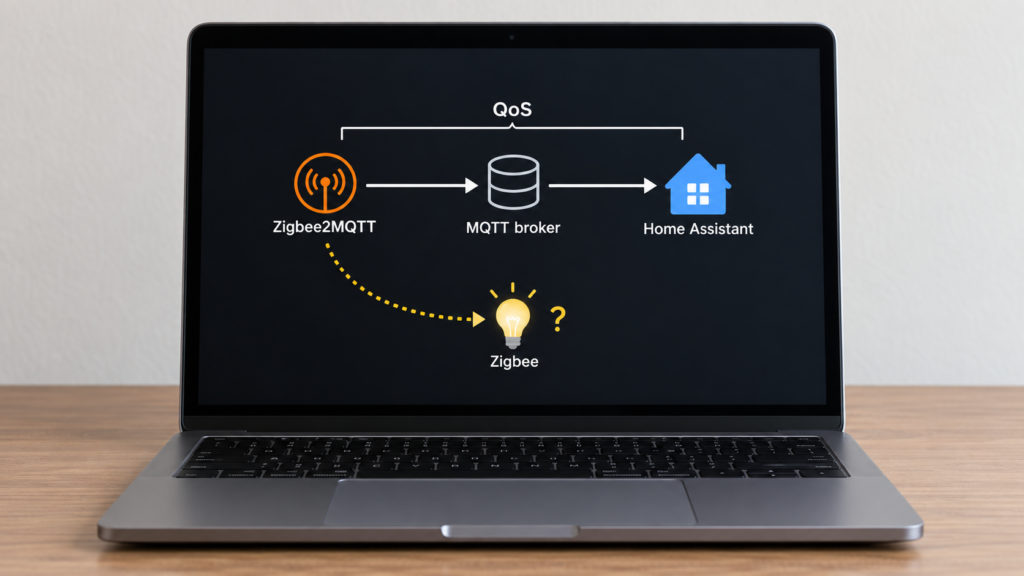
A device’s qos setting controls MQTT delivery of its state publications. It does not make a Zigbee command execute exactly once or prove that a bulb changed physically. Zigbee2MQTT, the broker, the subscribing client and the radio each handle a different part of the path.
The device/group documentation lists the option. This guide applies it to the actual MQTT paths, including the independent subscription side. The implementation checks below refer to Zigbee2MQTT 2.14.2; no physical-device delivery tests were performed.
Where qos lives, and what it doesn’t touch
Set qos on a device or group, or use device_options as a default for devices that do not override it. Device entries use IEEE-address keys; groups use their numeric group ID. Use the real IDs from your installation rather than the example below. The MQTT connection settings are a separate configuration area.
device_options:
  qos: 1

devices:
  '0x00158d0001a2b3c4':
    friendly_name: living_room_light
    qos: 2
    optimistic: false

groups:
  '1':
    friendly_name: downstairs_lights
    qos: 1
In the state-publication code, the entity’s qos defaults to 0 when unset. It governs that publication to the broker. It does not change another client’s command publish, the QoS Zigbee2MQTT requests when subscribing, or the Zigbee radio transmission.
Availability is a separate path: 2.14.2 publishes device availability at QoS 1, independently of the device’s state QoS. Discovery and bridge status also have their own code paths. Do not assume every topic about a device inherits the same option.
For incoming commands, 2.14.2’s MQTT code subscribes without an explicit QoS override, using MQTT.js’s default 0. Publishing a command at QoS 2 therefore does not force the broker-to-Zigbee2MQTT hop to use 2. The publication and subscription are independent settings.
If Zigbee2MQTT receives a command but the device does not respond, raising MQTT QoS cannot repair that radio/device failure. If Zigbee2MQTT never receives it, investigate command topics, broker permissions and connections first. Our MQTT topics guide helps identify that boundary.
What actually confirms the device got the command
MQTT acknowledgment is not a Zigbee acknowledgment. A broker can accept a command before Zigbee2MQTT has processed it, and a stack-level send result is not proof that a relay or bulb physically changed. Group/broadcast commands also differ from unicast requests; there is no blanket per-member physical-execution guarantee.
The MQTT-to-Zigbee QoS discussion asks about connecting those outcomes. The current per-device option does not do that. Use command-handling logs and fresh device reports or supported reads for the result you need to observe.
optimistic defaults to true: a successful command handler can update state before a device report. Setting optimistic: false suppresses that handler’s optimistic state update, as implemented in publish.ts. It does not make every subsequent MQTT payload fresh: cached attributes, startup publications and retained broker messages can still exist. Check the actual report or supported read for the expected property, and give any automation a bounded timeout. A matching value confirms observable state, not which command caused it.
QoS 0, 1, 2: what each level actually promises
The meanings come from the MQTT specification. The older MQTT background explanation gives another overview. Each QoS exchange covers one sender/receiver hop, not end-to-end device execution:
| QoS | MQTT delivery behavior | Protocol overhead | What it does not establish |
|---|---|---|---|
| 0 | At most once; no MQTT acknowledgment or retry handshake | Lowest | Receipt by a disconnected subscriber or physical device execution |
| 1 | At least once on the MQTT hop; duplicate delivery is possible | PUBLISH/PUBACK exchange | Exactly-once application actions or Zigbee success |
| 2 | Exactly-once MQTT delivery within that protocol exchange | PUBLISH/PUBREC/PUBREL/PUBCOMP exchange | Exactly-once Zigbee or physical execution |
The broker-to-subscriber delivery is limited by the publication’s QoS and the maximum granted for that subscription. A QoS-0 subscription receives QoS 0 even if the original publisher used 2. The broker’s grant can also be lower than requested, so inspect the actual subscription and delivered packet.
Offline delivery needs its own session conditions. QoS does not create a subscription or persistent session for a client that was absent. Persistent sessions can keep qualifying QoS-1/2 messages for reconnecting clients, subject to expiry and broker limits. Zigbee2MQTT’s 2.14.2 MQTT code skips a publication when disconnected; choosing a higher entity QoS does not turn that skipped call into a stored message.
Why MQTT Explorer still shows qos 0
The 2024 community report and an earlier report describe QoS 0 in MQTT Explorer despite a higher device setting. That can be the viewer’s subscription, rather than a failed Zigbee2MQTT setting.
MQTT Explorer 0.3.5 subscribes without a QoS option, using the client library’s default 0. Requests #323 and #334 asked for configurable subscriptions. The current development code passes a per-subscription QoS, so “Explorer can never change it” is not a rule for every build. Check the version and actual connection options.
A client that requests QoS 2 and prints the received packet’s QoS makes a better check. Replace the broker/topic details and supply your authentication/TLS settings. The Mosquitto subscriber documentation defines -q and the %q output field:
mosquitto_sub -h 192.168.10.20 -q 2 -t 'zigbee2mqtt/#' -F 'qos=%q topic=%t payload=%p'
Generate a fresh state report from the intended device and distinguish it from an old retained message. This tests the broker-to-client packet; it does not capture the original publisher’s handshake or prove a radio command succeeded. Also inspect the active saved device configuration if the result is unexpected.
Don’t confuse qos with the MQTT protocol version
mqtt.version defaults to 4, meaning MQTT 3.1.1 in the client configuration. QoS levels are independent of that choice. Set protocol version 5 when using a device’s retention option, which maps to MQTT message expiry; expiry is different from retaining the latest message.
retain tells the broker to store a topic’s latest retained publication for later subscribers. QoS controls the individual MQTT delivery exchange. Neither makes stored state a fresh device reading. See Retain versus state.json for the different caches.
Should you raise QoS for Home Assistant discovery messages?
Issue #18460 is a historical request for more reliable discovery publications; its reporter described modifying an older build. The current 2.14.2 discovery implementation already publishes discovery configurations at QoS 1. They are not governed by device_options.qos.
There is no need to patch the current version to reproduce that old request’s QoS-1 behavior. If entities fail to appear, check discovery topics, retained configuration, broker permissions and HA’s connection. Our discovery troubleshooting guide covers that separate workflow. QoS 1 still does not guarantee a subscriber with no suitable session was listening.
The broker side of this
Keep the broker reachable and inspect disconnects, authentication failures, storage limits and session expiry. QoS can retry a message within the protocol’s conditions, but cannot provide unlimited offline storage or undo a publication that the application never sent.
Start by deciding what needs confirmation: the broker accepting a publication, a client receiving it, Zigbee2MQTT handling a command, or a device reporting the expected result. Choose the check for that point in the path.
FAQ
Does higher QoS prove my Zigbee command reached the device? No. It concerns an MQTT hop. Use command logs and fresh device reports or supported reads for device behavior, with a timeout and suitable group/unicast expectations.
Why does Explorer show 0 after I set 2? A QoS-0 subscription receives at 0. Older Explorer builds use that default; newer development code supports a subscription setting. Check the installed build and broker grant.
Can I set a default for devices? Yes, with device_options.qos; per-device values override it. Groups and availability/discovery code paths need separate consideration.
Is QoS the same as retain? No. Retain stores a topic’s latest publication; QoS governs a delivery exchange. Offline sessions and expiry are further settings.
Will it fix an unreliable Zigbee device? It cannot repair radio delivery, device power or firmware. First determine whether the command failed before or after Zigbee2MQTT received it.
What this explainer verified
The option scope, availability/discovery exceptions and optimistic handler behavior were checked against 2.14.2 source and documentation. Protocol guarantees come from MQTT’s specification; viewer behavior is version-specific. This is a source-based explanation without bench measurements. QoS does not itself decide cloud dependence: that depends on where the broker and clients run.