

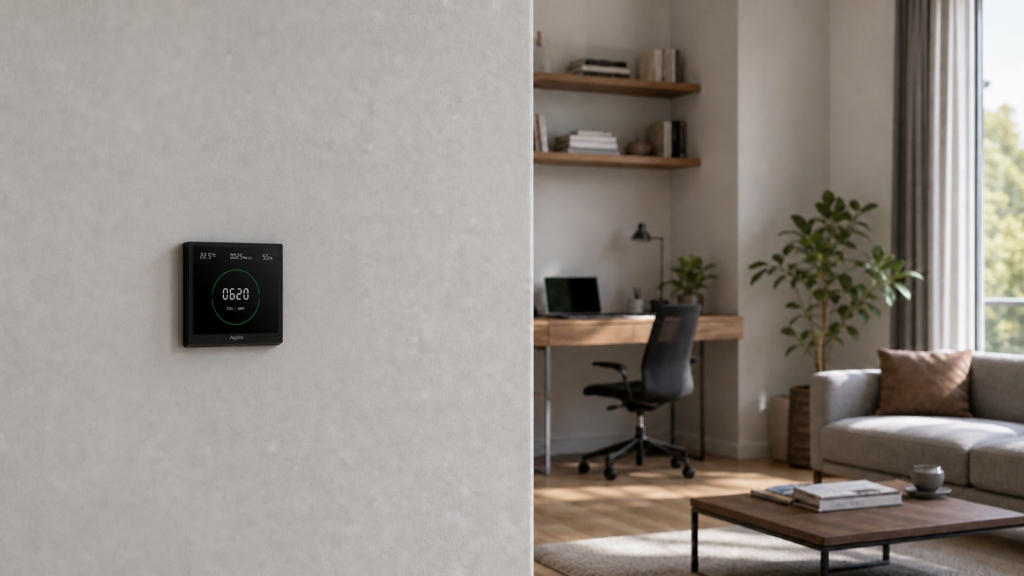
Aqara Air Monitoring Panel S1 (KQJCMB11LM) in Home Assistant via Zigbee2MQTT
The Aqara Air Monitoring Panel S1 (KQJCMB11LM) reports CO2, PM2.5, temperature, and humidity to Home Assistant through Zigbee2MQTT. It pairs directly with your Zigbee coordinator, so you can read those measurements without an Aqara hub or account.
The setup below covers pairing, calibration, and the reporting issues to check if a reading looks wrong.
What the Aqara Air Monitoring Panel S1 actually measures
The panel measures carbon dioxide, fine particles, temperature, and relative humidity. The four values are available in the Z2M device documentation.
The S1 measures carbon dioxide (CO2), not carbon monoxide (CO). Use it to monitor ventilation and indoor conditions. It is not a CO alarm, smoke alarm, or other life-safety device, and it cannot establish that a room is safe.
The Aqara TVOC Air Quality Monitor measures volatile organic compounds rather than CO2 and PM2.5. Check the model number before following a setup guide; the two products measure different things.
The S1 is a mains-powered wall panel, not a battery sensor. Check the voltage rating on your unit and the installation manual. Its 86 mm wall-box format may need a different mounting arrangement outside markets that use that format. Have a qualified installer assess the supply, neutral, enclosure, and local requirements before fitting it.
What you need before pairing
- A Zigbee coordinator running Zigbee2MQTT v1.29.0 or later. The S1 wasn’t supported before that version. If you’re not sure what version you’re running, check the Z2M frontend under Settings > About.
- Neutral wire at the installation location. The S1 needs both line and neutral to function. If your wall box only has line (common in some older European wiring), the S1 won’t work there.
- A suitable wall box and mounting arrangement, assessed by a qualified installer.
You do not need an Aqara hub, the Aqara Home app, or any cloud account. The S1 pairs directly to your Zigbee coordinator as a router device.
If you’re not yet set up with a Zigbee coordinator and Z2M, our guide to running Aqara Zigbee devices in Home Assistant without the hub covers that setup from scratch.
Pairing the S1 with Zigbee2MQTT
Once the panel is powered up and installed:
- Open the Z2M frontend and enable permit join (either globally or on a specific coordinator).
- Hold the button on the S1 (check the device’s short manual for button location; it’s typically a small recessed button on the side) until the panel display indicates pairing mode.
- The device should appear in Z2M within about 60 seconds under the model ID
lumi.airm.fhac01.
Check the OTA menu for available firmware and read the release notes before updating. Early reports mention version v0.0.0_0026 from 2022; that is historical context, not a recommendation to install that particular version today.
Confirm the pair by looking for the device in Z2M’s device list. The join type should read “Router,” which confirms it’s contributing to your mesh.
Entities exposed in Home Assistant
With MQTT discovery enabled, check for the following measurements in HA. Entity names depend on the device name and your existing setup.
| Entity | Unit | Notes |
|---|---|---|
sensor.co2 |
ppm | Carbon dioxide concentration |
sensor.pm25 |
µg/m³ | Laser-scattering particle sensor; see known bug below |
sensor.temperature |
°C | Calibration offset available |
sensor.humidity |
% | Calibration offset available; compare with a reference |
sensor.linkquality |
lqi | Standard Z2M link quality |
A reading can stay unchanged when room conditions are stable. HA’s last_updated timestamp does not by itself prove that the device is still reporting. Check Z2M logs or its last-seen information, if enabled, alongside the panel display.
Calibration — what you can adjust
Z2M provides absolute calibration offsets for the four measurements in its device settings. They take effect on the next report. Check the current options before changing a value.
A few notes on applying these:
Humidity: compare the panel with a reliable reference nearby under stable conditions. Apply an offset based on that comparison. An offset reported for someone else’s unit is not a default calibration for yours.
Temperature: The panel is wall-mounted and mains-powered, so waste heat from the circuitry can pull the temperature reading up over time. Let it settle for 24-48 hours after installation before calibrating, and compare against a reference sensor placed nearby at the same height.
CO2: use the sensor manufacturer’s calibration guidance and a suitable reference. Do not treat an assumed outdoor concentration as a precise calibration target. The Z2M offset adjusts the reported value; it is not automatic baseline correction.
PM2.5: compare with an independent particle monitor before applying an offset. A low reading in apparently clean air is not enough to establish a zero point.
Known issues and caveats
PM2.5 reporting as zero (Z2M bug #21475)
In certain Z2M versions, PM2.5 exposed as 0 in the entity even when the underlying measurement was being received correctly. The sensor itself was capturing the right value (visible in the dev console under endpoint 1, cluster pm25Measurement); the problem was in Z2M’s exposure layer.
If PM2.5 remains at zero while other values change, compare the panel display with Z2M reports and your software version. Issue #21475 is useful historical troubleshooting context; a similar symptom can have another cause.
Check support before choosing ZHA
Earlier reviews reported incorrect CO2 scaling and missing humidity in ZHA. Those reports describe the versions tested at the time. Check your current ZHA version and device quirk before assuming the same limitations still apply.
This guide uses Z2M, whose device page lists all four measurements. Whichever integration you choose, compare its readings with the panel display before using them in an automation.
Humidity accuracy
Check humidity against a reference before adjusting it. Repeated differences under stable conditions are more useful than one side-by-side reading.
Installation outside Asia
An 86 mm panel may not fit your existing wall box. Ask the installer to confirm a suitable enclosure and mounting method rather than improvising modifications.
Privacy and local control
The panel sends its readings over Zigbee to your coordinator. In this setup, Z2M and HA handle the data locally. External dashboards, backups, and notification services have their own data paths.
Normal pairing and reporting do not need an Aqara account. Firmware downloads through Z2M may still need internet access on the Z2M host.
The panel has no IP address to place on a VLAN. Apply network rules to the IP-connected coordinator, Z2M host, and MQTT broker as appropriate. Our IoT VLAN guide covers those connections.
Using the sensor data in automations
Once the measurements are reliable, they can trigger a ventilation reminder or air purifier. Each example below is a complete automation for Home Assistant’s automation YAML editor. Replace the example entity IDs with the ones in your installation.
CO2 ventilation alert
This example sends a reminder after CO2 exceeds 1000 ppm for five minutes. The number is an example automation setting, not a health or safety limit. Replace sensor.aqara_s1_co2 in both the trigger and the message, and replace notify.mobile_app_your_phone with your phone’s notification service.
alias: CO2 high alert
trigger:
  - platform: numeric_state
    entity_id: sensor.aqara_s1_co2
    above: 1000
    for:
      minutes: 5
action:
  - service: notify.mobile_app_your_phone
    data:
      message: "CO2 is at {{ states('sensor.aqara_s1_co2') }} ppm. Check ventilation."
The for: minutes: 5 guard prevents a single transient spike from firing a notification. Adjust the threshold and notification target to fit your setup.
PM2.5 fan trigger
The next example turns on an air purifier above 35 µg/m³. Replace sensor.aqara_s1_pm25 and the fan target with your own entities. Choose a threshold appropriate to your equipment and observations. A momentary sensor reading and a daily average are different measurements.
alias: PM2.5 purifier trigger
trigger:
  - platform: numeric_state
    entity_id: sensor.aqara_s1_pm25
    above: 35
action:
  - service: switch.turn_on
    target:
      entity_id: switch.air_purifier
Adjust the entity IDs to match your setup. If you’re running the air purifier as a fan entity rather than a switch, change the service call accordingly.
Check the notification service name and entity IDs before saving. Test the action manually, then verify that a real change in the sensor reading triggers it.
Frequently asked questions
Does the Aqara Air Monitoring Panel S1 work without an Aqara hub?
Yes. It’s a standard Zigbee device. It pairs directly to any Z2M-compatible coordinator without needing an Aqara hub, Aqara Home app, or account.
What sensors does the S1 expose in Home Assistant?
CO2 (ppm), PM2.5 (µg/m³), temperature (°C), and humidity (%). Check the generated entity names in HA; they will not necessarily match the examples above.
Why is PM2.5 showing as 0 on my S1 in Zigbee2MQTT?
A historical reporting issue is documented in #21475. Check your Z2M version, the raw reports, and the panel display before deciding whether your symptom has the same cause.
Does the S1 work with ZHA?
Earlier reviews reported incomplete or incorrectly scaled readings. Check current support for KQJCMB11LM rather than treating an older review as a permanent limitation.
What is the difference between the Aqara S1 panel and the Aqara TVOC monitor?
The S1 measures CO2 and particles. The battery-powered TVOC monitor measures volatile organic compounds. Use the TVOC setup guide if that is the model you own.