

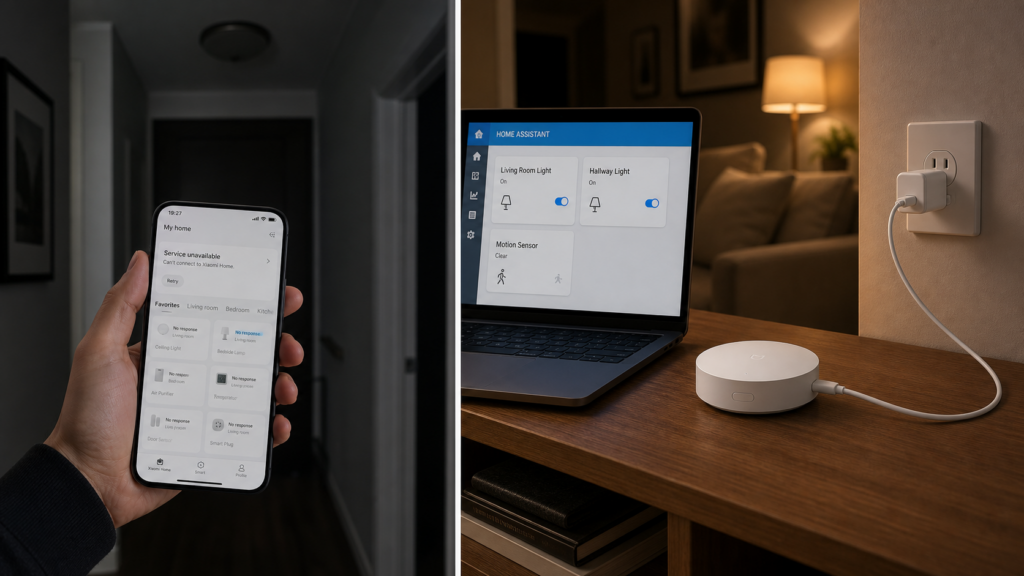
On 16 June, Xiaomi’s official Mijia (米家, the company’s smart home brand and app) account confirmed a network fault that took down app control and voice control for a wide swath of users. People couldn’t toggle lights from the app. Voice assistants stopped responding. For a few hours, devices that had worked fine that morning just sat there.
I didn’t lose anything that day, and that’s not a brag — it’s the point of this article. My Aqara and Xiaomi devices run through a multimode gateway (多模网关, a Xiaomi-made hub that speaks Zigbee, Bluetooth, and Wi-Fi) bridged into Home Assistant, with the automations executing locally. None of that touches Xiaomi’s servers during normal operation, so an outage on Xiaomi’s end is mostly invisible to me. But “mostly” is doing real work in that sentence, and the outage is a good excuse to explain exactly where the line sits — because it isn’t where most people assume.
What actually happened on 16 June
Mijia’s own Weibo account confirmed the fault and said service was restored after a delay. The scale was not small: PingWest’s English-language coverage reported the disruption hit tens of millions of users across the country, with “Mijia is Down” trending on Weibo and people complaining that their devices had vanished from the Mi Home app entirely. Because Xiaomi’s AIoT platform is heavily cloud-dependent, an interruption on the server side cascades straight into people’s living rooms.
What’s more interesting than the outage itself is what broke during it. Users reported the app couldn’t even display devices they’d already added — not just refuse new commands, fail outright. That’s a meaningfully different failure than “the server is slow to respond.” It means the app’s device list isn’t really cached locally in any durable way. It’s a view into a live cloud session, and when that session can’t be established, the view goes blank.
If you’ve ever wondered why the app sometimes shows “offline” for a device that’s clearly powered on and sitting two meters from your router, this is the same root cause. The app isn’t checking the device. It’s checking whether Xiaomi’s servers currently know about the device.
Manual control vs. automations: the split that actually matters
The detail buried in Xiaomi’s own explanation, picked up in Chinese-language coverage of the outage, is the one worth remembering: manually triggered actions in Mi Home are executed via the cloud, but automations that were already configured to run locally can keep executing during a cloud outage.
That’s a real distinction, not a technicality. Mi Home actually exposes this directly — a scene can be saved with a running mode of either LAN or Cloud. Tapping a light on in the app sends a command up to Xiaomi’s servers and back down to the device — full round trip, cloud required, every time. A scene set to run in LAN mode, where the trigger device and the execution device share the same gateway and network, doesn’t need that round trip. It’s already configured; it just needs the trigger and the action to both be reachable without leaving your network.
This is why two people running what looks like “the same setup” can have completely different outage experiences. If your motion-sensor-to-light automation is defined inside Mi Home’s cloud automation engine, it depends on the same infrastructure that just fell over. If the equivalent automation is defined in Home Assistant and the devices involved are on a gateway running in local mode, it doesn’t.
I noticed this distinction get flattened in a lot of the immediate reaction to the outage — people talking about “the cloud” as one monolithic thing that’s either up or down for you. It’s not. Manual app control and pre-configured automation logic are two separate execution paths that happen to share a vendor.
What stayed working, and why
Two setups came through the outage fine, for different reasons.
Xiaomi multimode gateways bridged to Home Assistant. Through the community-maintained XiaomiGateway3 integration, devices paired to a multimode gateway communicate over Zigbee and Bluetooth mesh between themselves and the gateway. When Home Assistant is the one evaluating automation logic — “if motion sensor triggers, turn on this light” — and both devices are local to that gateway, none of that traffic needs to reach Xiaomi’s servers at all. The gateway only needs the cloud for things like Mi Home app pairing or firmware updates, not for day-to-day operation once it’s bridged.
Zigbee2MQTT or ZHA setups that bypass Mi Home and Aqara Home entirely. This is the cleaner version of the same idea. If your Zigbee devices are paired through a Zigbee2MQTT coordinator instead of through a Xiaomi or Aqara hub, there’s no Xiaomi account or Xiaomi server in the loop at any point — not for pairing, not for control, not for automation. An outage on Xiaomi’s infrastructure is, by design, not an event that happens to your setup. It’s an event that happens to someone else’s.
The trade-off, as always, is convenience versus control. The multimode gateway path keeps Xiaomi’s hardware (mesh range, sensor compatibility) while routing the logic locally. The Zigbee2MQTT path drops Xiaomi’s gateway from the picture entirely, which means broader compatibility headaches with some Xiaomi-specific devices, but zero cloud dependency, period.
A quick self-check: is your setup exposed?
Run through this before the next outage, not during it:
- Open your automations and check where they’re defined. If they live inside the Mi Home or Aqara Home app, they depend on Xiaomi/Aqara’s cloud completing a round trip. If they live in Home Assistant, check the next item.
- Check what’s between Home Assistant and the device. If it’s a Xiaomi/Aqara gateway bridged locally (multimode gateway via XiaomiGateway3, or Aqara hub in LAN mode), automation execution stays local even if app control doesn’t. If it’s a cloud integration that proxies through Xiaomi’s API, you’re still exposed for that device.
- Check whether “local” actually means local for your specific device. With XiaomiGateway3, day-to-day Zigbee control runs locally over LAN once a device is bridged. The catch is at the edges: some BLE and Mesh devices can only be paired through Xiaomi’s China cloud in the first place, and a handful have no default entities until the integration sees live data from them. Once a supported device is bridged and reporting, its control and automation execution stay local — but it’s worth confirming your specific BLE/Mesh devices are on the supported list rather than assuming.
- If you’re on pure Zigbee2MQTT or ZHA for a device, you’re not exposed to this category of outage at all — there’s no Xiaomi or Aqara cloud account involved anywhere in that device’s path.
What to change if you want outage-proof automations
The fix isn’t dramatic, and it’s not “throw out your Xiaomi hardware.” It’s moving automation logic out of the vendor app and into something that runs on your network.
If you already have a multimode gateway, the XiaomiGateway3 integration on GitHub gets it bridged into Home Assistant with local execution for most device classes. Our Xiaomi Multimode Gateway local integration guide covers the actual bridging steps.
If you’re starting from Zigbee devices with no gateway preference yet, Zigbee2MQTT is the more durable long-term answer specifically because it removes the vendor account from the equation rather than just routing around it. Our guide on running Aqara and Xiaomi Zigbee devices in Home Assistant without a hub walks through pairing Aqara Zigbee devices directly, without any Aqara or Xiaomi hub at all.
Either path gets you to the same outcome: when the next outage hits — and these have been recurring, not one-offs — your lights still turn on when something moves in the hallway, whether or not Xiaomi’s servers are having a good day.
The bigger worry isn’t the outage itself
Worth saying plainly, because it’s the thing that actually drives people to switch setups: a few hours of downtime is annoying but forgivable. The recurring concern voiced in the aftermath of this kind of outage isn’t really about that day. It’s about what happens if the underlying cloud service goes away permanently — discontinued, deprecated, or the company quietly sunsets a product line. An app outage you can wait out. A company deciding to shut a service down is a different category of problem, and it’s the one local-first setups solve completely rather than just mitigating.
That’s also why I’d treat this outage as a prompt to check your setup now, while it’s a minor annoyance, rather than waiting until it’s an actual server shutdown. Our explainer on what data the Xiaomi Home integration collects and where local control draws the line goes into what these apps collect day-to-day, if the privacy angle matters to you as much as the reliability one. And does Aqara work without internet covers the related but distinct scenario of your own internet connection going down, rather than Xiaomi’s servers.
Frequently asked questions
Why did my Mijia/Mi Home app stop showing my devices during the outage?
The app’s device list is a live view into your cloud session, not a durable local cache. When the app can’t establish that session, it has nothing to show, even for devices it normally displays without issue.
Does Home Assistant still work if the Mi Home or Aqara Home server is down?
It depends on how your devices are bridged. If they’re connected through a local-mode gateway (Aqara hub in LAN mode, or a Xiaomi multimode gateway via XiaomiGateway3) and your automations are defined in Home Assistant rather than the vendor app, yes. If Home Assistant’s integration for that device still proxies through the vendor’s cloud API, no.
What’s the difference between manual control and automation during a Xiaomi cloud outage?
Manual app taps are a cloud round trip every time, by design. Pre-configured automations can run locally if the devices, gateway, and automation logic are all local — they don’t need to ask Xiaomi’s servers for permission to execute.
Do Zigbee2MQTT devices need Xiaomi’s cloud at all?
No, by design. Devices paired through a Zigbee2MQTT coordinator never touch Xiaomi’s or Aqara’s account infrastructure for control or automation. There’s nothing to outage.
How do I tell if my current Aqara/Xiaomi setup depends on the cloud or runs locally?
Check where the automation is defined (vendor app vs. Home Assistant) and what sits between Home Assistant and the device (cloud-proxied integration vs. local-mode gateway or Zigbee2MQTT). Both have to be local for the automation to survive a cloud outage.
This particular outage was a few hours of inconvenience for most people, and an invisible non-event for the part of my setup that’s already local. The gap between those two experiences is entirely a function of where the automation logic lives, not which brand of hardware is on the wall.